
So, what exactly is a Shopify app detector? Think of it as a specialized tool that peeks behind the curtain of a competitor's store. It scans the public code of a website, looking for the unique digital fingerprints that third-party apps leave behind. The result is a clean list of the technologies they're using to run their business. This kind of insight is gold for figuring out market trends and making smarter decisions for your own store.
Why Your Competitors' App Stack Matters
Ever landed on a competitor's site and wondered, "How did they do that?" Maybe it's their super-smooth checkout or a really clever loyalty program. More often than not, the secret sauce is their Shopify app stack. Using a Shopify app detector isn't just about snooping; it's about decoding your competition's entire game plan. When you see which apps they've chosen for everything from marketing automation to customer service, you get a direct window into what they value most.
This knowledge helps you spot emerging trends, find gaps in your own store's setup, and discover proven tools that could give your sales a serious lift. For instance, if you see all the big players in your niche using the same subscription app, that's a massive clue that recurring revenue is a key strategy. Or, if they're all using a specific dropshipping tool, it tells you a lot about their fulfillment model. Our guide on the best Shopify apps for dropshipping can give you a head start on what's out there.
Uncovering Strategic Priorities
The apps a store owner chooses are like a roadmap to their strategy. If you see a store loaded with apps for customer reviews and user-generated content (UGC), it’s a dead giveaway that they’re all-in on social proof and building a community. On the other hand, a shop with a bunch of upsell and cross-sell apps is clearly laser-focused on bumping up their average order value (AOV).
By analyzing an app stack, you are essentially reverse-engineering a competitor's customer experience strategy. It reveals where they invest their resources to reduce friction, build trust, and drive conversions.
Keeping Pace with a Growing Ecosystem
Trying to keep up with all the available apps manually is a losing battle. The Shopify App Store has absolutely exploded, growing from around 4,200 apps in May 2020 to a projected 14,836 by the end of 2025. That’s a staggering 253% increase. This boom means more specialized, powerful, and niche tools are hitting the market all the time.
Here's a glimpse of the official Shopify App Store, where thousands of tools are available.
This massive marketplace has a solution for pretty much every part of an e-commerce business, from marketing funnels to shipping logistics. To get a better sense of what tools are making a real impact, check out this excellent resource on the Top Apps for Shopify Store to Boost Sales & Efficiency. It’s a great overview of the kinds of high-impact apps you’ll find in successful stores.
Finding Clues Hidden in the Code
While automated tools are fast, nothing beats rolling up your sleeves and digging into a store’s code yourself. This hands-on approach gives you unfiltered, firsthand evidence of the apps they're running. Think of it like being a digital detective—you’re following the breadcrumbs left behind by different applications.
This puts you in the driver's seat, letting you confirm what a Shopify app detector might have told you and even discover apps that scanners sometimes miss.
Don't worry, you don't need to be a developer to do this. Every modern browser, from Chrome to Firefox, comes with built-in developer tools. The two features we'll focus on are "View Page Source" and "Inspect." They’re surprisingly easy to use for this kind of reconnaissance.
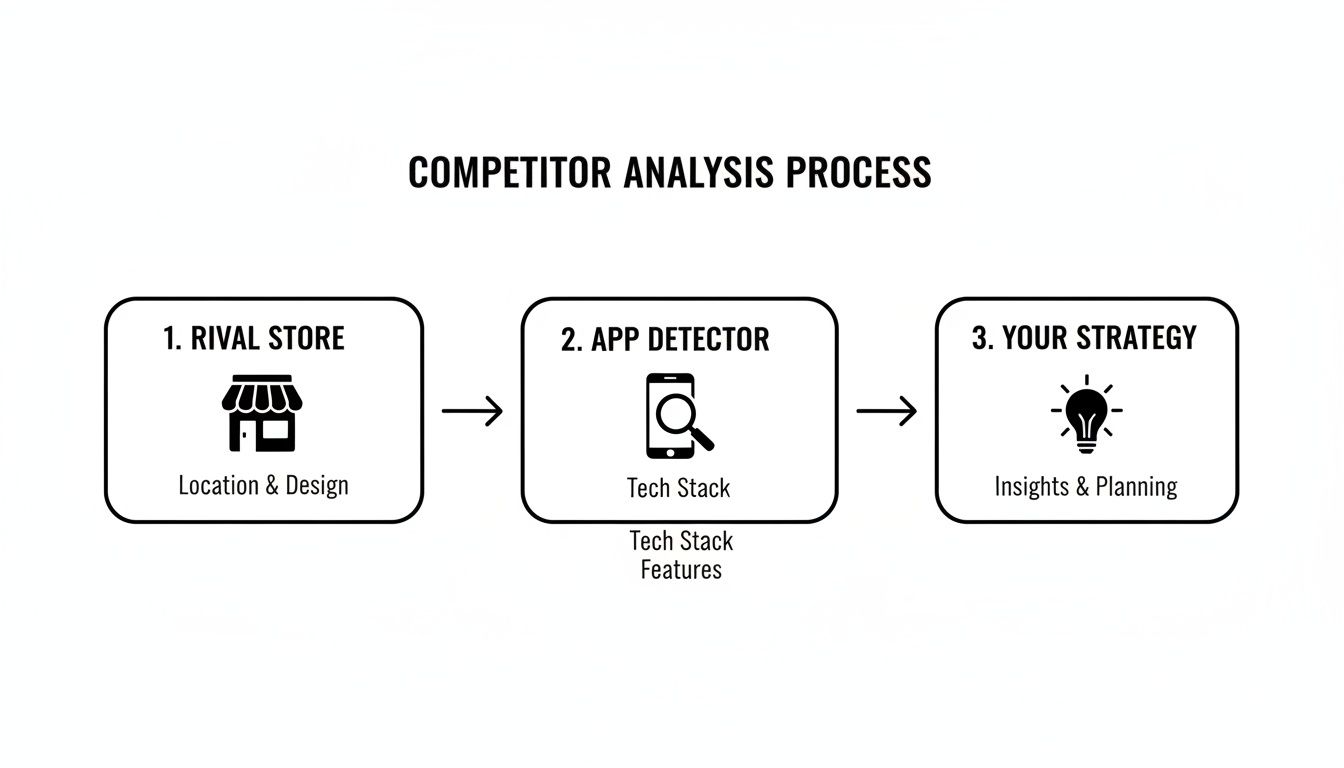
Here's a simple flowchart that shows how this process fits into a larger competitor analysis workflow. Identifying a rival's apps is a key step that directly informs your own business strategy.
Peeking at the Page Source
This is the easiest place to start. Just head to a competitor's Shopify store, right-click anywhere on the page, and select "View Page Source." A new tab will pop up, filled with the site's raw HTML. It might look like a wall of text, but we're only looking for specific keywords.
Hit Ctrl+F (or Cmd+F on a Mac) to open the search box. Here are a few terms I always look for first:
- /apps/: This is a classic. Shopify apps often load scripts or assets from URLs containing this path. It’s a dead giveaway.
- "reviews" or "loyalty": Searching for feature-specific terms can quickly point you to the apps powering them.
- Known App Names: If you have a hunch they're using a popular app like "Klaviyo" for email or "Recharge" for subscriptions, just search for the name directly.
When you find something, you'll likely see it inside a script or a link tag. For example, a URL like cdn.shopify.com/s/files/1/applications/some-review-app.js is a clear sign they’re using a specific review app. You've found your clue.
Remember, you're not trying to understand every line of code. You're just looking for patterns. The file paths and asset names are what tell the story of the store’s tech stack.
Using the Inspect Tool for Dynamic Clues
The "Inspect" tool is a bit more interactive and powerful. Right-click on a specific page element—like a pop-up, a review widget, or a subscription box—and choose "Inspect." A panel will open up showing you the exact HTML and CSS that makes that element work.
This is perfect for figuring out which apps create visible features on the front end. For instance, if you inspect a product review section and see a CSS class like class="loox-reviews-widget", that’s the fingerprint of the Loox reviews app. App developers often leave these kinds of unique identifiers behind, making our job much easier.
Keeping an eye on these elements can also reveal strategic shifts. For more advanced competitor intelligence, you can use tools for monitoring webpage changes to get alerts when a competitor adds or removes a key app.
Taking the time to do this manual work also gives you a better feel for how different scripts interact with a theme. This kind of insight is invaluable if you ever plan to customize Shopify themes on your own store.
Choosing Your Go-To Shopify App Detector
While digging into a store's code gives you the most accurate results, it's not always the fastest way. When you need a quick and dirty list of a competitor’s apps, a dedicated Shopify app detector is the tool for the job. These generally come in two flavors: browser extensions that work as you browse, and online websites where you just paste a store's URL.
The best tool really comes down to your workflow. Are you doing a deep-dive analysis of one major competitor? Or are you quickly scanning dozens of sites to get a feel for broader market trends? Each approach has its own strengths and weaknesses. Figuring out which one fits your needs will help you work smarter, not harder.
Browser Extensions vs. Online Tools
Browser extensions are fantastic for on-the-fly analysis. With a single click on an icon in your toolbar, you get an instant rundown of the apps running on the page you're looking at. This is incredibly handy for quick spot-checks during your regular competitor research.
Online tools, on the other hand, require an extra step—you have to copy a store's URL and paste it into a search bar on their website. The trade-off is that these platforms often give you much richer reports. You might see apps sorted by category or even get "confidence scores" that tell you how certain the tool is about each detection.
Here's a quick look at some of the most popular tools and how they stack up.
Shopify App Detector Tool Comparison
| Detector Type | Key Features | Best For | Potential Drawbacks |
|---|---|---|---|
| Browser Extension | Instant on-page analysis, one-click operation, sits in your browser toolbar. | Quick, frequent spot-checks while browsing multiple stores. | Can be less detailed; functionality may be limited to a simple app list. |
| Online Detector | In-depth reports, app categorization, confidence scores, often allows historical lookups. | Deep-dive analysis of a single, high-value competitor. | Requires switching tabs and copy-pasting URLs, which can slow you down. |
| Hybrid Tools | Some services offer both a web-based tool and a companion browser extension for flexibility. | Users who want both quick checks and the option for deep analysis. | May require a subscription for full access to both tools. |
In my experience, using a mix of both is the most effective strategy. I'll use a browser extension for my day-to-day browsing and then fire up a more powerful online tool when I'm ready to build a detailed report on a key competitor.
Key Features of a Great Detector
Not all app detectors are created equal. The sheer number of apps out there makes accurate detection a real challenge. For context, the Shopify App Store was home to over 12,320 apps in early 2025, a number that grew to over 14,000 by the end of that year. This constant growth, which you can read more about in this analysis of the Shopify ecosystem on meetanshi.com, means a detector's database is everything.
When you're trying out a new tool, keep an eye out for these critical features:
- Detection Accuracy: The tool has to be able to reliably spot both popular and obscure apps without constantly giving you false positives. Some of the better ones provide confidence scores to show how sure they are of a match.
- Database Size: A bigger, frequently updated database is non-negotiable. It's the only way a tool can recognize new and niche apps as they hit the market.
- User Interface (UI): The results need to be clean and easy to scan. A huge plus is when tools group the detected apps by category, like "Reviews," "Upsells," or "Loyalty."
- Speed: The whole point is to save time, so the analysis should take seconds, not minutes.
A truly effective app detector doesn't just list script names; it translates technical clues into actionable business intelligence, telling you what a competitor is using and why.
By focusing on these qualities, you can find a reliable Shopify app detector that becomes a core part of your competitive research toolkit, giving you the insights you need to build a better, more profitable store.
Turning Your Findings Into a Winning Strategy

Alright, so you've used a Shopify app detector and now you have a list of the apps your competitors are using. That’s a great start. But raw data is just that—raw. The real magic happens when you turn that list into a practical, hard-hitting action plan for your own store.
Remember, the goal here isn't to build a carbon copy of another brand. It’s about reverse-engineering their strategy to understand what’s working in your niche and then using that knowledge to leapfrog them.
Categorize and Conquer
First things first, let's bring some order to that app list. Looking at a jumbled collection of names won't tell you much. The key is to start grouping the apps into strategic categories. This simple step transforms a random list into a clear business narrative.
I usually break it down into a few core functional groups:
- Marketing and Sales: Think email marketing platforms, pop-up builders, upsell/cross-sell tools, and affiliate management apps.
- Customer Experience: This is where you'll find product reviews, loyalty programs, live chat widgets, and helpdesk integrations.
- Store Operations: These are the workhorse apps for inventory, shipping, subscriptions, and order fulfillment.
- Analytics and Reporting: Any tools they're using to track performance, monitor customer behavior, and analyze conversions.
Once you’ve sorted the apps this way, you'll start to see patterns immediately. It becomes obvious where they're focusing their energy and budget—and what they believe is critical for success.
Identify Key Strategic Patterns
With your apps neatly sorted, it's time to connect the dots. Do all your top competitors use the same advanced reviews app? That’s a massive signal that powerful social proof is a non-negotiable in your market. Are they all leaning on a specific subscription tool? That tells you a recurring revenue model isn't just a nice-to-have; it's something customers in your space likely expect.
The most valuable insight isn't what apps they use, but why. Each app represents a solution to a specific business problem or a way to capitalize on a market opportunity. Your job is to decode that strategic intent.
This analysis is perfect for performing an honest gap analysis on your own store. For instance, if you see rivals heavily invested in loyalty programs and you're not running one, you might be missing a huge piece of the customer retention puzzle.
But this doesn’t mean you should panic-install the same app. Instead, ask yourself, "How can I solve this problem in a way that aligns with my brand?" Maybe a different loyalty approach would resonate better with your customers. Properly setting up Google Tag Manager on Shopify can give you the hard data you need, helping you track which on-site features are actually driving sales and engagement to validate these strategic choices.
Innovate, Don't Imitate
Ultimately, using a Shopify app detector is about gathering intelligence to fuel your own innovation. Blindly copying a competitor's app stack is a surefire way to remain a follower, never a leader. You don't know their budget, their specific customer feedback, or the internal business goals that led to those decisions.
Instead, use what you've learned to ask smarter questions about your own business:
- Where are my biggest strategic gaps right now?
- What customer problems are my competitors solving that I'm currently ignoring?
- Can I solve these same problems more effectively, creatively, or affordably?
By analyzing their playbook, you can uncover your own unique competitive edge. Maybe that means using a more modern tool, offering a superior customer experience, or zeroing in on a niche they’ve overlooked. Think of your competitor’s strategy as inspiration, not an instruction manual.
Conducting Ethical and Smart Competitor Research
Figuring out what apps a competitor is using has become a pretty standard part of e-commerce research. But it’s important to go into it with the right mindset. This isn't about some kind of digital spy mission; it's about smart, ethical market analysis using information that’s already out there for anyone to see.
Every tool and technique we've covered simply looks at the public-facing source code of a website. It’s the very same code your own browser downloads and reads to show you the page. There’s no hacking, no data breaches, and absolutely no peeking into their private back-end systems.
A good analogy is walking through a rival's physical store to check out their product displays and layout. You're just observing what's publicly visible, not breaking in after hours.
Inspiration, Not Imitation
The whole point of this exercise is to gather strategic inspiration, not to just copy-paste another store's app stack. Blindly installing the same apps as a competitor is a recipe for failure because you're missing the most important piece of the puzzle: the context.
You have no idea what their profit margins look like, what their customer feedback says, or the specific business problems that led them to choose those exact tools. A far better approach is to use what you find to understand what customers in your market have come to expect, and then find your own way to innovate.
- Spot the Market Standards: If you notice all the top players in your niche are using a sophisticated reviews app, that’s a huge signal that social proof is non-negotiable for your customers.
- Gauge Customer Desires: Seeing loyalty and rewards programs everywhere? It's a safe bet that your target audience appreciates being recognized for their repeat business.
- Find Gaps in the Market: What if no one is using something like a product recommendation quiz? You might have just stumbled upon a fantastic opportunity to stand out and offer a more personalized shopping experience.
Focus on the why behind their app choices. That’s how you turn simple data into powerful business intelligence that can shape your own unique strategy.
Building a Defensible Brand
At the end of the day, long-term success comes from building a brand that's hard to copy. That means developing a unique voice, curating a one-of-a-kind product mix, and delivering a customer experience that feels distinctly yours.
A Shopify app detector should be a tool that empowers you to make smarter decisions. Think of the data you collect as a starting point for asking better questions about your own business, not as a blueprint to follow.
Instead of just copying, your findings should prompt you to ask, "How can I solve this same customer problem in a way that’s authentic to my brand?" This shift in thinking ensures you're building a truly defensible business that stands out from the crowd. Staying on the right side of the ethical line isn’t just about rules; it’s about building a brand with integrity that customers will trust for years to come.
A Few Common Questions About Shopify App Detection
Once you start digging into a competitor's tech stack with a Shopify app detector, a few questions almost always pop up. It’s a powerful way to do market research, but it helps to go in with your eyes open. Let’s clear up some of the most common queries I hear.
Is This Actually Legal to Do?
Yes, it's completely legal. Think of it this way: these tools are just reading the public-facing source code of a website. It's the same HTML, CSS, and JavaScript your own web browser downloads to show you the page.
You're not accessing any private data, and it's certainly not hacking. It's the digital equivalent of walking into a competitor's retail store to see how they've arranged their displays. It’s standard, ethical market research—you're just observing what's on public display to inform your own strategy.
How Accurate Are These App Detectors, Really?
This is a great question. Accuracy definitely varies from tool to tool and even depends on the specific app you're trying to spot. Most of the good detectors are spot-on when it comes to popular, well-known apps that leave obvious "fingerprints" in a store's code.
Where they can sometimes fall short is with brand-new apps, obscure ones, or custom-coded solutions that don't follow a standard pattern.
My advice? Use an automated tool for the initial quick scan, but don't be afraid to do a quick manual code check if something seems off or you want to verify a key finding. Treat the detector as an excellent starting point, not the absolute final word.
This combination of automation and manual verification gives you the best of both worlds: speed and accuracy.
Can a Store Owner Hide the Apps They're Using?
It’s nearly impossible to hide everything, at least not without a ton of effort. A skilled developer can definitely try to obscure some of the code, but at the end of the day, most apps have to interact with the public side of the store to work properly. This always leaves traces.
To completely hide an app would require so much custom work that it would basically defeat the entire purpose of using a pre-built app in the first place. Because of this, you can almost always find a detectable app footprint to analyze.
Okay, I Have This Info… Now What?
The data you uncover should be used for inspiration, not imitation. The goal isn't to create a carbon copy of a competitor. It's about understanding the strategies that are working in your corner of the market.
- Spot Market Standards: Are all your top competitors using a specific loyalty app? That’s a huge clue that customer retention is a major focus in your niche.
- Understand Customer Expectations: If everyone is using advanced product review apps, it tells you that social proof is non-negotiable for building trust with your target audience.
- Discover Your Unique Angle: Use what you learn to ask better questions, like, "Okay, they're solving this customer need one way. How can I solve it in a way that's totally unique to my brand?"
By studying their playbook, you can find gaps and opportunities to build a business that truly stands out.
For dropshippers trying to build standout product pages without the headache, AliSave Pro is a must-have. It lets you download high-quality product images and videos from AliExpress in a single click. Cut down your workflow and start creating beautiful listings today. Get AliSave Pro for free at https://alisavepro.com.