
Standing out on a platform flooded with millions of other sellers isn't about working harder—it's about working smarter. This guide is your blueprint for transforming standard eBay listings into powerful sales engines that catch the eye of both eager buyers and eBay's Cassini search algorithm.
Your Blueprint For A High-Converting eBay Listing
To really nail an eBay listing, you have to concentrate on the elements that actually drive visibility and sales. We're talking about keyword-packed titles, fully completed item specifics, professional-grade images, and smart pricing. It’s a process of perfectly aligning what you’re selling with what shoppers are actively searching for and what eBay’s algorithm is designed to promote. For dropshippers pulling products from places like AliExpress, this kind of focused strategy is the difference between profit and loss.
Think about it: with an estimated 2–5 million new listings hitting eBay every single day, just showing up isn't enough. You have to be visible. Listings with complete category data and item specifics can pull in up to 35% more impressions, simply because the algorithm has a crystal-clear understanding of your product and who to show it to.
The Core Components of Optimization
Getting from a basic listing to one that consistently makes sales involves a few key moves. Don't think of it as a tedious checklist; see it as a repeatable blueprint you can apply to every product. The whole game is about grabbing a buyer's attention with the right words and visuals, then sealing the deal with an offer that feels trustworthy and valuable.
This simple flowchart breaks down the essential steps for creating an eBay listing that wins.
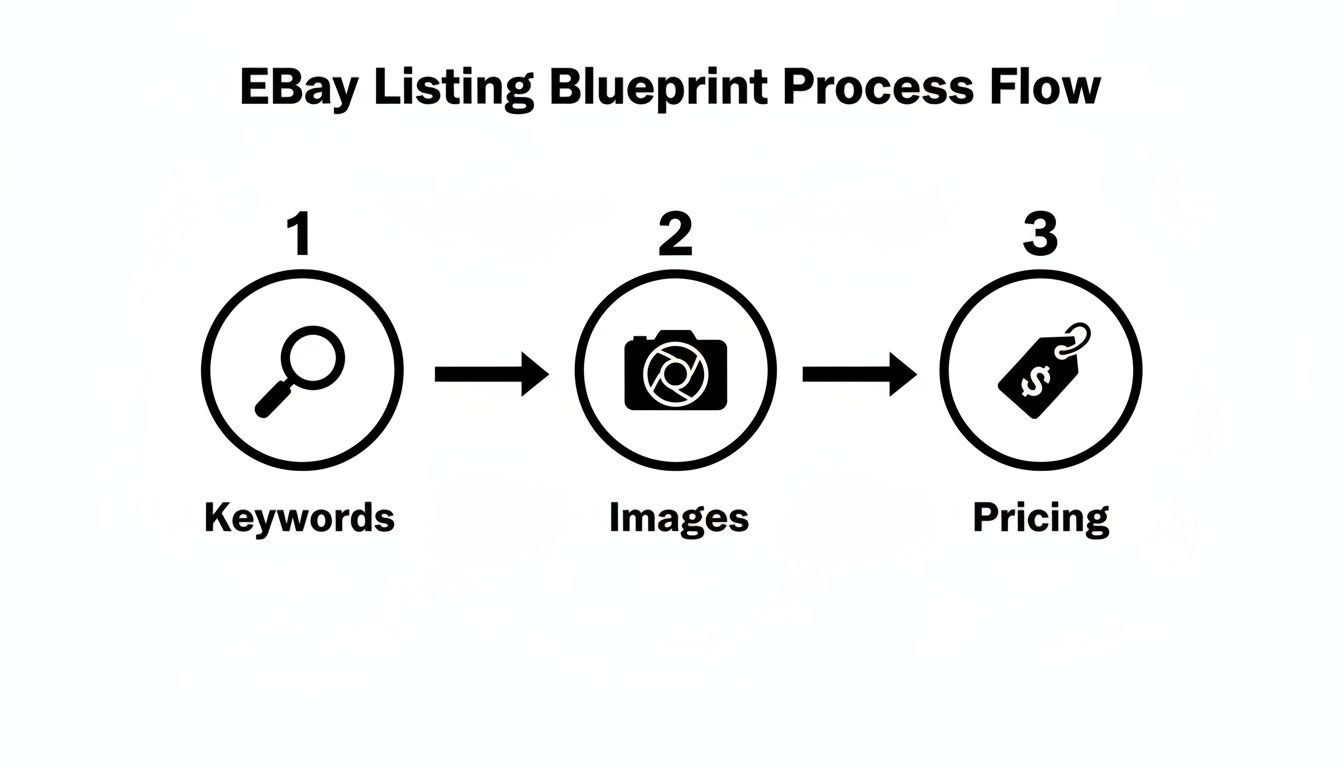
As you can see, it all starts with keywords to pull in traffic. From there, your images have to engage the shopper, and finally, your pricing strategy needs to close the sale.
This blueprint is a lifesaver for dropshippers who need to list products quickly without sacrificing quality. For example, when you find a hot product on AliExpress, manually saving every single product photo, video, and variant image is a massive time sink. This is where a tool like AliSave Pro becomes a non-negotiable part of your workflow. It automates the media gathering so you can focus your time on the strategic stuff—like keyword research and competitive pricing—that actually makes you money. To dive even deeper, check out this ultimate guide to product page optimization for higher conversions.
Key Takeaway: Optimization isn't just about changing a title. It's a complete system that blends search visibility (SEO), visual appeal (images), and perceived value (price and shipping) to build a listing that shoppers simply can't pass up. Getting this system down is what turns an eBay store from a side hustle into a serious business.
Here's a quick summary of the essential components we'll be covering, what they do, and the one key thing you need to focus on for each.
Quick Guide to eBay Listing Optimization Elements
| Optimization Element | Primary Goal | Key Action Item |
|---|---|---|
| Title Keywords | Attract relevant search traffic | Include the top 3-5 keywords buyers use to find your item. |
| Item Specifics | Help eBay's algorithm filter and rank your listing | Fill out every single relevant field, especially the recommended ones. |
| High-Quality Images | Build trust and showcase the product's value | Use at least 8-12 clear, well-lit photos from multiple angles. |
| Pricing & Shipping | Convert browsers into buyers with a compelling offer | Research competitors and offer free or competitively priced shipping. |
| SEO-Friendly Description | Reassure buyers and provide detailed information | Write a clear, scannable description that answers common questions. |
By focusing on these foundational pillars, you build a listing that doesn't just rank higher in search results; it also builds the trust required to turn a casual window shopper into a paying customer. Now, let's put these principles into action with some https://alisavepro.com/good-things-to-resell-on-ebay/.
Nail Your Keywords and Categories to Get Seen
Think of eBay's search engine, Cassini, as a super-smart matchmaker. Its only job is to connect what a buyer types into the search bar with the perfect listing. If you want your product to be its top pick, you have to speak its language. That means getting serious about keywords and being meticulous with your category selection.
Your listing title is, without a doubt, the most critical piece of the puzzle. You get 80 characters to convince both the algorithm and a real-life shopper that your item is exactly what they need. This isn't the space for flowery language or creative marketing fluff; it's all about strategic precision.
Finding the Keywords Real Buyers Use
Before you can craft a killer title, you need to get inside your customer's head. What are they actually typing into eBay's search bar? Guessing isn't a strategy, it's a recipe for low visibility.
The easiest place to start your research is right on eBay itself.
Begin typing a broad term for your product, like "wireless earbuds," and watch the autocomplete suggestions pop up. These aren't random guesses; they are the most popular and recent searches people are making for that item.
For instance, a search for "wireless earbuds" might instantly suggest:
- "wireless earbuds with noise cancelling"
- "wireless earbuds for android"
- "wireless earbuds with charging case"
These longer phrases, or "long-tail keywords," are pure gold. They show clear buyer intent. Someone searching for "wireless earbuds for android" is much further along in their buying journey—and much more likely to click "Buy It Now"—than someone just vaguely looking for "earbuds."
How to Structure Your 80-Character Title
Once you've got your top 3-5 keywords, it's time to assemble them into a title that makes sense to a human while also checking all the boxes for the search engine. I’ve found a simple formula works best, moving from the general to the specific.
A structure that consistently performs well is: Brand + Model/Product Name + Key Feature 1 + Key Feature 2 + Size/Color/Condition.
Let's see it in action. Instead of a weak, generic title like "Good Earbuds for Sale," a properly optimized one would look like this:
"Sony WF-1000XM4 Wireless Earbuds Noise Cancelling Bluetooth Black – New Sealed"
This title gives Cassini all the right signals. It's packed with high-intent keywords but is still perfectly clear and easy to read for a shopper. This single change is one of the most powerful ways to optimize your eBay listing.
Pro Tip: Whatever you do, don't use ALL CAPS, spammy symbols like asterisks, or subjective hype words like "amazing" or "stunning." These tactics can actually get you penalized in search results and make your listing look sketchy to potential buyers.
A great way to confirm you're on the right track is to see what's already selling. Analyzing the titles of successful competitors is a smart move. For a detailed walkthrough on how to do this, check out our guide on how to find sold listings on eBay.
Don't Skip Categories and Item Specifics—It's a Costly Mistake
Choosing the right category is just as important as your title. Listing your item in the wrong spot is like putting milk in the hardware aisle of a supermarket; the people looking for it will simply never see it. eBay usually gives good suggestions, but always take a second to make sure you're in the most specific sub-category you can find.
Once you’ve picked a category, eBay will prompt you to fill out Item Specifics. This is where so many sellers drop the ball.
These fields—Brand, Color, Material, Size, Style, and so on—directly power the search filters buyers use on the left side of the screen to drill down their results.
Look at all those filters. Every single one is an opportunity.
Every specific you complete is another pathway for a motivated buyer to discover your listing. If a customer filters for "Black" shoes and you left the "Color" field blank on your listing, you are completely invisible to them. It doesn't matter how great your title or price is.
Take the time to fill out every single relevant field. It’s a simple step that has a massive impact on getting your product in front of buyers who are ready to make a purchase.
Creating a Visually Compelling Product Showcase
On eBay, your photos are your storefront. They’re the first thing a shopper sees and often the last thing they consider before hitting "Buy It Now." When a customer can't physically touch or inspect an item, your images have to do all the heavy lifting—building trust, answering questions, and creating a genuine desire to own the product.
Think about it from the buyer's perspective. A single, blurry photo is a red flag. A complete, professional-looking gallery, on the other hand, tells them you're a serious seller who cares about quality. It's the difference between a window shopper and a paying customer.
Building Your Essential Photo Gallery
To truly optimize an eBay listing, you need to tell the product's entire story through pictures. Your goal is to anticipate every question a potential buyer might have and answer it visually before they even have to ask.
A knockout product gallery should always include:
- Multiple High-Resolution Angles: Show the front, back, sides, top, and bottom. Don't leave any part of the item a mystery.
- Detailed Close-Ups: Get right in there. Zoom in on textures, logos, stitching, or unique features that scream quality.
- In-Use or Lifestyle Shots: Help buyers imagine the product in their own lives. A photo of a watch on a wrist or a backpack on a trail is far more powerful than one on a plain white background.
- Scale and Size Reference: Place the item next to something familiar, like a coin or a ruler. This gives an immediate, clear idea of its actual size and prevents returns.
With over 60% of eBay traffic now coming from mobile devices, high-impact photos are non-negotiable. Most of the top eBay playbooks I’ve seen recommend using 6–8 professional images per listing. This covers all the essential angles and details needed to drive a conversion on a small screen.
A Game-Changer for Dropshippers and Importers
If you’re a dropshipper sourcing from a platform like AliExpress, the thought of gathering all these photos is probably making you tired. Manually saving dozens of images for every single product, especially when you have multiple color variants, is a soul-crushing time-suck.
This is exactly where you need to bring in some automation.
Tools like AliSave Pro are built to eliminate this headache. In one click, you can grab an entire media kit—all the professional product shots, every variant image, customer review photos, and even the supplier's video—directly from an AliExpress page. Suddenly, you have a complete, high-resolution media package ready to upload.
Key Insight: Every minute you save on tedious tasks like gathering images is a minute you can reinvest in high-impact activities like keyword research and pricing strategy. That’s what actually moves the needle.
The Power of Product Videos
While great photos are the foundation, a short product video can be the ace up your sleeve. A video can show how a product works, highlight features in action, and answer complex questions in a way static images simply can't.
Imagine you're selling a gadget with a unique folding mechanism. A 30-second video clip removes all guesswork and builds incredible confidence. It doesn’t have to be a big production—a simple, well-lit demo shot on your smartphone is often more than enough to boost conversions. And again, tools like AliSave Pro can pull existing supplier videos in seconds.
For sellers who really want to stand out, exploring advanced AI product photography techniques can create stunningly consistent imagery across your entire store. This gives your brand a polished, professional sheen that encourages trust and repeat business. At the end of the day, your visual presentation is a silent salesperson working for you 24/7.
Crafting Descriptions That Convert on Any Screen
Think of it this way: your title and photos earn the click, but it's your description that actually closes the deal. The moment a shopper lands on your page, you have a very short window to build on their initial curiosity, answer their unasked questions, and convince them to hit "Buy It Now."
And here’s a stat that changes the game entirely: a massive 60% of all eBay transactions now happen on a phone.
This means that old-school, dense walls of text are officially dead. If your description isn't designed to be quickly scanned on a small screen, you're losing sales. A mobile-first mindset isn't just a nice-to-have; it's fundamental to optimizing your eBay listings for today's buyers.
Structure Your Description for the Modern Shopper
Your description shouldn't read like a novel. It needs to be a series of easy-to-grab pieces of information. The goal is to let a buyer's eyes jump directly to what they care about most, whether that's a key feature, a specific measurement, or your return policy.
The key is breaking up your text with a strong visual hierarchy. Forget long, winding sentences. Embrace clarity and brevity.
I've found this simple structure works wonders, especially on mobile:
- Quick Hook: Kick things off with one or two short sentences that get right to the product's main benefit.
- Key Features: Immediately follow up with a bulleted list of the top 3-5 features. Use bold text to make the most important words pop.
- Detailed Specs: Use another simple list (or a table, if it's complex) for the nitty-gritty details like dimensions, materials, or compatibility.
- What's in the Box: Be explicit. For example, "Package Includes: 1 x Wireless Charger, 1 x USB-C Cable, 1 x User Manual." This removes any guesswork.
- Logistics: Briefly state your shipping speed and return policy. This is a huge trust-builder.
This scannable format lets a shopper absorb all the critical info in less than 30 seconds. In the world of online shopping, that's an eternity of attention you've just captured.
Weaving in Keywords Without Sounding Like a Robot
While your title is prime real estate for your main keywords, the description is where you can layer in secondary and long-tail keywords. Think of these as related terms a buyer might use when they're a little deeper into their research. Doing this well tells eBay’s search algorithm, Cassini, that your listing is highly relevant.
Let's say your title is "Waterproof Hiking Backpack 50L Lightweight for Camping." You could then sprinkle these related phrases into the description:
- "This durable outdoor travel bag is perfect for your next adventure."
- "With multiple compartments, this trekking rucksack keeps all your gear organized and within reach."
- "Engineered to be a reliable daypack for trail running and other demanding outdoor sports."
See how those terms fit naturally into sentences that actually add value? You're supporting your main keywords, not just stuffing them in. This strategy helps you show up for a much wider variety of searches, signaling to eBay that your product is the solution for multiple customer needs.
My Two Cents: Always write for the human first and the algorithm second. When you focus on creating clear, helpful, and concise information, the SEO benefits tend to take care of themselves.
Finally, keep it clean. Avoid the temptation to use complex HTML, huge images, or custom fonts within your description. These elements can kill your page load speed on mobile, causing frustrated buyers to simply leave. Stick to eBay's built-in formatting tools—bold, italics, and bullet points. They ensure your listing is fast, clean, and easy to read on any device.
Nail Your Pricing, Shipping, and Promotions to Close the Deal
A great title and killer photos get you the click, but your price and shipping are what actually make the sale. Think about it: a buyer has landed on your page, and now you have to convince them that your product offers the best overall value. This is where the deal gets done.
Getting the price right is a balancing act. Price too high, and you're invisible. Price too low, and you're leaving money on the table. The best way to start is by doing a little bit of detective work.
Go to eBay, search for your exact product, and then—this is the crucial part—filter the results by "Sold Items." This is your crystal ball. It shows you what people are actually paying, not just what sellers are asking. This simple step takes all the guesswork out of pricing and roots your strategy in real-world data.
The Undeniable Power of "Free Shipping"
In e-commerce, two words work like magic: free shipping. It’s a psychological trigger. A buyer is far more likely to jump on an item priced at $24.99 with free shipping than the exact same item listed for $19.99 + $5.00 shipping. Same total cost, but one feels like a much better deal.
Of course, we all know shipping isn't really free for us. The trick is to bake that cost directly into your listing price. Figure out your average shipping cost for that item, add it to your product cost and desired profit, and you've got your "free shipping" price. You protect your profit margin while giving buyers the simple, all-in price they love.
Pro Tip: Free shipping removes friction from the buying process. When a shopper sees the final price upfront, it builds trust and makes them click that "Buy It Now" button faster. No one likes surprise fees at checkout.
Choosing the Right Listing Format
For most sellers, especially dropshippers, "Buy It Now" is the way to go. It's fast, predictable, and easy to manage. But don't write off the auction format completely; it has its place.
- Buy It Now (BIN): This is your bread and butter. Use it for any item with a stable, known market value. It’s the most efficient way to sell.
- Auction: Save this for the special stuff. Think rare, collectible, or one-of-a-kind items where you're not quite sure what the market will bear. A good old-fashioned bidding war can sometimes push the final price way higher than you'd expect.
My go-to strategy for most listings? A Buy It Now price combined with the "Best Offer" option. This gives you the best of both worlds. It lets interested buyers negotiate, which can snag a sale you might have otherwise lost, but you still get to set a minimum price you're willing to accept.
Put eBay's Promotional Tools to Work for You
eBay gives you some powerful tools to get more eyes on your listings and encourage shoppers to buy more. Using them isn't just about making more sales; it also signals to eBay's algorithm that you're a serious, active seller.
Two of the most effective promotions are Promoted Listings Standard and Order Discounts.
- Promoted Listings Standard: This is basically eBay's version of pay-per-click advertising, but better—it's pay-per-sale. You choose an ad rate (a percentage of the sale price) you're willing to pay if someone buys your item after clicking the ad. Your listing gets a massive visibility boost, but you only pay if it actually sells. It's a very low-risk way to get your products in front of more people.
- Order Discounts: These are brilliant for increasing your average order value. You can create offers like "Save 10% when you buy 2 or more" or "Spend $50, save $5." It’s a simple nudge that encourages shoppers to add one more item to their cart.
Of course, running promotions effectively means knowing your numbers inside and out. For a full breakdown of the fee structure, make sure you understand the costs to sell on eBay so you can ensure every sale is a profitable one. When you combine smart promotions with clear shipping and return policies, you build the kind of buyer confidence that leads to long-term success.
Analyzing Performance to Continuously Improve Listings
Think of your eBay listing not as a finished product, but as a living, breathing thing. Once it's live, your job isn't over—it's just begun. The real secret to scaling on eBay is a constant cycle of action, analysis, and refinement. Thankfully, eBay gives you all the data you need to stop guessing and start making informed decisions.
Your go-to spot for this is the Performance tab inside the eBay Seller Hub. This is where you'll find the raw truth about how shoppers are interacting with your listings. Don't let all the numbers intimidate you; we're going to focus on just a few key metrics that tell the most important story.
Key Metrics to Watch in Seller Hub
The data here cuts right to the chase, showing you exactly where your listing is excelling and where it's falling flat. If you can get a handle on these three metrics, you'll be miles ahead of the competition.
- Impressions: This is simply how many times your listing has shown up in someone's search results. If this number is low, it’s a massive red flag that your keywords, item specifics, or even your category choice are off the mark. You're basically invisible.
- Click-Through Rate (CTR): This is your clicks divided by your impressions. It tells you what percentage of people who saw your listing actually bothered to click on it. A low CTR usually means your main photo, title, or price isn't compelling enough to grab a buyer's attention.
- Sales Conversion Rate: Out of all the people who clicked, what percentage actually bought something? That's your conversion rate. If you're getting plenty of clicks (high CTR) but few sales (low conversion rate), the problem is inside your listing. It could be your shipping costs, your description, or a lack of trust signals.
A Simple A/B Testing Framework for eBay
Once you’ve used the data to spot a weakness, you need a plan to fix it. This is where a little A/B testing comes in. It sounds complex, but it's just comparing version 'A' of your listing to version 'B' to see which one performs better. The golden rule? Change only one thing at a time. If you change the title and the main photo, you'll never know which one actually made the difference.
Let's say your data shows a low CTR. The prime suspect is almost always the main image.
- Form a Hypothesis: "I bet a lifestyle photo showing the product in use will get more clicks than the current plain, white-background shot."
- Run the Test: Swap out the main image for the new lifestyle photo. Don't touch anything else. Let it run for a solid week or two to gather enough data.
- Analyze the Results: Head back to your Seller Hub performance data. Did the CTR go up? If it did, your theory was right. Keep the new image and move on to the next test.
Pro Tip: A/B testing takes the emotion out of selling. Instead of relying on gut feelings, you're using real customer behavior to guide your strategy. These small, data-backed tweaks add up over time, leading to serious growth.
This ongoing process—analyzing, testing, and tweaking—is what separates casual sellers from the pros. It ensures you're constantly adapting to what buyers actually want, turning your good listings into unstoppable selling machines.
Your Top eBay Listing Questions Answered
After walking through all the steps to optimize an eBay listing, you're bound to have a few specific questions pop up. It happens to everyone. Let's tackle some of the most common ones I hear from sellers trying to get that extra edge.

How Long Does It Take to Rank Higher on eBay?
Patience is key here. A brand-new listing typically needs about one to two weeks of solid activity before eBay's search algorithm, Cassini, really starts to take notice and improve its ranking.
Think of this initial period as a "proving ground." You need to show eBay that your listing is active and that buyers are interested. Making small adjustments during this time can also signal that you're an engaged seller keeping things fresh.
Do Promoted Listings Help My Organic Ranking?
Absolutely, though it's an indirect benefit. When you run a Promoted Listing, the extra impressions and clicks you get are seen by Cassini as positive signals. Buyers are finding your item relevant, and that's exactly what the algorithm wants to see.
This paid activity essentially feeds the organic algorithm. Over time, as your listing proves its demand through both paid and organic traffic, its natural search placement can see a nice boost.
Key Insight: Every positive interaction—whether it comes from a paid promotion or an organic search—builds trust with eBay's algorithm. More trust means more visibility in the long run.
Is It Better to Use Auctions or Buy It Now?
For the vast majority of products, especially if you're dropshipping, Buy It Now is the way to go. It offers clear, stable pricing and makes the buying process simple and immediate for your customers.
Save the auction format for those truly special finds. If you've got a rare collectible, a one-of-a-kind vintage piece, or something else where the market value isn't clear, an auction can create a bidding frenzy that drives the price up. For everything else, stick with the reliability of Buy It Now.
Ready to streamline your product media workflow? With AliSave Pro, you can download all AliExpress product images and videos in a single click, saving you hours of tedious work. Get the extension for free and create stunning, high-converting listings faster than ever. Download AliSave Pro today