
Connecting Shopify to Salesforce is less about a technical task and more about turning raw sales data into a powerful, actionable asset. It's the process of getting your customer, order, and product information to flow seamlessly between your e-commerce storefront and your CRM. The ultimate goal? To create a single source of truth that fuels smarter marketing, sharper sales tactics, and more responsive customer service.
Why Integrating Shopify with Salesforce Matters
If you're running a growing Shopify store, you know the headache of siloed data. Customer details are in Shopify, support tickets live in your helpdesk, and email stats are trapped in another platform entirely. This disconnect creates frustrating bottlenecks and makes it impossible to see the complete customer journey. You simply can't scale a business by juggling CSV exports and manual data entry, especially as you evolve from a lean dropshipping operation to a fully-fledged brand.
Unifying Your Customer Data
This is the core problem an integration solves. By connecting Shopify and Salesforce, you build a 360-degree customer view. Now, when a customer places an order, abandons a cart, or even just browses a few product pages, that activity automatically pipes into their Salesforce profile. Your teams no longer waste time trying to piece together a customer’s history—it’s all laid out in one place.
The whole point of this exercise is to use Salesforce's muscle to see everything about your customers in one spot. This unified profile becomes the bedrock for almost every growth initiative. Digging into the possibilities of Salesforce Customer 360 integrations shows just how much you can accomplish when your systems are actually talking to each other.
With centralized data, your teams can finally:
- Deliver Personalized Marketing: Segment customers based on their purchase history, lifetime value, or product preferences to launch campaigns that actually resonate.
- Enable Proactive Customer Support: Give your service agents the full story—every order and interaction—so they can resolve issues faster and leave customers happier.
- Identify Sales Opportunities: Spot your high-value customers, identify buying trends, and get smart about driving repeat purchases and upsells.
Choosing Your Integration Path
Getting these two platforms to work together means picking the right technical approach for your business. Your decision will hinge on your budget, your team's technical skills, and how much you plan to scale. Shopify is a fantastic tool, but it's just one part of your tech stack; understanding how it stacks up when you're choosing the https://alisavepro.com/best-ecommerce-platform/ is key to building a solid foundation.
At its core, this integration is about transforming raw transaction data into strategic business intelligence. Without it, you’re just collecting data. With it, you’re putting that data to work.
There are three main ways you can tackle a Shopify-Salesforce integration:
- Direct Apps and Connectors: These are the plug-and-play solutions you'll find on the Shopify App Store or Salesforce AppExchange. They're great for straightforward, standard data syncing.
- Middleware Platforms: Tools like Zapier, Celigo, or MuleSoft act as a translator between the two systems, offering more flexibility and custom logic than direct apps.
- Custom API Integration: This is the build-it-yourself route. It gives you total control and is best for businesses with truly unique workflows or complex data needs.
Each of these paths comes with its own set of pros and cons, which we'll break down next to help you figure out which one makes the most sense for you.
Choosing Your Shopify and Salesforce Integration Method
Figuring out how to connect your Shopify store with Salesforce is a major decision. It’s not just about picking a piece of technology; it’s about matching your budget, team skills, and future goals with a solution that can actually keep up with your growth. The path you choose here will have a real impact on your speed, flexibility, and how much you end up spending.
You have three main routes you can take: simple plug-and-play connectors, more flexible middleware platforms, or a completely custom-built API solution. Let's break down what each one really means for your business, so you can avoid future headaches.
H3: Direct Apps and Connectors
For a lot of store owners, especially if you're just starting out or have pretty standard needs, an app from the Shopify App Store or Salesforce AppExchange is the most sensible place to start. These connectors are built for one thing: getting you up and running fast, with almost no technical fuss. They’re designed to handle the basic—but critical—job of syncing your customers, orders, and products.
Think of these apps as a pre-built bridge. They come with preset data maps and workflows, so you can get essential information flowing between systems in hours, not weeks. Imagine you just launched your store and want to get customer data into Salesforce to build your first email lists—this approach gives you that win without a huge investment.
The catch? Simplicity has its limits. Customization is usually off the table. If your business uses unique data fields in Shopify or needs complex rules—like routing international orders to a specific sales team—a standard connector will probably fall short. They're fantastic for getting off the ground, but you might outgrow them as your business gets more complex.
H3: The Flexible Middle Ground: Middleware Platforms
What happens when a simple app isn't enough, but a full custom build feels like using a sledgehammer to crack a nut? That’s where middleware platforms come in. Tools like Zapier, Celigo, MuleSoft, or Workato act as a central hub, translating data between Shopify, Salesforce, and any other apps you use. They hit that sweet spot between pre-built functionality and custom logic.
Middleware is like a universal adapter with a programmable brain. It already knows how to talk to both Shopify’s and Salesforce’s APIs, letting you build much more sophisticated workflows without having to write code from scratch.
Here’s a real-world example: A retailer selling on Shopify and Amazon. They need to sync Shopify orders into Salesforce, pull inventory numbers from a separate warehouse system, and then push shipping updates to a logistics platform. Middleware is perfect for orchestrating these multi-step, multi-system processes.
These platforms often use a visual, drag-and-drop interface for building these "recipes" or "flows," which opens them up to tech-savvy business users, not just developers. The main trade-off is the cost. You’ll typically pay a monthly subscription that goes up as your data volume or workflow complexity increases.
H3: Full Control With a Custom API Integration
For large businesses with very specific needs, or for anyone who wants total control over their data, a custom integration using the Shopify and Salesforce APIs is the final frontier. This means writing code from the ground up to connect the two systems in a way that’s perfectly molded to your business logic.
This is the path you take when you have unique challenges. For instance, a subscription box company on Shopify might need to sync recurring billing data into custom Salesforce objects to calculate churn and customer lifetime value using their own formula. No off-the-shelf app can do that. You get unmatched flexibility and performance, but it comes with the highest upfront cost in both time and developer talent. And remember, a custom solution isn't a "set it and forget it" deal; it needs ongoing maintenance to keep up with API updates and business changes.
From 2020 to 2025, Shopify truly became a connected commerce platform, making a solid CRM integration a non-negotiable for growth. With over 13,000 apps on the Shopify App Store and 75% of merchants using them, it's clear that ready-made solutions are a popular starting point. As stores scale, many turn to powerful CRMs like Salesforce, where customers report an average 45% higher ROI. Shopify itself even recommends connectors that can handle historical data backfills—a critical feature for established dropshippers who need to sync years of order history to start segmenting customers right away. You can get more insight from their official CRM integration guide.
To help you decide, let's lay out the options side-by-side.
Comparing Shopify to Salesforce Integration Methods
This table breaks down the three primary methods for connecting Shopify and Salesforce, helping you see which approach aligns best with your business's current state and future ambitions.
| Method | Best For | Cost | Technical Skill | Scalability |
|---|---|---|---|---|
| Direct Apps/Connectors | Startups and SMBs with standard data sync needs (customers, orders, products). Ideal for rapid setup. | Low (often a flat monthly fee) | Low (no-code, plug-and-play setup) | Limited (struggles with custom fields and complex logic) |
| Middleware Platforms | Growing businesses with multiple systems, custom workflows, or the need for more advanced logic without a full dev team. | Medium (subscription-based, scales with usage) | Medium (low-code, requires logical thinking) | High (can handle complex, multi-step integrations) |
| Custom API Solution | Enterprises with unique data models, high transaction volumes, or specific security/performance needs. | High (upfront development and ongoing maintenance costs) | High (requires experienced developers) | Very High (built to your exact specifications) |
Ultimately, making the right call comes down to an honest look at where you are now and where you want to be. For many dropshippers, starting with an app from the store is a great, low-risk way to get started. To learn more about what to look for in a tool, take a look at our guide on finding the best Shopify app for dropshipping. You can always graduate to a more powerful solution when the time—and the ROI—is right.
Mapping Your Data Between Shopify and Salesforce
Once you’ve settled on an integration method, you get to the most critical part of the whole process: data mapping. This is where you literally draw the lines connecting the data points in your Shopify store to their new homes in your Salesforce CRM. Think of it as creating a universal translator—you’re teaching Salesforce that a Shopify "customer" is the same as a Salesforce "Contact" and "Account."
If you rush this step, you'll end up with a tangled mess. Data gets lost, mismatched, or dumped in the wrong fields, creating a chaotic situation that’s often worse than having no integration at all. A little bit of meticulous planning here will save you from massive headaches down the line and ensure your teams can actually trust the data they're looking at.
Establishing Your Core Data Objects
First things first, you need to identify the main buckets of information in each system and decide how they’ll connect. While every business is a bit different, almost every Shopify-to-Salesforce integration starts with these fundamental pairings.
A solid starting point usually looks like this:
- Shopify Customer → Salesforce Contact & Account: When a new customer signs up or checks out in Shopify, a new Contact record should be created in Salesforce. This Contact is typically linked to a Salesforce Account, which might represent an individual household or a business.
- Shopify Product → Salesforce Product: All your Shopify products—including their names, SKUs, and prices—should map directly to the Product object in Salesforce. This gives your sales reps a clear view of what’s been purchased and what’s available.
- Shopify Order → Salesforce Order: A new Shopify order should trigger the creation of a corresponding Order record in Salesforce. This new order gets linked to the right Contact/Account and includes all the specific products from the purchase.
Key Takeaway: Don't fall into the trap of syncing everything just because you can. Start by mapping only the most critical data your teams need to do their jobs. A cluttered Salesforce instance stuffed with irrelevant Shopify data is just as useless as disconnected data silos.
For example, a simple but essential rule is making sure the email field on a Shopify Customer record perfectly populates the Email field on the corresponding Salesforce Contact. That single connection is the bedrock for nearly all your marketing and customer service efforts.
This diagram gives a great high-level view of how data flows through different integration architectures.
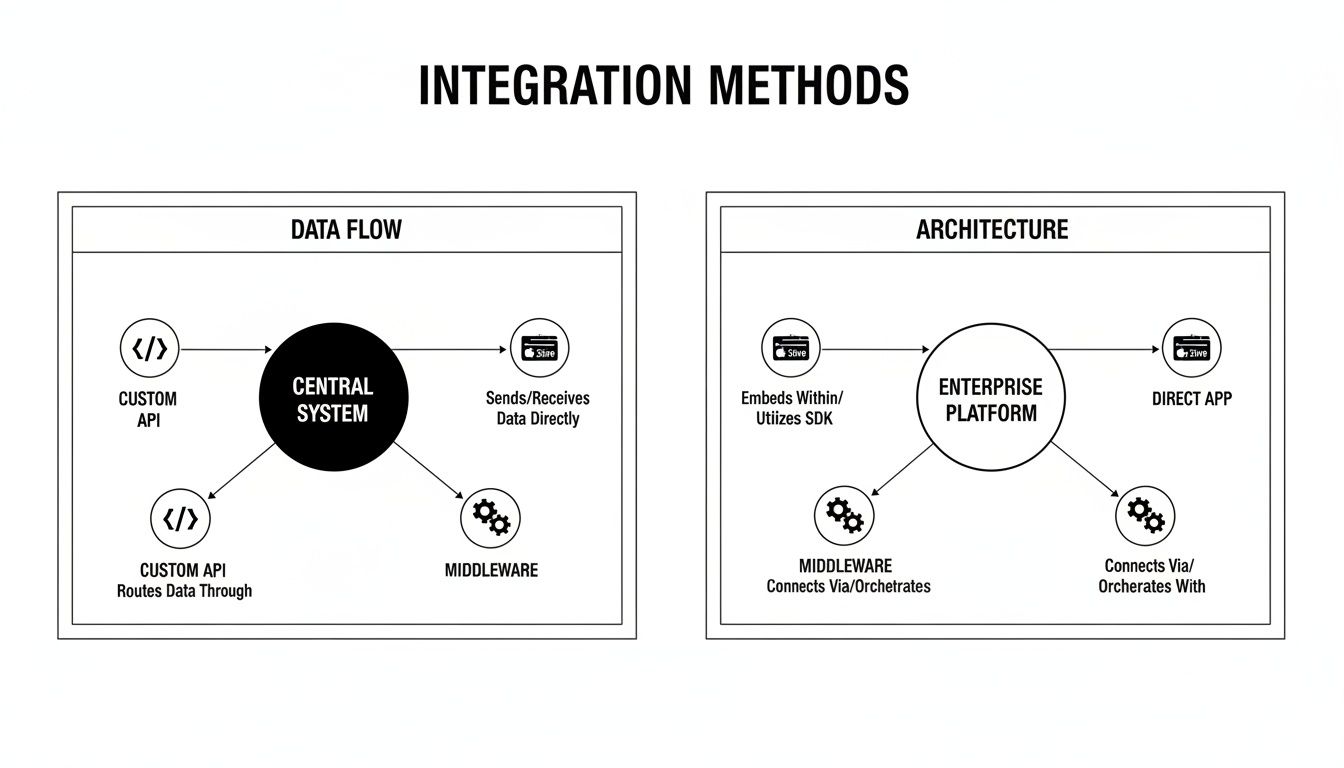
As the visual shows, it doesn't matter if you're using a pre-built app, a middleware platform, or a custom API. The goal of mapping data from one system to the other is always the same; it's just the tool and its complexity that change.
Defining Your Synchronization Rules
With your objects mapped, you now need to set the rules of the road for your data. This means deciding the direction, frequency, and specific conditions for when data moves between the two platforms. To keep everything consistent, having a solid grasp of data synchronization concepts is absolutely essential.
You'll need to work through these key questions:
- Sync Direction: Is data flowing one way or two? For the most part, customer and order info will flow one-way, from Shopify into Salesforce. But something like product inventory might need a two-way sync if your team can adjust stock levels in either system.
- Sync Frequency: How often does the data need to be refreshed? For critical events like a new order, you'll want a real-time sync so your sales team gets notified instantly. For less urgent data, like minor product description updates, a batch sync that runs every hour or once a day might be perfectly fine.
- Sync Triggers: What specific action kicks off the sync? A classic trigger is "Order Created" in Shopify, which starts the workflow to create new records in Salesforce. You might also set up triggers for "Customer Updated" or "Order Fulfilled."
Getting granular here is where you can unlock some powerful workflows. For instance, you could use Shopify tags to control exactly which customers get synced to Salesforce, which is great for segmentation. You can dive deeper into these strategies in our guide on using https://alisavepro.com/tags-on-shopify/.
The Critical Role of Historical Data
One of the most common mistakes I see is when teams focus only on syncing new data from this point forward. To truly get value out of this integration from day one, you absolutely have to plan for a historical data sync. This is the process of pushing all your existing Shopify customers, orders, and products into Salesforce.
Importing this historical context immediately gives your CRM a rich, actionable dataset. Your marketing team can instantly segment customers based on their entire purchase history, not just what they buy tomorrow. This lets them spot VIPs, build campaigns to win back lapsed customers, and calculate an accurate lifetime value (LTV) right from the start. Without it, you're building your customer profiles from scratch, which could take months or even years.
As Shopify's popularity exploded—with 42.2% of new enterprise ecommerce sites choosing the platform in recent years—integrating with CRMs like Salesforce went from a "nice-to-have" to a necessity. At the same time, Salesforce customers reported a 37% reduction in IT systems and a 27% ROI increase after consolidating their data. For global brands, this kind of integration is the only way to unify all channels into one customer view and avoid the data fragmentation that makes accurate LTV analysis impossible.
Configuring Secure Authentication and Webhooks
Before any data can move between Shopify and Salesforce, you have to build a secure, trusted bridge between them. This all starts with authentication—basically, proving that your integration tool has the right permissions to access and modify data. Think of it as giving your integration a digital key that only opens specific doors, keeping everything else locked down tight.
The two main ways to handle this are with API keys or OAuth 2.0. API keys are straightforward, like a simple username and password made just for an app. OAuth 2.0 is a bit more sophisticated; it lets you grant an application specific, limited permissions without ever handing over your actual login details. For that reason, most modern connectors and middleware platforms rely on OAuth 2.0 for its rock-solid security.
Establishing the Handshake with API Credentials
Your first real hands-on task is generating the necessary credentials in both Shopify and Salesforce. In Shopify, you’ll do this by creating a "private app" right from your store's admin panel. Once you set it up, Shopify gives you an API key and a password. Simple as that.
Over in Salesforce, you'll create what's called a "Connected App." This is where you'll define the exact permissions for your integration, spelling out what it can and can't do. After you've configured it, Salesforce will hand over a Consumer Key and Consumer Secret, which are its version of Shopify’s credentials.
Treat these keys like you would any password—they’re sensitive. You need to store them securely and never, ever expose them in public code or repositories. Your integration tool, whether it’s a platform like Zapier or your own custom code, will have a secure spot to keep these credentials and will use them to sign every single request it sends.
Critical Tip: When you're setting permissions, always stick to the principle of least privilege. Only grant the access your integration absolutely needs to function. If it just needs to read orders and create contacts, don't give it permission to delete products. This simple step dramatically reduces your risk if a key ever gets compromised.
Using Webhooks for Real-Time Automation
Okay, so now your systems can talk to each other securely. The next step is to make that conversation happen instantly and automatically. This is where webhooks are a game-changer.
A webhook is just an automated message sent from one app to another when a specific event happens. Instead of your integration constantly pinging Shopify and asking, "Anything new yet? How about now?", webhooks let Shopify proactively tap your integration on the shoulder and say, "Hey, a new order just came in!"
This event-driven approach is way more efficient than the old-school method of polling for updates, which hammers your APIs and creates delays. In e-commerce, real-time data is everything—it's what keeps customers happy and operations running smoothly.
Here are a few real-world examples of how you'll use webhooks:
- New Orders: The
orders/createwebhook in Shopify can kick off a workflow that immediately creates a new Order, Contact, and Account in Salesforce. No more manual entry. - Customer Updates: When a customer changes their shipping address in their Shopify account, the
customers/updatewebhook ensures their Salesforce Contact record is updated to match. - Shipping Updates: The
fulfillments/createwebhook can update the order status in Salesforce the moment an item ships, giving your support team a real-time view of every order.
Configuring Your First Webhook
Setting up a webhook is surprisingly easy. In Shopify, just head to the "Notifications" section in your settings and find the webhooks area. You'll only need to define two things:
- The Event: This is the specific action you want to listen for (e.g.,
orders/paid). - The URL: This is the endpoint address of your integration tool where Shopify will send the data.
When that event happens, Shopify will fire off a payload of data (in JSON format) to that URL. Your integration's job is to catch that data, parse the information, and trigger the right actions in Salesforce. When you have your webhooks configured correctly, you’ve built the engine for a truly automated system that keeps your data perfectly in sync without you lifting a finger.
How to Test Your Integration and Troubleshoot Errors
An integration that doesn't work correctly is often worse than no integration at all. Once you have your data maps and authentication sorted, it's time to put your hard work to the test before flipping the switch. This isn't just a quick check to see if data is flowing; it’s about making sure it flows accurately and reliably, just as it would in the real world.
The absolute best place to do this is in a Salesforce Sandbox. Think of it as a perfect, isolated copy of your live Salesforce environment. You can connect your Shopify store to this sandbox and go wild, simulating every possible customer action without any risk to your actual business data.
Building Your Core Testing Checklist
Your main goal here is to run through the most common, day-to-day e-commerce scenarios. For every test, you'll do something in Shopify and then immediately jump over to your Salesforce Sandbox to see what happened. Don't just glance to see if a record was created—dig in and check the details for accuracy.
Here are the must-do tests for any Shopify-Salesforce connection:
- New Customer Creation: Head to your Shopify store and create a new test customer account. Then, pop over to Salesforce and search for a new Contact and Account. Did the name, email, and address fields all come through perfectly?
- First-Time Order Placement: Use that new test customer to buy a single item. In Salesforce, you should see a new Order record. Is it linked correctly to the right Contact and Account? Do the product, quantity, and price match exactly what you saw in Shopify?
- Order with Multiple Items: Now, place a more complex order with several different products. This is a great way to stress-test how your integration handles multiple line items. Check the Salesforce Order record to ensure every product, its quantity, and the total value are all correct.
- Inventory Update: Manually change the stock level of a product in Shopify. Did the corresponding Product record in Salesforce update to match? This is absolutely critical, especially if you're aiming for a two-way sync.
- Order Refund or Cancellation: Process a full or partial refund for one of the test orders in Shopify. Look for the result in Salesforce. Did the Order status change as you expected? Was a credit memo or a similar record created?
Anticipating Common Integration Errors
Even the most carefully planned integrations can hit a snag. Knowing where to look for trouble will make fixing it so much faster. The usual suspects are often Salesforce data validation rules that block incoming data from Shopify, or you might hit API rate limits if you're syncing a high volume of orders.
A broken data sync is an invisible problem until a customer complains or a report comes back wrong. Proactive logging isn't just a technical task; it's a core business process for maintaining data integrity.
To catch these issues before they turn into major headaches, you need some basic logging and alerts. Most middleware platforms or custom integration setups let you configure notifications for failed syncs. A simple alert piped into a Slack channel or sent to an email alias can tell your team the moment something breaks. This means they can investigate right away, instead of finding out days later when the damage is already done. This kind of proactive monitoring is what separates a fragile integration from a truly reliable one.
Putting Your Integrated Shopify and Salesforce Data to Work

Alright, the technical heavy lifting is done. You’ve successfully connected Shopify and Salesforce, but the real work—and the real payoff—starts now. This is where you pivot from just syncing data to actually using it to drive growth.
Your goal is to activate this unified customer view to build smarter marketing campaigns, provide more efficient support, and create a brand experience that keeps people coming back. We're turning raw purchase data into strategic, actionable insights.
Build Hyper-Targeted Customer Segments
First things first, let's slice and dice that customer data. With all your Shopify order history living inside Salesforce, you can go way beyond basic email lists and build dynamic segments based on actual buying behavior.
Here are a few powerful segments you can build right away:
- High-Value Customers: Create a dynamic list of anyone with a lifetime spend over a specific amount, like $500. These are your VIPs, perfect for early access to sales or loyalty perks.
- First-Time Buyers: Isolate customers who have only made a single purchase. This is your prime audience for a targeted welcome series that guides them toward their second buy.
- At-Risk Customers: Identify shoppers who used to buy regularly but haven't made a purchase in the last 90 days. A strategic win-back campaign can bring them back into the fold.
- Category-Specific Shoppers: Group customers based on the product categories they love. When you launch a new product in that category, they should be the first to know.
Launch Personalized and Automated Campaigns
With your segments defined, you can unleash the power of Salesforce's automation tools. Whether you're using Marketing Cloud Account Engagement (formerly Pardot) or building sophisticated flows in Marketing Cloud Journeys, you can now engage customers with surgical precision.
Think about what this means for abandoned carts. A Shopify Abandoned Checkout event can trigger a whole automated sequence in Salesforce. It's not just one generic reminder email anymore. You could build a journey that sends a follow-up email after two hours, a text message with a small discount code the next day, and for carts over $200, it could even create a task for a sales rep to personally reach out.
The real magic here is closing the loop. When your storefront activity is directly tied to your customer relationship management, your teams are empowered to make smarter, faster decisions. It’s no longer a guessing game.
The data proves it works. Salesforce reports that businesses using connected data and AI see an average 45% higher ROI and a 30% boost in productivity. Every time a customer views a product or makes a repeat purchase in Shopify, that event can become a trigger for a highly relevant campaign in Salesforce. For dropshippers, this creates a seamless pipeline from product sourcing all the way to personalized marketing. You can learn more about the impact of connected commerce data directly from Salesforce.
Ultimately, this integration shifts your entire business from being reactive to proactive. You can anticipate what your customers need, personalize their entire journey, and build a brand that earns genuine loyalty, not just one-off sales.
Ready to streamline your product media workflow? AliSave Pro is a free Chrome extension that lets you download all AliExpress product photos, videos, and review images in a single click. Join over 20,000 dropshippers who are saving time and building better stores. Get AliSave Pro for free at alisavepro.com.