
Picking the best ecommerce platform usually boils down to a classic tug-of-war: the plug-and-play simplicity of a hosted service like Shopify versus the open-ended flexibility of a self-hosted option like WooCommerce. The right answer for you really depends on your tech skills, your budget, and where you see your business heading down the road. This decision is huge—it sets the entire tone for how you'll run and grow your store.
Choosing Your Ecommerce Foundation
Let's be clear: selecting an ecommerce platform is the most critical decision you'll make for your online business. This isn't just about getting a pretty storefront online. You're choosing the engine that will run everything—from managing products and inventory to processing payments and handling customer information. This one choice dictates your startup costs, how much technical heavy lifting you'll have to do, and how much room you'll have to grow. As you weigh your options, it’s smart to get familiar with Content Management System best practices, since a good ecommerce platform is also a powerful CMS.
The market really splits into two main camps: hosted and self-hosted solutions. Getting a handle on what makes them different is the first, most important step in finding the right fit for your business.

Hosted vs. Self-Hosted Platforms
Hosted platforms, what the industry calls "Software as a Service" or SaaS, are the all-in-one deals. You pay a monthly fee, and they give you the software, hosting, security, and customer support. It’s no surprise they’re a hit with beginners and businesses that just want to get up and running fast without a ton of fuss.
On the other side of the coin, you have self-hosted platforms. These are open-source pieces of software that you download and install on your own web server. This route gives you the keys to the kingdom—complete control over your store's design, features, and code. It's the perfect path for merchants with very specific needs or those who have the tech chops to manage their own setup. Many new sellers use these platforms for different business models; for instance, you can learn more about one popular method in this guide on how to start dropshipping.
The core trade-off is simple: Hosted platforms trade customization for convenience, while self-hosted platforms trade convenience for complete control. Your choice depends entirely on which of these two assets is more valuable to your business right now.
To make this crystal clear, let's put them side-by-side.
| Feature | Hosted Platforms (e.g., Shopify, BigCommerce) | Self-Hosted Platforms (e.g., WooCommerce) |
|---|---|---|
| Ease of Use | High. Built for people who aren't developers. Think intuitive dashboards and drag-and-drop editors. | Moderate to Low. You'll need some technical know-how to get it set up, secured, and running smoothly. |
| Initial Cost | Predictable. You know exactly what you'll pay each month with a fixed subscription fee. | Variable. The software is free, but you’re on the hook for hosting, themes, plugins, and maybe a developer. |
| Customization | Good but limited. You can customize a lot, but you have to stay within the platform's rules and app ecosystem. | Unlimited. With full access to the source code, you can build or modify absolutely anything you can imagine. |
| Maintenance | Minimal. They handle all the boring stuff—updates, security patches, and server upkeep—for you. | High. It's all on you. You're responsible for updates, security, backups, and making sure the site stays fast. |
A Detailed Comparison of Top Ecommerce Platforms
Picking the right foundation for your online store goes way beyond just looking at a glossy feature list. To really find the best fit, you have to get practical and compare the top contenders—Shopify, WooCommerce, BigCommerce, and Squarespace—on the things that actually matter day-to-day: how much they really cost, how easy they are for someone who isn't a developer, and whether they can handle your business as it grows.
This isn't just about features; it's about scenarios. We'll explore how one platform's famous simplicity can quickly turn into a frustrating limitation, or how another's initial complexity is actually the key to unlocking total control over your brand. We're going to break down how each one performs from the moment you sign up to the day you're scaling up.
Ease Of Use And Initial Setup
For anyone just starting out, getting a store up and running quickly is a huge win. This is where hosted platforms like Shopify and Squarespace really pull ahead, offering guided setups that take the tech headaches out of the equation.
Shopify is legendary for its user-friendly onboarding. You can genuinely go from a new account to a polished, functional store in just a few hours. The dashboard is clean, logical, and makes everyday tasks like adding products or managing orders feel completely natural, even if you’ve never done it before.
Squarespace offers a similar drag-and-drop feel but with a laser focus on beautiful design. If your brand is all about aesthetics—think an art gallery, a fashion boutique, or a portfolio—Squarespace’s award-winning templates give you a gorgeous head start. It’s probably the easiest way to create a visually stunning website with almost no effort.
Key Differentiator: While Shopify is built to get you selling as fast as possible, Squarespace is all about crafting a polished, design-forward brand experience. Your choice really comes down to what's more important on day one: launching sales operations or perfecting your visual identity.
On the other end of the spectrum is WooCommerce, a plugin for WordPress, which definitely has a steeper learning curve. The setup is on you: find and pay for your own hosting, install WordPress, and then get the WooCommerce plugin configured. It’s a process that offers incredible freedom but requires more technical know-how and a bigger time investment upfront.
BigCommerce lands somewhere in the middle. It’s a hosted platform like Shopify, but its dashboard is packed with more advanced features right from the start. For an established business, this is a huge plus, but for a newcomer, it can feel a bit like sitting in a cockpit without knowing how to fly.
Pricing Structures And Hidden Costs
Figuring out the true cost of a platform means looking past the monthly subscription fee. Transaction fees, app subscriptions, and theme purchases can dramatically change your total monthly spend.
To give you a real sense of what to expect, we've created a table that breaks down the features and likely costs for each major platform.
Feature and Cost Comparison of Leading Ecommerce Platforms
| Feature | Shopify | WooCommerce | BigCommerce | Squarespace |
|---|---|---|---|---|
| Ideal For | Beginners & fast-growing brands | DIYers & businesses with unique needs | Mid-market & large businesses | Creatives & content-first brands |
| Hosting | Included | Self-hosted (you pay for it) | Included | Included |
| Ease of Use | Very High | Moderate (requires tech skills) | High | Very High |
| Monthly Cost | Starts at $39/mo | Free software, but hosting & plugins cost $30-$200+/mo | Starts at $39/mo | Starts at $23/mo for commerce |
| Transaction Fees | 0.5% – 2% if not using Shopify Payments | 0% (only processor fees) | 0% on all plans | 3% on Business Plan, 0% on Commerce plans |
This table provides a snapshot, but let's dive into the specifics that often catch people by surprise.
Shopify: The monthly plans are clear, but if you don't use their in-house Shopify Payments, you'll be hit with an extra transaction fee of 0.5% to 2% on every sale. This is on top of what your payment gateway (like PayPal) already charges. Also, many of the best apps in its extensive store come with their own monthly fees.
WooCommerce: The plugin itself is free, which is a massive draw. But the "hidden" costs are real: you have to pay for web hosting, a domain, and an SSL certificate. Premium themes and essential extensions can easily add up to hundreds of dollars a year. A comprehensive ecommerce platform comparison can help you budget for these extras.
BigCommerce: Their killer feature is charging zero transaction fees on all plans, no matter which payment gateway you use. This can save high-volume stores a ton of money. The catch? BigCommerce will automatically move you to a more expensive plan once your annual sales cross a certain threshold.
Squarespace: To sell products, you need their "Business" plan or higher. Be warned, though—the Business plan comes with a 3% transaction fee. You have to upgrade to one of their more expensive "Commerce" plans to get rid of it.
Customization And Scalability
The platform that's perfect for a startup with five products just won't cut it for a business managing thousands of SKUs across multiple countries. Scalability isn't just about handling more traffic; it's about whether the platform can grow with your operational needs.
WooCommerce offers complete, unrivaled customization. Since it’s open-source, you or your developer can control every single line of code. This makes it the go-to for businesses with highly specific product needs or those that need to integrate with custom-built internal systems. It's this flexibility that has helped it power a staggering 39.05% of all online stores worldwide.
Shopify, on the other hand, provides excellent scalability within a managed, structured ecosystem. With over 8,000 apps, you can bolt on advanced functionality without ever touching code. For bigger players, Shopify Plus is a powerhouse solution built for high-volume merchants, proving the platform can hang with the big dogs. The best part? Shopify handles all the technical heavy lifting of scaling—servers, security, uptime—so you don't have to. For more on similar platforms, our guide on https://alisavepro.com/ecwid-vs-shopify/ offers some great insights.
BigCommerce was designed for growth right from the get-go. Many features you’d have to pay for as apps on Shopify (like advanced product filtering or multi-currency support) are already built into BigCommerce’s core product. This makes it an incredibly strong choice for established businesses that want powerful tools out of the box without relying on a patchwork of third-party apps.
Squarespace is fantastic for smaller stores and brands where content is king, but it does hit a ceiling when it comes to scaling. Its app marketplace is much smaller, and it just doesn't have the advanced inventory, shipping, or B2B features that complex businesses eventually need. It truly shines for sellers with straightforward catalogs and business models.
Essential Features Your Online Store Needs to Succeed

Choosing the best ecommerce platform goes way beyond just picking a place to list your products. You're building the entire operational engine for your business, and the features it comes with will either fuel your growth or become a constant source of headaches. A beautiful storefront is table stakes, but it's the tools humming along in the background that really make or break a business.
The right features should solve your real-world problems. Whether it's processing payments, wrangling inventory, or bringing back would-be customers, the right toolset is what saves you time, cuts down on mistakes, and ultimately puts more money in your pocket.
Secure and Flexible Payment Gateways
Let's be blunt: the single most important thing your store must do is take money. Your platform's payment gateway is the digital version of a cash register, and its reliability and fees hit your bottom line and your customers' trust directly. You need a setup that makes customers feel safe and makes financial sense for you.
Platforms generally take one of two routes: their own in-house system or integrations with outside payment processors.
- Proprietary Gateways: Think Shopify Payments. These are baked right into the platform, making setup a breeze. They often offer decent rates and keep all your transaction data neatly in one dashboard.
- Third-Party Gateways: This is where names like PayPal, Stripe, and Authorize.net come in. They give you flexibility, which is great if you already have a merchant account with killer rates or need to offer payment options popular in other countries.
Watch out for hidden costs. Some platforms, most notably Shopify, will tack on an extra transaction fee if you choose not to use their built-in gateway. This can add 0.5% to 2% on top of what your third-party processor already charges, so run the numbers carefully.
Robust Inventory and Order Management
When you're just starting, keeping track of stock is easy. But as you grow, it gets complicated fast. You need more than just a simple count; you need a system that stops you from selling products you don't have, tracks inventory across different locations, and makes fulfilling orders feel effortless.
A solid platform should give you:
- Real-Time Stock Counts: Inventory should update automatically the second a sale is made. No exceptions.
- Low-Stock Alerts: You need a heads-up when an item is running low so you can reorder before it's too late.
- Multi-Location Support: This is non-negotiable if you use a warehouse, have a brick-and-mortar shop, or work with dropshippers.
- Order Processing Tools: The ability to pick, pack, and print shipping labels straight from your admin panel is a massive time-saver.
Without these tools, you're setting yourself up for disappointed customers and logistical messes that eat up all your time. Good inventory management is the true backbone of any scalable ecommerce operation.
Built-in Marketing and SEO Tools
A great store is useless if no one can find it. That's where Search Engine Optimization (SEO) and marketing features come in. The best platforms hand you the controls to get your site noticed by search engines and to keep customers coming back.
At a minimum, you need to be able to easily edit basic SEO elements like page titles, meta descriptions, and image alt text. These are the fundamentals for getting ranked on Google.
Beyond that, look for tools that help you recover lost sales. Abandoned cart recovery is a must-have. We know that sending an automated email to someone who left items in their cart can claw back a surprising amount of revenue. If you want to get good at this, you should learn more about how to improve ecommerce conversion rates and squeeze every last drop of value from your traffic.
Finally, don't underestimate the power of a great app ecosystem. No platform does everything perfectly out of the box. A rich marketplace of third-party apps is your secret weapon, letting you plug in advanced email marketing, loyalty programs, or deep analytics as you need them. It's this adaptability that ensures your platform can grow right alongside your business.
How Platforms Handle a Traffic Tsunami
Every online store owner dreams of a sudden flood of visitors. But that dream can quickly become a nightmare if your site buckles under the pressure. The best platform isn't just for the day-to-day grind; it’s about staying online and lightning-fast during a Black Friday frenzy or when your product unexpectedly goes viral. How your store is built determines whether it can perform when it matters most.
This is where the difference between hosted and self-hosted platforms really comes into focus. A hosted solution like Shopify is built on an infrastructure designed for massive scale. On the other hand, a self-hosted platform like WooCommerce puts the burden of performance and scalability entirely on you.
Hosted Platforms: Built to Scale
When you sign up for a hosted platform, you're tapping into a massive, fine-tuned infrastructure. It's like your store is an apartment in a skyscraper engineered to withstand anything. When a huge storm—or a massive traffic spike—hits, the building’s foundation, power grid, and maintenance crews are already in place to keep everything running smoothly.
There's a reason Shopify leads the pack here. Its entire system is engineered to absorb huge, unpredictable traffic surges without missing a beat. During peak shopping seasons, their servers are ready to handle millions of requests per minute. This ensures your checkout process stays fast and reliable when sales are on the line, which is a big reason why so many major brands trust it.
The numbers back this up, especially when you look at successful stores. In 2025, Shopify powers around 4.65 million active ecommerce websites, but its real strength is at the top. It holds a 28.8% market share among the top one million high-traffic sites, comfortably ahead of WooCommerce at 18.2%. You can discover more insights about Shopify's market share to see just how well it performs with high-volume brands.
The Self-Hosted Performance Puzzle
With a self-hosted platform like WooCommerce, you're the architect and builder of your own skyscraper. Your store’s performance isn't really about WooCommerce itself—it's about the quality of your web hosting and the technical skill you put into optimization. A cheap, shared hosting plan might be fine when you're starting out, but it will absolutely crumble under the weight of a serious traffic spike.
To get a WooCommerce store ready for prime time, you have to invest in a much better hosting solution. Your options typically include:
- Managed WordPress Hosting: These providers specialize in WordPress, offering server-level caching and performance tuning right out of the box.
- Virtual Private Server (VPS): This gives you your own dedicated slice of a server, offering far more power and stability than shared plans.
- Cloud Hosting: Services from AWS or Google Cloud offer incredible scalability, but managing them requires serious technical know-how.
The bottom line is this: with WooCommerce, performance is a variable you have to actively manage and pay for. With Shopify, performance is a core feature baked into your monthly plan. If you're planning for explosive growth, you have to decide: do you want to become an expert in server management, or do you want to just focus on selling?
Making the Right Choice for Your Business
Picking an ecommerce platform isn't about finding a single "best" solution. It’s about finding the right one for your business model, your comfort level with tech, and your plans for growth. After weighing all the features, performance specs, and costs, the choice really boils down to your specific situation.
Think of it this way: a startup just trying to get its first product out the door has completely different needs than a high-volume retailer managing a massive catalog. By figuring out which camp you fall into, you can cut through the noise and choose a platform that’s truly built for you.
Scenarios to Guide Your Decision
Let's look at a few common situations to make this choice easier. Each one highlights a specific business need and points you toward the platform that's best equipped to handle it.
The Rapid-Launch Startup: Need to get your store online fast? If speed, simplicity, and low technical stress are your top priorities, then Shopify is your best bet. Its guided setup and reliable hosting mean you can go from zero to a professional, sales-ready store in a few hours. It’s perfect for entrepreneurs who want to spend their time selling, not wrestling with code.
The Content-Driven Custom Brand: Is your brand all about unique design, deep customization, and a strong content game (like a blog-heavy store)? You'll want the freedom of WooCommerce. It gives you complete control, which is ideal if you have some tech skills (or a developer on hand) and hate being boxed in by a template. You can build any feature you dream up, making it the go-to for a truly one-of-a-kind brand experience.
The Scaling Mid-Market Business: Are you an established business with a complex product line and a serious focus on SEO and selling across multiple channels? BigCommerce was built for you. It packs powerful, enterprise-grade features—like advanced product filters and zero transaction fees on all plans—right into its core. This gives you a solid, scalable foundation without having to bolt on a ton of third-party apps.
This simple decision tree shows how even a single factor, like how much traffic you expect, can steer you in the right direction.
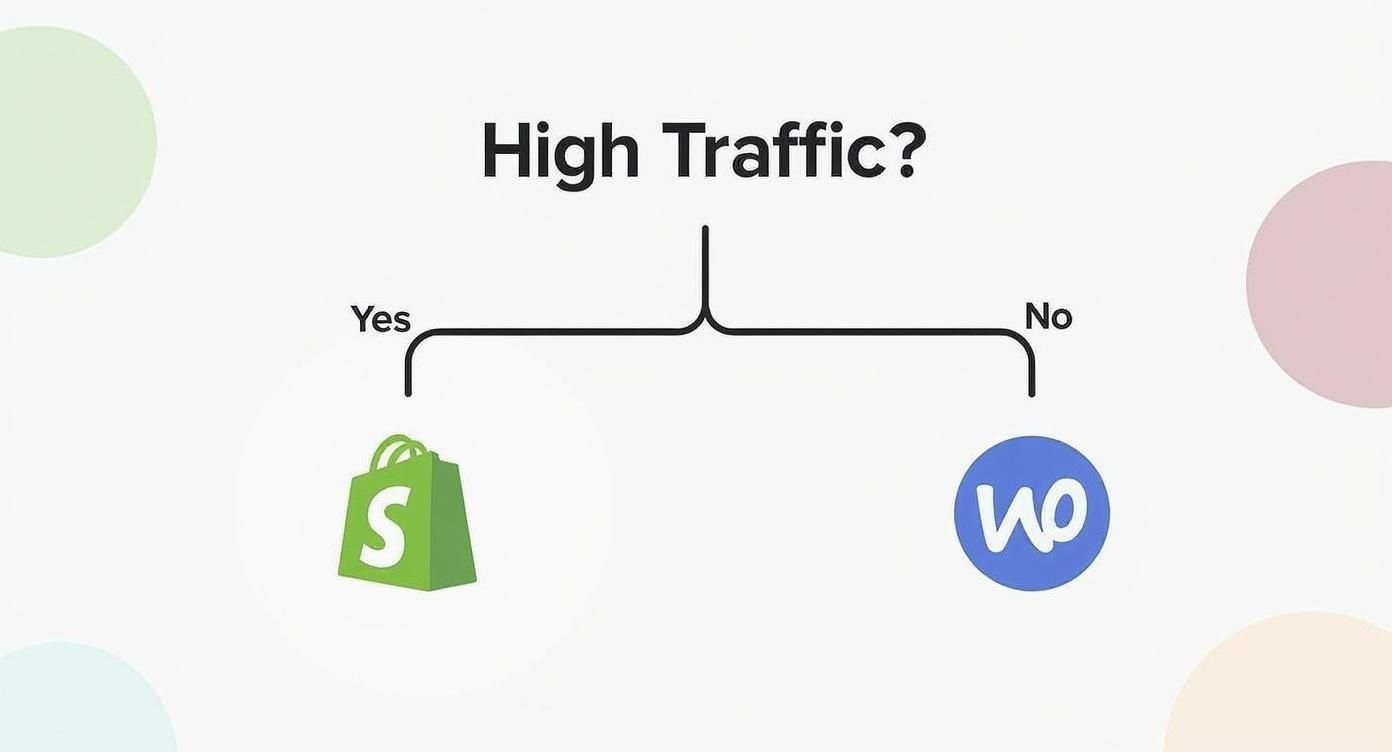
It’s a great reminder that these platforms are engineered for different scales. Your growth plans should be a major part of your decision.
The most effective way to choose your platform is to be honest about your resources. Acknowledge your team's technical skills, your budget for both setup and ongoing costs, and how much time you can realistically dedicate to site management.
Thinking Beyond Your Own Storefront
It’s also smart to look at the wider market you're stepping into. In the United States, for instance, Amazon is still the giant in the room, projected to command a massive 37.6% of the online retail market by 2025. This fact isn't just trivia; it's a strategic reality that pushes many sellers toward a multi-platform approach to find customers and stay competitive. You can get a better feel for the current state of the ecommerce market to help shape your strategy.
At the end of the day, your platform is a long-term partner. When you align its strengths with your business goals, you’re doing more than just building a store—you’re setting up the foundation that will support your vision for years to come.
Frequently Asked Questions About Ecommerce Platforms
Choosing an ecommerce platform is a big commitment, and it's smart to have a few questions before you dive in. We’ve pulled together the most common things we hear from entrepreneurs to give you clear, practical answers and help you make your final decision with confidence. Let's tackle the big ones: total costs, future-proofing, and technical skills.
What's the Real Cost of Running an Online Store?
The monthly subscription fee you see advertised is just the starting point. The true cost of running your store is a mix of several expenses that can sneak up on you if you're not paying attention.
Your total monthly bill will almost always include:
- Subscription Fees: This is your base cost for the platform itself, typically running from $29 to $299+ per month for the standard plans.
- Payment Processing Fees: These are unavoidable. Every time you make a sale, gateways like Stripe or PayPal take a cut, usually around 2.9% + 30¢ per transaction.
- Transaction Fees: Some platforms, most notably Shopify, add their own fee (from 0.5% to 2%) on top if you decide not to use their built-in payment processor.
- Apps and Extensions: Your store will likely need extra functionality for things like advanced marketing, custom shipping rules, or back-in-stock alerts. These apps can range from free to hundreds of dollars a month.
And if you're looking at a self-hosted platform like WooCommerce, remember that while the software is free, you're on the hook for hosting, security, premium themes, and potentially developer help. Those costs can easily add up to more than a hosted plan.
Which Platform Gives Me the Best SEO Tools?
Search engine optimization is how customers find you for free, so this is a huge deal. Straight out of the box, Shopify and BigCommerce probably offer the most complete and user-friendly SEO toolsets. They handle the technical stuff well, giving you clean code, simple ways to edit meta titles and descriptions, and automatic sitemaps.
Because it's built on WordPress, WooCommerce is also an SEO powerhouse. With a plugin like Yoast SEO, you get incredible control over every tiny detail of your site's optimization. The flip side? That power comes with responsibility. You have to know how to configure it correctly to get results.
A platform gives you the tools, but it can't do the work for you. Great SEO always comes down to your content, your keyword strategy, and the effort you put in. No platform can magically land you on page one without a solid strategy.
Do I Need to Know How to Code for Something Like WooCommerce?
You don't need to be a professional developer, but it really helps to be comfortable with a bit of tech. Unlike a platform that handles everything for you, WooCommerce means you're in charge of your own hosting, security updates, and making sure your plugins all play nicely together.
Day-to-day tasks like adding products or writing blog posts are simple. But when you want to make bigger design changes, figure out why two plugins are conflicting, or speed up your site, you'll often find yourself needing to touch a bit of code or dig into server settings. Many people get by just fine using page-builder plugins and a great web host, but a willingness to learn (or a budget for a developer) will make your life a whole lot easier.
How Hard Is It to Move to a New Platform Later?
Switching your store to a new platform is a serious project, but it's definitely doable. How difficult it is really depends on the size of your store, how much data you have, and which platforms you're moving between.
Most migrations come down to moving three key buckets of data:
- Product Data: All your titles, descriptions, images, SKUs, and product variations.
- Customer Data: Names, contact info, and their purchase history.
- Order Data: Your complete transaction history.
Many platforms have apps or automated tools to help with this. But for a large, established store, hiring a migration expert is often the smartest move. It’s the best way to make sure no data gets lost and your hard-earned SEO rankings are protected during the move.
At AliSave Pro, we know that getting great product images is one of the first big steps in setting up your store. Our free Chrome extension lets you download all AliExpress product media—high-res photos, videos, and even reviews—in a single click. It streamlines your workflow, no matter which platform you choose. Get started with AliSave Pro today.