
Before you can start selling, you’ve got to lay the groundwork. The path to an eBay Store starts with a basic eBay account, which you'll then need to officially switch over to a seller account. It’s a straightforward process, but it requires getting your ducks in a row: verifying your business details, linking up a payment method for eBay's Managed Payments, and then choosing your Store subscription. This is the launchpad for reaching a massive global audience.
Building Your Foundation for eBay Success

Don't rush through this initial phase. It might seem like just a bunch of forms, but getting your account set up correctly from the start is crucial. A solid, professional foundation ensures your operation runs smoothly and prevents headaches like account holds or payment delays down the road.
First things first, if you don't already have one, create a standard eBay account. The real magic happens when you convert it into a seller account. This flip of a switch unlocks the Seller Hub and lets eBay know you mean business.
Setting Up Your Seller Account and Payments
When you make the switch to a seller account, eBay will need to verify who you are. Having all your information ready beforehand will make this part a breeze.
Here’s what you'll need to have handy:
- Legal Business Information: Your full legal name (if you're a sole proprietor) or your registered business name and address.
- Tax Details: For individuals, this is your Social Security Number (SSN). For a registered business, it's your Employer Identification Number (EIN).
- Bank Account Information: You'll need to link a checking account for eBay's Managed Payments system. This is how you'll get paid.
This step is mandatory. eBay’s Managed Payments system is now the central hub for all financial transactions on the platform, handling everything from processing customer payments to sending you the final payouts. A clean setup here means your money gets to you without a hitch.
Think of this initial setup as pouring the concrete foundation for a house. Getting it right ensures everything you build on top of it—your listings, branding, and customer relationships—remains stable and secure.
Opening an eBay store plugs you directly into a huge global marketplace with 134 million active buyers and 18 million active sellers worldwide. This gives you instant access to an eager audience searching for popular items in electronics, clothing, and auto parts. To get a better feel for where your store fits in, it's a good idea to check out broader e-commerce industry insights. You can also dig into current platform stats from Thunderbit.com to see just how big the opportunity really is.
Choosing the Right eBay Store Subscription
Once you've got your seller account ready to go, you’ll hit your first major strategic decision: picking an eBay Store subscription. This isn't just another monthly fee to tack onto your expenses; it's a critical choice that can directly impact your profitability. Get it right, and you'll save a ton on fees while unlocking powerful growth tools. Get it wrong, and you could be needlessly chipping away at your margins.
The core question to ask yourself is simple: will the savings on fees and the value of the store tools be more than the monthly subscription cost? For the vast majority of sellers, even those just starting out, the answer is a clear "yes." It all comes down to matching your subscription level to your real-world sales volume and what you hope to achieve.
Breaking Down the Subscription Tiers
eBay has a ladder of subscription plans, and each rung is built for a different kind of seller. As you climb higher, two main things happen: you get a lot more free listings each month, and you pay lower final value fees (the percentage eBay takes from your total sale).
Here’s a quick rundown of the main options you'll be looking at:
- Starter Store: This is your ground floor, perfect for hobbyists or sellers just dipping their toes in the water. It’s designed for anyone listing fewer than 250 items a month.
- Basic Store: A real step up. The Basic plan is the sweet spot for sellers who are consistently listing and selling, usually managing a few hundred products at any given time.
- Premium Store: Now we're talking volume. This plan is for established sellers with thousands of listings who need serious discounts on fees and more advanced tools.
- Anchor Store: The top tier. This is for large-scale businesses managing a massive inventory. They need the absolute lowest fees and the most powerful features eBay offers.
Each of these tiers gives you a specific number of "zero insertion fee" listings for both auction-style and fixed-price items. If you go over that allowance, you'll pay a small insertion fee for every extra listing. This makes your inventory size the very first thing you need to consider.
eBay Store Subscription Tiers Comparison
To really see the differences, it helps to put the plans side-by-side. This table breaks down what you get at each level, making it easier to see where your business fits in.
| Feature | Starter | Basic | Premium | Anchor |
|---|---|---|---|---|
| Free Fixed-Price Listings | Up to 250 | Up to 1,000 | Up to 10,000 | Up to 25,000 |
| Final Value Fee Discount | Standard | Reduced | More Reduced | Lowest |
| Promoted Listings Credit | N/A | Up to $25/quarter | Up to $50/quarter | Up to $150/quarter |
| Terapeak Sourcing Insights | Limited Access | Included | Included | Included |
| Shipping Supply Coupon | $25/quarter | $50/quarter | $150/quarter | $150/quarter |
| Dedicated Support | No | Yes | Yes | Yes |
As you can see, the benefits scale up pretty quickly. The right choice depends entirely on your listing volume and how much you plan to use the extra marketing and research tools.
Matching a Plan to Your Selling Scenario
Thinking through a couple of real-world situations makes this choice a lot clearer. It’s all about lining up the subscription cost with how many items you plan to list.
Let's say you're a collector who wants to sell around 50 vintage action figures a month. The Starter store is a no-brainer. You get more than enough free listings for your inventory without paying for a subscription built for a much larger operation.
But what if you're planning to dropship a catalog of 500 different phone cases? The Starter plan's listing allowance would get eaten up in an instant, and you'd start racking up insertion fees. In that case, a Basic or even a Premium store would be way more cost-effective. The monthly fee would be easily covered by what you save on listing fees alone.
The golden rule is to avoid paying for more than you need but to upgrade the moment your listing volume makes it a smart financial move. Keep a close eye on your listing fees; when they start to consistently cost more than the next subscription tier up, it’s time to level up.
For a more in-depth look at account structures, check out our guide on the differences between a business and personal eBay account.
Beyond Just Listings and Fees
While the financial math is the main event, the perks of higher-tier subscriptions are about more than just saving money on listings. As you move up the ladder, you unlock tools that can give you a real competitive edge.
The Promotions Manager, for example, lets you run sales, create coupon codes, and offer discounts on larger orders—all proven tactics for boosting your average sale price. Getting full access to Terapeak Sourcing Insights is another huge win; it's an incredible market research tool that shows you what’s selling, for how much, and when. And don't forget the quarterly credit for Promoted Listings, which is basically a free ad budget to get more eyes on your products.
Ultimately, picking your eBay Store subscription is about finding that perfect balance where the cost, the features, and your business goals all align. Start with an honest look at your inventory and sales projections, and don't hesitate to upgrade as your business starts to take off.
Designing a Storefront That Builds Trust
Once your subscription is live, the real fun begins. It's time to stop looking like just another eBay page and start building a real brand. Think of your eBay Store as your digital real estate—a generic, un-customized page feels temporary and can make buyers hesitant.
A sharp, well-designed storefront does the opposite. It immediately tells shoppers you're a serious, professional seller. This first impression is often the difference between someone clicking away and someone sticking around to see what you've got. It's your first, best chance to turn a casual browser into a loyal customer.
Crafting Your Brand Identity
Your visual branding boils down to two critical pieces: your logo and your store banner. These are the very first things a visitor sees, so they need to instantly communicate who you are and what you sell.
- Your Logo: This is your brand’s calling card. It needs to be clean, professional, and recognizable, even when it’s just a tiny icon. Steer clear of anything too busy or blurry.
- Your Store Banner: This is the big billboard at the top of your page. Use this prime space to highlight your best products, announce a big sale, or just give a feel for your brand’s personality. It's your visual welcome mat.
Imagine you're selling handmade leather goods. A rustic, clean logo paired with a banner image showing the crafting process instantly signals quality and authenticity before a customer even scrolls down.
A strong visual identity does more than just look good—it builds a psychological shortcut for trust. When a storefront looks professional, shoppers assume the products and customer service will be professional, too.
Optimizing Your Store Layout and Navigation
Looks are important, but how your store functions is just as crucial. A messy, disorganized shop is a fast way to lose a sale. Thankfully, eBay provides the tools to create a shopping experience that feels intuitive and easy.
Your most powerful tool here is custom store categories. Don't just throw all your products into one big pile. Create specific, logical categories that guide your customers, just like the aisles in a physical store. This simple step makes it effortless for buyers to find what they need and often encourages them to discover other items they didn't even know you had.
Let's say you specialize in vintage clothing. Instead of one "Apparel" category, you could break it down like this:
- Men's 1970s Jackets
- Women's 1980s Dresses
- Vintage Denim
- Classic Band Tees
This kind of organization makes your inventory feel curated and professional, which drastically improves the entire shopping experience.
Claiming Your Digital Address
One of the most valuable—and often overlooked—perks of an eBay Store is the ability to create your own custom URL. Instead of a generic web address with a bunch of numbers, you can claim one that actually reflects your brand name.
Getting your custom URL is incredibly straightforward:
- Head over to your Seller Hub.
- Click on the Store tab.
- You'll find an option to edit your store's URL.
Your new address will look something like yourbrand.ebaystores.com. This makes your store so much easier for people to remember and for you to share on social media or business cards. It’s a small detail, but it reinforces the idea that you're a real business, not just a casual seller.
Crafting Product Listings That Actually Convert
A well-designed storefront might get customers in the door, but it’s the quality of your product listings that actually makes the sale. I’ve seen countless sellers with great products fail because their listings were lazy or uninspired. It's a classic mistake.
Crafting a listing that converts is both an art and a science. It's about blending sharp, persuasive copywriting with visuals that build a massive amount of trust. Think of it this way: every single element in your listing, from the title down to the return policy, should anticipate and answer a customer's questions before they even have a chance to ask.
When you truly get how to improve e-commerce conversion rates, you see your listing as a guided path, gently leading a shopper straight to that "Buy It Now" button.
Writing Titles That Get Found
Your listing title is, without a doubt, the most critical piece of SEO you control on eBay. It's the primary way eBay's search engine, Cassini, connects your product to a searching buyer. A weak title makes you invisible; a strong one is like having a premium spot on the digital shelf.
You have to think like your customer. What words are they actually typing into the search bar? "Nice Men's Shirt" isn't going to cut it. You need to pack it with descriptive, relevant keywords.
- Weak Title: "Nike Polo"
- Strong Title: "Nike Dri-Fit Mens Golf Polo Shirt Blue Striped Short Sleeve Size Large"
The second example is a masterclass in detail. It hits the brand, product line, intended user, item type, color, pattern, sleeve style, and size. This kind of title casts a wide net, catching everything from a broad "Nike polo" search to a super-specific "blue striped golf shirt large" query.
Creating Descriptions That Sell
Once a buyer clicks, your description needs to take the baton and run with it. This is your moment to be the expert salesperson, highlighting not just features, but the benefits of those features.
So, instead of just stating, "Made of 100% merino wool," you paint a picture: "Stay warm without the bulk with this ultra-soft, 100% merino wool sweater that's naturally breathable and odor-resistant." You're selling the experience of wearing the sweater, not just the material it's made from.
A great product description leaves no questions unanswered. If a buyer has to message you to ask for something as basic as measurements or condition, you've introduced friction. That friction is often enough to lose the sale.
Use bullet points and bold headings to break up the text. Let's be honest, people don't read online; they scan. Make it effortless for them to find the info they need. For a deeper dive into writing compelling listing content, our guide on https://alisavepro.com/ebay-listing-optimization/ is a fantastic resource.
The Power of High-Quality Visuals
Good copy is essential, but in e-commerce, visuals do the real heavy lifting. You absolutely cannot skimp on high-quality photos and videos. They are your most powerful tools for showing a customer exactly what they're getting.
The data doesn't lie: listings with 12 or more photos can sell up to 4.5 times faster. This is especially crucial for dropshippers who need to build trust from a distance. With over 2.4 billion active listings on the platform, standout visuals are what separate the amateurs from the pros.
Your photo gallery should tell a complete visual story:
- Show the product from every conceivable angle—front, back, sides, top, and bottom.
- Get close-ups of important details like textures, logos, and unique features.
- Be brutally honest about any flaws or defects. Transparency is a massive trust-builder.
- Include a photo with a common object (like a coin or a can) to give buyers a clear sense of scale.
A Game-Changing Workflow for Dropshippers
If you’re dropshipping from a site like AliExpress, you know the soul-crushing grind of gathering product media. Manually saving dozens of images for every single product—and all its color and size variants—is a monumental waste of time.
This is where a specialized tool becomes a lifesaver.
Tools like AliSave Pro are built specifically to eliminate this bottleneck. With just one click, you can download all the high-quality images and videos for any AliExpress listing. It turns a task that could take hours into something that takes seconds.
But it’s not just about grabbing the professional product shots. The real magic is the ability to download customer review photos. These real-world images from actual buyers are pure gold. They provide incredible social proof and show your potential customers exactly how the product looks and works in a real person's hands—that's more persuasive than any polished studio photo.
Pricing, Shipping, and Returns
Your pricing has to hit that sweet spot between being competitive and actually making you a profit. The best way to do this is by researching eBay's completed listings. This filter shows you what people have actually paid for similar items, which is far more valuable than what other sellers are currently asking.
Finally, be obsessively clear about your shipping and return policies. Unexpectedly high shipping costs are the number one killer of sales at checkout. Be upfront.
A generous return policy is one of the strongest trust signals you can send. Offering 30-day free returns might seem scary, but it dramatically reduces a buyer's perceived risk. It tells them you stand behind your product and are confident they’re going to love it.
Getting Shoppers to Your Store and Tracking What Works
Getting your eBay store live is a fantastic first step, but the real work starts now. Think of it this way: you've built a beautiful shop, but it's on a side street. Now, it's time to put up the big signs and run ads that bring people in from the main road.
Your focus needs to shift from building to attracting. The goal is to drive a steady stream of traffic and, more importantly, convert those browsers into buyers.
Thankfully, eBay gives you a whole suite of tools to make this happen. You don't have to be a marketing genius, but you do need to know which levers to pull and how to read the results. Let's dive in.
Driving Sales with Promotions and Special Offers
Head over to your Seller Hub and find the Promotions Manager. This is where you can cook up all sorts of deals to entice shoppers. These aren't just random discounts; they're smart tactics to get people to buy more or buy now.
You’ve got a few solid options to play with:
- Order Discounts: This is your classic "spend more, save more" play. You could offer 15% off any order over $50. It's a simple, effective way to bump up your average sale value.
- Bundled Deals: Ever seen "Buy one, get one 50% off"? That’s a bundled deal. They work wonders for clearing out old stock or selling items that naturally go together. Think "Buy 3 for the price of 2" on related products.
- Sale Events: Nothing creates urgency like a limited-time offer. Run a "Weekend Flash Sale" across your whole store or put a specific category on sale to draw attention to seasonal items.
Let’s say you sell vintage t-shirts. A simple percentage-off discount is fine, but an offer like "Buy 2 shirts, get a 3rd free" often feels like a much bigger win for the customer. It's not just about saving money; it's about getting more stuff.
Boosting Your Visibility with Promoted Listings
While promotions are great for converting the traffic you already have, Promoted Listings are how you go out and find new customers. This is eBay’s own advertising platform, and it’s a direct line to getting your products noticed.
The most popular and beginner-friendly option is Promoted Listings Standard. The beauty of this tool is that it works on a cost-per-sale model. You decide on an ad rate—a percentage of the item's final sale price—that you're willing to pay if the ad works.
You only pay that fee if a shopper clicks your ad and buys that specific item within 30 days.
There’s virtually no upfront risk. If your ad doesn't generate a sale, you don't pay a single cent. It’s an incredibly powerful way to get your listings into prime real estate, like the top of search results.
Knowing Your Numbers: What to Track in the Seller Hub
Throwing money at marketing without tracking the results is a surefire way to lose it. You need to know what's working and what's a waste of time. Your Seller Hub's Performance tab is your dashboard for all this crucial data.
Don't let all the charts and numbers intimidate you. At the start, just focus on three key metrics:
- Impressions: How many times your listing was shown to a potential buyer. If this number is low, your titles and keywords probably need some work.
- Click-Through Rate (CTR): The percentage of people who saw your listing (impressions) and actually clicked on it. A low CTR is often a red flag for a bad main photo or an unappealing price.
- Sales Conversion Rate: Out of all the people who visited your listing page, what percentage actually bought the item? A high CTR but a low conversion rate suggests the problem is on the listing page itself—maybe your description is weak or your shipping costs are too high.
Think of your analytics as a story. High impressions but a low CTR tells you people are seeing your listing but scrolling right past it. That’s your signal to A/B test a new primary photo or tweak your price.
By checking in on these numbers regularly, you take the guesswork out of selling. You'll quickly learn which promotions move the needle, which ads deliver a real return, and which products your customers love. This is how you turn a brand-new eBay store into a sustainable, profitable business.
Your Essential eBay Store Launch Checklist
Alright, you've done the hard work, and now it's time to bring it all together. Before you officially flip the switch on your new eBay venture, running through a final check is crucial. Think of it like a pilot's pre-flight inspection—it's about making sure every system is a go for a smooth and successful launch.
Let's walk through the key phases, from laying the groundwork to planning your long-term growth.
Phase 1: Pre-Launch Prep
Before you even think about subscribing to a Store package, you need a solid foundation. Getting the administrative stuff right from the start saves you from major headaches down the road. If you're starting from square one, make sure you set up your initial eBay account the right way first.
- Verify Your Seller Account: Double-check that all your business info, tax details, and the linked bank account are accurate and fully verified by eBay. No loose ends here.
- Pick Your Subscription Plan: Take a hard look at how many items you plan to list. Choose the store tier (Starter, Basic, etc.) that gives you the best bang for your buck on fees.
- Do Your Niche Homework: Fire up tools like Terapeak. You need to know if there's real demand for your products and who you're up against.
Phase 2: Store Setup and Branding
With the paperwork out of the way, it's time to build your digital storefront. This is where you create a professional, trustworthy space that makes a great first impression.
- Logo and Banner: Get your brand graphics designed and uploaded. Keep it clean and professional—it should immediately tell shoppers what you're all about.
- Custom Store Categories: Don't just dump all your products in one place. Organize your inventory into logical categories so shoppers can easily find what they're looking for.
- Claim Your Custom Store URL: Grab a memorable URL for your store (like yourbrand.ebaystores.com). It makes your shop much easier to find and share.
Once your store is live, your focus shifts to a simple but powerful growth cycle: promote, optimize, and measure.
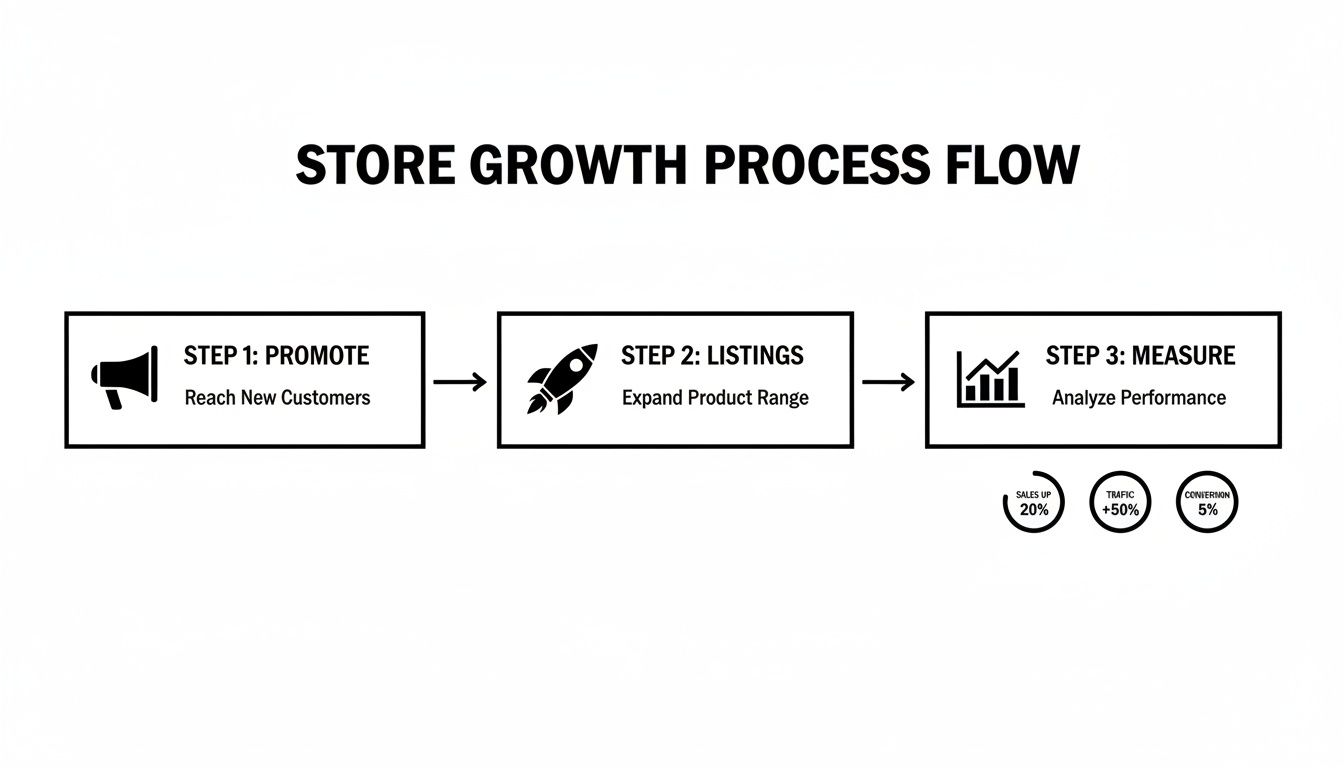
This loop is the engine of your business. Smart promotions drive traffic, great listings turn visitors into buyers, and your performance data tells you exactly what to do next.
Phase 3: Listings and Liftoff
Your store is built, branded, and ready. The final push involves getting your first products listed and kicking off your marketing.
- Create Your First Listings: Aim for at least 10 solid, optimized listings. This means keyword-rich titles, detailed descriptions, and fantastic photos for every product.
- Lock in Policies: Clearly define your shipping and return policies. Being upfront and fair is one of the fastest ways to build buyer trust.
- Launch a Promotion: Start a Promoted Listings campaign, even with a small budget. The goal is to drive that crucial initial traffic and start collecting data.
The Ultimate eBay Store Launch Checklist
To make sure you don't miss a single step, here’s a handy checklist. Use this to track your progress and ensure you've covered all the bases before, during, and after your launch.
| Phase | Task | Status |
|---|---|---|
| Pre-Launch | Register and Verify eBay Seller Account | ☐ Complete |
| Research Niche & Competitors | ☐ Complete | |
| Choose and Subscribe to a Store Plan | ☐ Complete | |
| Store Setup | Design & Upload Logo and Banner | ☐ Complete |
| Create Custom Store Categories | ☐ Complete | |
| Customize Storefront & Claim URL | ☐ Complete | |
| Write About Us / Policy Pages | ☐ Complete | |
| Go-Live | Create First 10+ Optimized Listings | ☐ Complete |
| Define Shipping & Return Policies | ☐ Complete | |
| Configure Business Policies in eBay | ☐ Complete | |
| Launch First Promoted Listings Campaign | ☐ Complete | |
| Post-Launch | Monitor Performance Analytics Weekly | ☐ Ongoing |
| Respond to Customer Messages Promptly | ☐ Ongoing | |
| Manage Inventory and Fulfill Orders | ☐ Ongoing |
Treat this checklist as your roadmap. Ticking off each item methodically will give you the confidence that you've built a solid foundation for a thriving eBay business.
Questions New Sellers Always Ask
Getting your eBay store off the ground can feel like a whirlwind, and it's natural to have a bunch of questions. I've been there. Let's tackle some of the most common ones I hear from sellers who are just starting out.
How Much Does It Really Cost to Start an eBay Store?
The number you'll see first is your monthly subscription fee, which can be as low as $4.95 for the Starter plan. But that's just the starting line. The real costs are the variable selling fees that pop up once you start making sales.
You’ve got insertion fees (if you go over your plan's free listings) and the big one: the final value fee. This is a percentage of the total sale amount, including what the buyer pays for shipping. You have to factor these into your pricing, or you'll find your profits disappearing fast.
Before you even list an item, get familiar with eBay's fee calculator. If you don't know your numbers, you're not running a business—you're just guessing.
Do I Need a Formal Business (Like an LLC) to Open a Store?
Nope, you can dive right in as an individual seller. When you sign up, you'll just use your personal information, and eBay will use your Social Security Number for tax purposes. No need to rush out and form an LLC right away.
That said, once you start seeing consistent sales, it's a good idea to chat with a tax professional. They can help you figure out if and when creating a formal business structure makes sense for tax benefits and liability protection.
What Are the Biggest Mistakes New eBay Store Owners Make?
I see the same rookie mistakes trip people up time and time again. They almost always boil down to getting the basics wrong. If you can sidestep these, you'll be miles ahead of the competition.
- Terrible Product Photos: This is the number one sales killer. Blurry, dark, or single-angle photos scream "amateur" and scare buyers away. Your pictures are your entire sales pitch.
- Lazy Item Descriptions: If a buyer has to message you to ask a basic question about size, condition, or features, you’ve already failed. Be painfully specific and answer questions before they're even asked.
- Ignoring Customers and Shipping Slowly: In the world of e-commerce, speed is everything. Quick replies and getting packages out the door fast are how you build a stellar reputation and earn that all-important positive feedback.
Ready to create stunning, high-converting product listings without the headache? AliSave Pro is the tool I use to grab all the high-quality images and videos from a supplier's page in just one click. It saves me hours. You can get the professional media you need to make your listings pop. Download the free Chrome extension from AliSave Pro and see for yourself.