
When you boil it down, ebay listing optimization is all about getting your products seen and sold. It's the craft of tweaking every single part of your listing—the title, photos, item details, price—to catch the eye of both shoppers and eBay's search algorithm, Cassini. Getting this right is what separates a store with stagnant inventory from one with consistent, daily sales.
Building a High-Performing eBay Listing
A top-tier eBay listing isn't just a jumble of keywords and a price tag. It's a finely tuned sales pitch built to align with how Cassini works. The algorithm's one and only job is to match eager buyers with the exact product they're looking for, leading to a quick sale. Understanding how you fit into that process is everything.
Success on eBay really comes down to a three-step journey: get found, get the click, then get the sale.
- Visibility: First things first, you have to show up in search results. This is all about your title, the category you choose, and how thoroughly you fill out the item specifics.
- Click-Through Rate (CTR): Once you appear on the page, something has to make a buyer choose your listing over all the others. Your main photo is a huge piece of this, along with your price and shipping cost.
- Conversion: After they click, you have to close the deal. This is where your full gallery of photos, your detailed description, and your seller feedback come into play.
This simple diagram shows how a shopper moves from just seeing your product to actually buying it. It’s a funnel, and you have to guide them through every step.
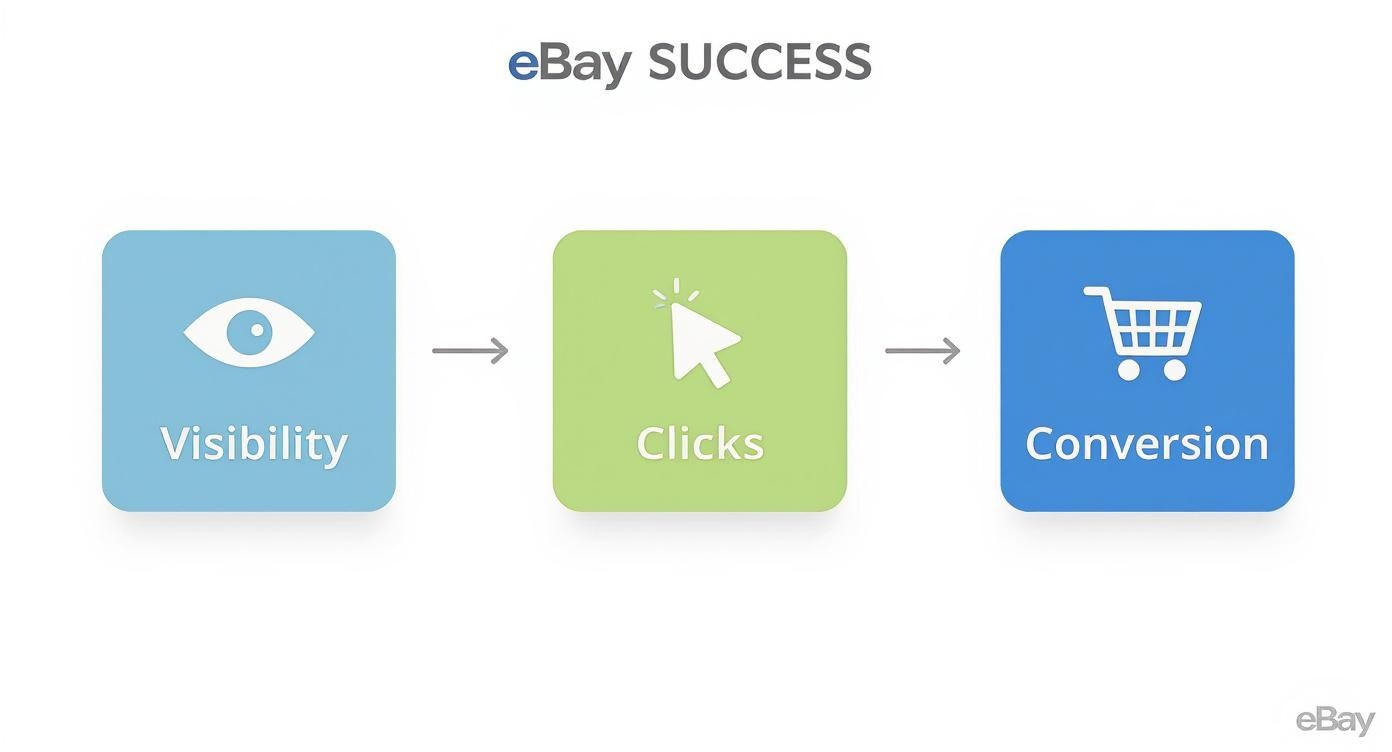
As you can see, each stage depends on the one before it. If you fail at any point, the chain breaks, and you lose the sale.
Think of it like this: every part of your listing is a gear in a machine. A great title won't do you any good if your main photo is blurry and unappealing—no one will ever click to see the amazing listing you've built. Likewise, fantastic photos won't matter if your title is so vague that no one can find you. For a solid overview, understanding the basics of creating listings on Amazon, eBay, and Etsy is a great starting point.
Your goal is to build a listing so complete and compelling that it answers every potential buyer question before they even have to ask. This approach builds trust and significantly shortens the path from browsing to buying.
Ultimately, a well-optimized listing signals to both eBay and your customers that you're a serious, professional seller. To help you structure your efforts, here’s a breakdown of the most critical components and how they influence your success.
Core Pillars of eBay Listing Optimization and Their Impact
| Optimization Pillar | Primary Goal | Impact on Cassini Algorithm |
|---|---|---|
| Keyword-Rich Title | Capture buyer search queries and maximize initial visibility. | High. Directly matches your listing to search terms. |
| High-Quality Images | Drive clicks from search results and build buyer confidence. | Moderate. Low-quality images can hurt your CTR, which Cassini tracks. |
| Complete Item Specifics | Appear in filtered searches and provide crucial product details. | High. A key factor for ranking in specific, narrowed-down searches. |
| Competitive Pricing | Attract price-conscious buyers and convert clicks into sales. | Moderate. Influences conversion rate, a major signal of relevance. |
| Clear Description | Answer questions, overcome objections, and close the sale. | Low. Primarily for the buyer post-click, but can affect returns. |
Mastering these pillars is the foundation of a successful eBay business. When you provide comprehensive details, crisp photos, and a fair price, you're building a foundation of trust.
This isn’t just about theory. Each sale you make reinforces your listing's authority in Cassini's eyes, leading to a powerful cycle of increased visibility and more sales. For a deeper dive, check out our guide on how to improve ecommerce conversion rates to turn more of those hard-earned clicks into cash.
Nailing Your Titles and Item Specifics for Maximum Impact
Think of your listing title as the front door to your sale. You've got just 80 characters to convince a buyer to click and convince eBay's search algorithm, Cassini, that you're relevant. This is your single most important piece of text—get it right, and you're in the game. Get it wrong, and you're invisible.
Too many sellers fall into the trap of writing lazy titles like "Nike Shoes" or "Vintage Dress." That's a huge mistake. Real buyers don't search that way. They have a specific need in mind—a particular model, a certain size, a desired color. Your title needs to meet them where they are.
Anatomy of a Title That Sells
The best titles are a careful blend of human-friendly language and algorithm-pleasing keywords. There’s a proven formula that works time and time again because it presents information in the order a buyer's brain processes it.
Here’s a structure I've seen succeed consistently:
Brand + Model/Style + Key Features + Size/Color/Condition
Let's put it into practice. That weak "Nike Shoes" title? We can do much better.
A top-tier title looks like this:
"Nike Air Max 90 Men's Running Shoes Sneakers White Size 10 New"
This one works. Why? It immediately answers a buyer's core questions right from the search results. They see the brand (Nike), the exact model (Air Max 90), what it is (Men's Running Shoes Sneakers), the key details (White, Size 10), and its condition (New). Every single one of those words is a potential search term.
Your goal isn't just getting found; it's getting found by the right person. A super-specific title acts as a filter, attracting serious buyers and dramatically improving your click-through rate.
Don't Get Filtered Out: The Power of Item Specifics
If the title gets you the click, item specifics close the deal—or at least keep you in the running. This is where the real work of eBay listing optimization happens, and frankly, it's where most sellers drop the ball. Item specifics are those structured fields: Brand, MPN (Manufacturer Part Number), Style Code, Color, Material, and so on.
Ever notice the filters on the left side of the search results? When a buyer ticks the box for "Size 10" or "Stainless Steel," eBay looks exclusively at the item specifics you filled out. If those fields are blank, your listing simply vanishes for that highly motivated shopper.
Filling these out isn't just a "nice-to-have." It’s essential. It’s how you compete on the modern eBay marketplace. Plus, this data is what Google Shopping and other external search engines pull from, so you're boosting your visibility far beyond just eBay's walls.
Focus on the Specifics That Matter Most
eBay will throw a ton of recommended specifics at you. While filling out every relevant one is the goal, some have way more pull than others.
- Product Identifiers (UPCs, EANs, ISBNs): These are absolute gold. They let eBay sync your item with its official product catalog, sometimes auto-populating details and stock photos for you.
- Brand and MPN: For anything branded, these are non-negotiable. Die-hard fans and savvy shoppers often search by Manufacturer Part Number to find the exact item they want.
- Physical Details: This is your bread and butter—Size, Color, Material, Dimensions. These are hands-down the most-used filters by buyers.
A Few Practical Pointers
Getting this right becomes second nature with practice. It's a workflow, not a one-off task.
- Put on Your Buyer Hat: Before you write a single word, jot down 5-7 phrases you’d search for if you were looking for your item. Weave the best ones into your title.
- No Keyword Stuffing: Don't write "Nike Shoes Nike Sneakers." It looks awful to buyers, and Cassini is smart enough to know they're related. You're just wasting precious character space.
- Fill Out Everything: Seriously, take the extra five minutes. It’s the highest-return activity you can do when creating a listing.
- Use eBay’s Help (But Don't Blindly Trust It): eBay often suggests a title or specifics from similar sold listings. It’s a great starting point, but always tweak it to perfectly match your item.
For those of us dropshipping a high volume of products, this can get tedious. That's where a solid workflow comes in. Using a tool like AliSave Pro can handle the heavy lifting of grabbing all your product media, which frees you up to spend that time where it counts: writing a killer title and maxing out your item specifics. It's that combination of great visuals and sharp, optimized text that really moves the needle. To get a better handle on the big picture, our guide to understanding SEO for ecommerce covers core principles that are just as powerful on eBay.
Bringing Your Product to Life with Photos and Descriptions
So, you got the click. Your title and item specifics did their job. Now what? Now, the real selling starts. This is where your photos and description take over, turning a casual looker into an actual buyer.
Think of your photos as your digital handshake and your storefront window all in one. It's no surprise that over 90% of online shoppers point to photo quality as the single most important factor in their decision to buy. If your photos are blurry, dark, or just plain lazy, you're basically telling buyers to go check out your competitor's listing. It’s that simple.
Good Photos Don't Require a Fancy Studio
You don't need to be a professional photographer to create images that sell. Honestly, your smartphone, some decent light (natural light from a window is your best friend), and a consistent process are all it takes. The goal here is to answer every single one of your buyer's visual questions before they even have to ask.
Here's a quick checklist I run through for every single item I list:
- The Hero Shot: This is your main image, and it has to be perfect. Throw the item on a clean, neutral background—a cheap white poster board from the dollar store works wonders. Make sure it's bright, in sharp focus, and shows the entire product. No exceptions.
- Use All 12 Photo Slots: eBay gives you 12 free spots for a reason. Use them! Show the front, back, sides, top, and bottom. Buyers want to feel like they’re holding the item in their hands, and this is the closest you can get to making that happen.
- Zoom in on the Details: Get up close and personal with key features. Show the texture of the fabric, the brand logo on a zipper, the ports on an electronic device, or the artist's signature on a piece of pottery. These shots scream quality and authenticity.
- Give a Sense of Scale: We’ve all been there—ordering something that looked huge online, only for a tiny box to show up. Avoid that disappointment for your customers by placing a common object like a coin or a ruler next to the item in one of the photos. It instantly clarifies the size.
- Be Brutally Honest About Flaws: This might be the most important tip. Never, ever try to hide a scratch, scuff, or imperfection. Instead, take a clear, well-lit photo of it and point it out. This builds an incredible amount of trust and almost completely eliminates "item not as described" returns.
If you’re dropshipping, getting unique photos is a known headache. This is where a tool like AliSave Pro can be a real lifesaver. It lets you quickly grab all the supplier’s images—including variant and review photos—giving you a much better visual library to start with.
A full gallery of great photos does more than just show off your item. It tells a story that you're a professional who cares. When a buyer sees you've put in that effort, they automatically assume the product is better, too.
Writing Descriptions That Actually Get Read
Once the photos have their attention, the description is what seals the deal. The single biggest mistake I see sellers make is just dumping a massive wall of text into the description box. With over 60% of all eBay sales now touching a mobile device at some point, that dense paragraph is completely unreadable on a small screen.
Forget the long-winded essays. You need something clean, scannable, and mobile-friendly. A simple template that uses headings and bullet points is infinitely more effective.
My Go-To Description Template
Using a consistent structure for every listing not only saves you a ton of time but also ensures you never forget to include critical information. Here’s a simple but powerful one you can steal.
- The Hook: Start with a single, punchy sentence that summarizes the item and its main benefit. For example, "This durable North Face backpack is perfect for your next weekend adventure, with plenty of room for all your gear."
- Key Features (Bulleted): This is where their eyes will go first, so make it count. Use a bulleted list to call out the most important features, but frame them as benefits.
- Don't just say: "Has five pockets."
- Instead, write: "Five spacious pockets to keep your essentials organized and easy to access."
- The Condition Report: Give this its own little section. Be direct and honest. "Excellent pre-owned condition with no rips or tears. Please see photo #8 for a minor scuff on the front logo." Linking your text to a specific photo is a pro move.
- The Fine Print: End with a couple of quick lines about your shipping, returns, and how you handle customer questions. It's a simple way to reassure buyers that you're a real person who runs a reliable business.
This whole approach is about guiding the buyer, not overwhelming them. You're telling a concise story, setting clear expectations, and answering their questions before they even ask. That’s how you build the trust that turns a click into a sale.
Mastering Strategic Pricing, Shipping, and Promotions
You can have the most beautiful, keyword-stuffed listing on all of eBay, but if your pricing and shipping are off, it's just going to sit there.Getting the listing itself right is only half the job. Now, we need to talk about the commercial side of things—the strategy that actually turns those views into sales and puts money in your pocket.
At the heart of any good strategy is solid data, not just a gut feeling. Guessing what a buyer will pay is a fast track to either leaving profit on the table or pricing your item right out of the market. To be a serious seller, you absolutely have to know your numbers.
Finding Your Pricing Sweet Spot
Your mission here is to find that perfect balance between making a good profit and actually moving your inventory. Price it too high, and you'll be waiting around forever. Price it too low, and you're basically working for free.
To nail this, you need to look at what similar items have actually sold for. Ignore the aspirational prices other sellers are asking for; focus on the completed sales.
This is where you need to put on your analyst hat. eBay’s own ecosystem is packed with tools for this, especially Terapeak, which is a goldmine for sellers. It lets you dig into the hard data: sold prices, sales volume, sell-through rates, and what your competitors are up to. I've used Terapeak to spot high-demand products with little competition and to time my listings for seasonal peaks, which makes a huge difference in visibility.
For instance, if you're selling "Sony WH-1000XM4 Headphones," a quick search in Terapeak won't just show you current listings. It will pull up a 90-day sales history. You'll see the average sale price for new versus used, which days of the week get the most sales, and how many of the sold listings offered free shipping. That’s the kind of actionable intel that lets you price with real confidence.

Decoding Your Shipping Strategy
Shipping is so much more than just putting an item in a box. It's a huge psychological trigger for buyers. I've seen countless abandoned carts simply because the shipping cost felt too high, even if the total price was fair. Your shipping offer can absolutely make or break a sale.
The age-old debate is always about "Free Shipping." Is it really the best way to go?
- The Power of "Free": Let's be honest, "free" is one of the most persuasive words in retail. Offering free shipping gives you a nice visibility boost since buyers can filter their search results for it, and it can definitely bump up your conversion rate.
- The Catch: Of course, shipping is never really free. You have to bake that cost into your item's price. This strategy is fantastic for lightweight, high-margin products. It gets a lot trickier for heavy or bulky items where shipping costs can swing wildly depending on the buyer's zip code.
Calculated shipping is the alternative, where the buyer pays the exact postage based on their location. This approach is much safer for you (and fairer for the buyer) when you're selling heavier things. It ensures you don't lose your shirt shipping something from Miami to Seattle. A big part of this is knowing exactly how to calculate shipping costs on eBay so you don't get caught out.
Pro Tip: I often use a hybrid model. Offer free shipping on the small, lightweight stuff to get that "free" advantage. For anything over a pound or two, switch to calculated shipping. This gives you the best of both worlds—you appeal to buyers while protecting your margins. You can also explore different options by reading our guide on the https://alisavepro.com/best-shipping-for-small-business/ operations.
Using Promotions to Amplify Your Efforts
Promotions are not a band-aid for a bad listing. Think of them as a turbocharger for an already great offer. When your title, photos, and price are all dialed in, a promotion can be the final nudge a buyer needs.
The go-to tool for most sellers is Promoted Listings Standard. It’s a cost-per-sale model, which is great because you only pay the ad fee if someone clicks your promoted ad and actually buys the item within 30 days.
The trick is setting the right ad rate. eBay will suggest a rate, but you don't have to take it. I always start low, maybe just 1-2% over the minimum, and watch my impressions. If the listing isn't getting seen, I'll inch the rate up slowly. The goal isn’t to pay the most; it's to find the cheapest rate that gets you the traffic you need.
Beyond promoted listings, don't forget about running a good old-fashioned sale. This feature lets you knock a percentage or a flat dollar amount off certain items for a set time. This is powerful for two reasons:
- It Creates Urgency: That little countdown timer can be incredibly effective at pushing on-the-fence shoppers to click "Buy It Now."
- It Clears Out Old Stock: A sale is a perfect way to move stale inventory and free up cash for new products.
When you bring together data-driven pricing, a smart shipping offer, and a targeted promotional campaign, you complete the puzzle. You’re not just listing products anymore; you're running a complete sales strategy built to maximize your visibility, conversion rate, and—most importantly—your profit.
Putting Your Optimization on Autopilot with Automation and AI
Let's be honest. When your eBay store starts to grow, optimizing every single listing by hand becomes an absolute nightmare. If you're managing hundreds—or even thousands—of products, trying to do it all manually isn't just a time sink; it’s a one-way ticket to burnout and leaving money on the table.
This is exactly where modern tools come into play. Successful sellers aren’t spending their days manually tweaking titles one by one. They've found ways to automate the grunt work, which frees them up to focus on what actually grows the business: sourcing new products, analyzing sales data, and planning marketing campaigns.
How AI Can Build a Killer Listing in Seconds
Picture this: you need to create a new eBay listing. Instead of staring at a blank screen, you use a tool that generates a keyword-stuffed title, a clean, mobile-friendly description, and fills in all the crucial item specifics for you—all in under a minute. That's not science fiction; it's what AI-powered listing tools do right now.
These tools are constantly analyzing what's selling on eBay, which keywords are trending, and what buyers are actually typing into the search bar. Based on that live data, they build a listing that’s engineered to get seen from the moment you publish it.
It's about more than just speed. It brings a level of data-backed precision that’s tough to match on your own.
- No More Typos or Omissions: AI doesn’t forget to add a critical item specific like the 'MPN' or 'Style Code'. Every listing comes out complete and professional.
- A Consistent Look and Feel: You can apply the same polished, mobile-ready template to all your descriptions, giving your store a cohesive and trustworthy feel.
- Always Up-to-Date: The AI uses current market data, not what worked six months ago. Your listings are always tuned to what buyers are looking for today.
The efficiency gains are staggering. Some studies show these tools can create a fully optimized listing 95% faster than the old-school manual method, which can easily take 15-25 minutes per product. You can read more about these automation and SEO findings from Maxmerce to see the data for yourself.
Automation isn't about replacing you. It's about empowering you. It takes over the repetitive, soul-crushing tasks so you can use your brain for what really matters: making smart decisions to scale your business.
Managing Your Inventory at Scale with Bulk Editing
The real "aha!" moment with automation comes when you need to update your entire inventory. Imagine eBay suddenly makes a new item specific mandatory in a category where you have 500 active listings. Doing that manually is easily a full day's work—we're talking 8-10 hours of tedious, mind-numbing clicking.
With a good bulk editing tool, you can apply that single change across all 500 listings at once, in just a couple of minutes.
Need to update your shipping policy? Want to run a flash sale for the weekend? Adding a new sentence about your return policy to every description? Bulk actions turn these massive projects into quick, simple tasks. This is the kind of efficiency that separates the hobby sellers from the pros who are building a serious, scalable business.
Your Top eBay Listing Optimization Questions, Answered
Even with the best strategy in place, you're bound to have questions as you start fine-tuning your listings. It happens to everyone. Let's dig into some of the most common ones I hear from sellers, because getting these details right is what separates a listing that sells from one that just sits there.

How Often Should I Update My eBay Listings?
This question comes up a lot, and there's an old myth that constantly "refreshing" listings somehow tricks the algorithm. That’s just not how it works anymore. You don’t need to be relisting things every few days.
Instead, your updates should be strategic. The number one reason to edit a listing is when eBay adds new Item Specifics for its category. Jump on those immediately—they're gold for getting found in filtered searches. You should also check your pricing every so often with a tool like Terapeak, especially if you're in a market where prices change quickly.
A good rule of thumb? If a listing isn't getting impressions or sales after 30-60 days, it’s time for a full audit. Go back through everything—title, photos, keywords, price—and figure out what’s not working. Think of it as periodic maintenance, not a daily chore.
Does Using Promoted Listings Guarantee More Sales?
No, but it's a common misconception. Promoted Listings only guarantee one thing: more visibility. It doesn't guarantee sales.
Think of it like paying for a premium end-cap display at a grocery store. More shoppers will see your product, but that's just the first step. If the packaging is bad (your photos), the price is wrong, or the label is confusing (your title), people will walk right on by.
Promotions work best when they amplify an already great listing. If you promote an item with blurry pictures or a sky-high price, you're basically just paying for clicks that go nowhere.
First, optimize your listing for conversion—nail the title, specifics, photos, and price. Then, use Promoted Listings to get that killer offer in front of a bigger audience. It’s an accelerator, not a magic fix for a weak foundation.
Can I Use the Same Title and Description for Similar Items?
It’s so tempting to just copy and paste, especially when you're listing dozens of similar products. But this can really hurt your search performance. eBay's search engine, Cassini, works a lot like Google's; it prefers unique, relevant content. Duplicate listings just end up competing with each other.
Even if you’re selling the same shirt in five different colors, each one needs its own unique title and description.
- For your titles: Keep the core keywords but always switch up the order or add the specific attribute. For example, "Men's Graphic Tee Size L Blue" is distinct from "Graphic Tee for Men Red Size M."
- For your descriptions: A template is fine for structure, but the actual descriptive sentences need to be rewritten to be specific to that item's color, size, or unique feature.
This small bit of extra work does more than just avoid duplicate content penalties. It lets you target slightly different keywords for each variation, which can massively improve your visibility in those specific, long-tail searches. It’s a better experience for the buyer, and it’s a lot better for your sales.
Tired of manually saving product photos? Streamline your entire media workflow with AliSave Pro. You can download every image and video from an AliExpress page in a single click, helping you create stunning, high-converting listings in a fraction of the time. Get back to what matters—growing your business. You can try AliSave Pro for free.