
When you're starting out on eBay, one of the first questions you'll hit is whether to open a personal or business account. The real difference boils down to your goals. Are you just selling off old stuff from your garage, or are you trying to build a consistent income stream?
A personal account is perfect for the casual seller—the person clearing out clutter, selling a few unwanted gifts, or dipping their toes into the eBay waters. It’s simple, straightforward, and the default for anyone signing up.
On the other hand, a business account is designed for people who are serious about selling. This is for you if you buy items specifically to resell, create your own products, or sell in high volumes. It's a formal setup that signals to eBay and your buyers that you're running a proper operation.
A Quick Guide to Choosing Your eBay Account
Think of it this way: your account type shapes everything from the fees you pay and the number of items you can list to the professional tools you get to use. A business account requires you to register with your official business name, which immediately opens up a suite of powerful features designed for growth. It’s about building a brand and operating like a pro.
This isn't just about appearances, though. The right account structure has real-world implications for your taxes, legal responsibilities, and ultimately, your bottom line.
Quick Comparison eBay Personal vs Business Account
To help you see the differences at a glance, here’s a straightforward breakdown. This should make the decision a lot clearer.
| Feature | Personal Account | Business Account |
|---|---|---|
| Ideal User | Casual sellers, hobbyists | Serious resellers, dropshippers |
| Fees | Higher per-item fees after free listings | Lower fees with store subscriptions |
| Listing Limits | Starts low (e.g., 10 items) | Much higher, scalable limits |
| Branding | Displays personal username | Can display a professional business name |
| Tools Access | Basic listing and selling tools | Promotions Manager, Terapeak research |
| Tax Implications | Income is personal | Can deduct business expenses |
Ultimately, choosing a business account gives you the foundation and tools to scale your operations, while a personal account keeps things simple for occasional sales.
This flowchart is a great way to visualize the decision. It walks you through the key questions about your selling habits.
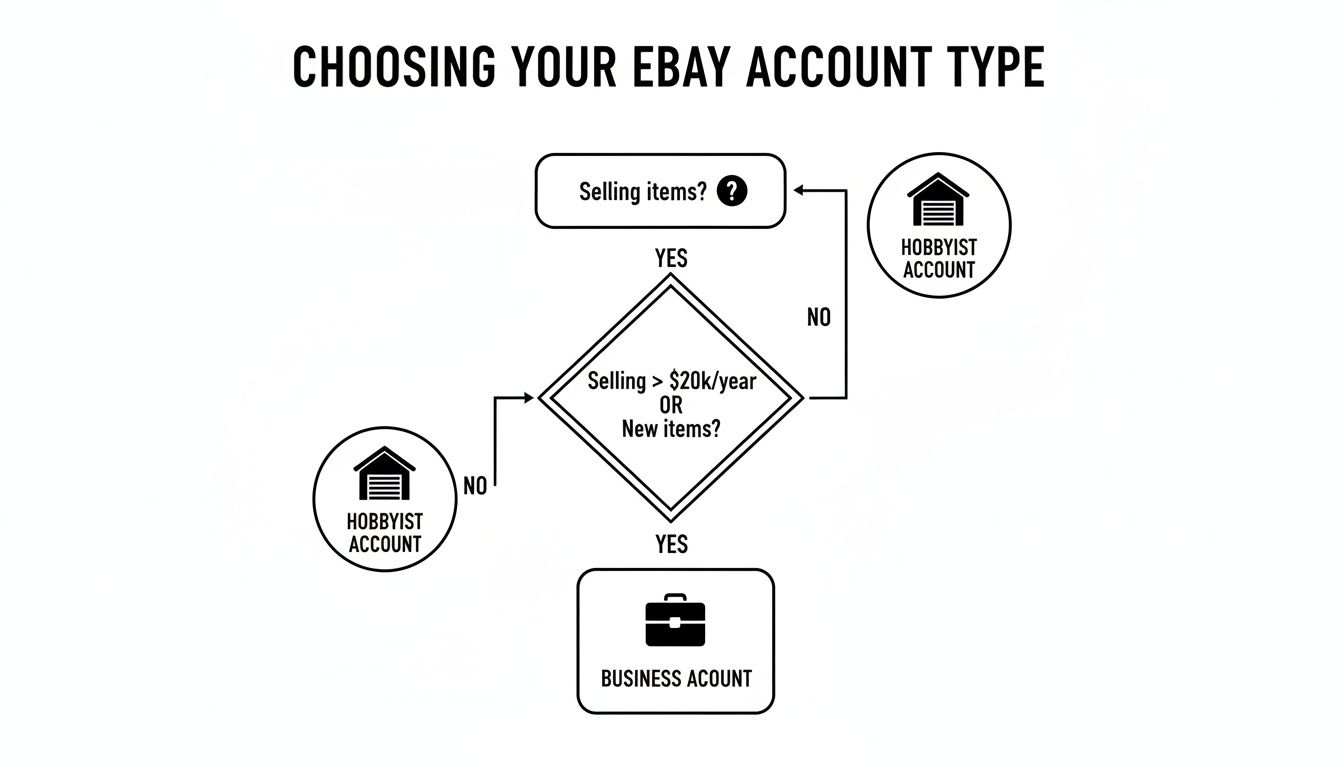
As you can see, if you're reselling for profit, making your own products, or just plain selling a lot, the path clearly points to a business account. It's built to support those exact activities and give you the room you need to grow.
Understanding the Core Differences in Account Structures
So, you're trying to decide between a personal or business eBay account. The first thing to get is why eBay even makes you choose. It’s not just a box to tick; this choice defines how you'll operate on one of the world's biggest marketplaces. One path is for casual selling, the other is for serious commerce.
Think of a personal account as your digital garage sale. It’s built for simplicity. You’re selling old gadgets, clearing out your closet, or offloading a few hobby projects. The setup is fast because eBay assumes you're an individual, not a company, so it only asks for the basics: name, address, and a way to get paid.
A business account, on the other hand, is for people running an actual business on the platform. This is for anyone who makes their own products, buys items specifically to resell, or just sells a lot of stuff. The whole structure is designed to support a commercial operation from day one.
Setup and Verification Requirements
You’ll feel the difference right away during signup. A personal account is a breeze. A business account? Not so much. It requires you to prove you're a legitimate business.
You'll need to hand over official details about your company, such as:
- Your registered business name
- A formal business address and phone number
- Your business tax ID (like an EIN in the US or a UTR in the UK)
Before diving in, it's a good idea to get your head around the different types of legal business structures. Resources like this guide on Incorporation vs. Sole Proprietorship in Canada can clarify the commitments you’re making. This legal footing is what really separates a professional seller from a hobbyist, both for eBay and the taxman.
Key Insight: That extra verification for a business account isn't just red tape. It’s the key that unlocks higher selling limits, professional tools, and legal protections that personal accounts simply don't get.
This separation is crucial for a marketplace of eBay’s size. As of Q1 2025, the platform has around 134 million active buyers. To manage that ecosystem, eBay has to set different rules. Personal accounts often start with a tight limit of just 10 items per month, while business accounts are built for scale with virtually unlimited listing potential.
By asking for formal registration, eBay builds a more trustworthy environment for buyers while giving real businesses the powerful tools they need to grow. It’s a fundamental split that will shape your entire selling journey.
Diving Into Fees, Taxes, and Financial Implications
Let's talk about the money. When you're deciding between a personal and a business eBay account, the financial side of things is usually what tips the scales. It's not just about setting up an account; your choice directly shapes your profit margins through fees, potential subscriptions, and how you handle your taxes. It's a classic case of having to spend money to make money, and getting the numbers right is everything.
A personal account is free to have, which is perfect if you're just selling a few things here and there. But once you burn through your free monthly listings, the fees start to bite. You’ll run into insertion fees (just to create the listing) and final value fees (a cut of the final sale price). For someone clearing out their closet, this model is fine—it keeps costs low for occasional sales.
But if you're trying to grow, paying per item quickly becomes a major hurdle. This is exactly where the financial setup of a business account, built around an eBay Store subscription, starts to look much more appealing.
A Tale of Two Fee Structures
A business account usually means signing up for an eBay Store subscription, which has a monthly cost. While that’s an upfront expense, it unlocks a huge number of free listings and often lowers your final value fees in certain categories. The math is pretty straightforward: you pay a predictable flat rate to slash your per-sale costs, which is a must-have for anyone selling in volume.
Business account sellers in 2025 will see that extra monthly fee, and it can add up over a year. But the trade-off is access to tax deductions that can seriously lower your taxable income, helping to balance out that subscription cost. Personal account users get to skip the monthly fee, but they pay for it in other ways—namely, with much higher per-item fees once they pass their free listing limit. You have to ask yourself if the investment in a Store subscription will save you enough in fees to make it worthwhile.
The real tipping point comes when the insertion and final value fees you're paying on your personal account start costing more than a basic eBay Store subscription. At that moment, you're officially paying more for less.
The Tax Advantage of a Business Account
Here’s where a business account really pulls ahead: taxes. By running your eBay operation as a registered business, you can deduct a whole host of operational expenses from your taxable income. This is a massive advantage that simply isn't available to personal account sellers.
What kind of deductions are we talking about?
- Cost of Goods Sold (COGS): The actual price you paid for the items you're selling.
- Shipping Supplies: All those boxes, rolls of tape, labels, and of course, postage.
- Platform Fees: Your eBay Store subscription, final value fees, and other selling costs.
- Home Office Expenses: If you have a dedicated space for your business, you can deduct a portion of your rent or mortgage and utilities.
For anyone serious enough to have a business account, learning the ropes of tax filing is non-negotiable. There are fantastic resources that explain how to file taxes as a reseller, walking you through the details of deductions and reporting. This strategic financial management is what separates a casual hobby from a profitable online business.
Advanced Selling Tools and Listing Limits
The ability to actually grow a business on eBay hinges on the tools and limits your account gives you. This is where the rubber really meets the road when comparing a business vs. personal account. A personal account is deliberately constrained, designed to keep things straightforward for someone just cleaning out their garage.
If you open a new personal account today, you’ll likely start with a pretty tight leash: a limit of just 10 items per month. For anyone serious about making money, that cap is a serious bottleneck. It means you can't test a variety of products, nor can you scale up quickly when you find something that sells well.
A business account, on the other hand, is built for scale right from the get-go. While they still start with limits to verify you're a legitimate seller, the entire system is designed to raise those limits as you establish a good track record. The platform expects you to sell in high volume, so you can eventually list hundreds or even thousands of items without bumping into the low ceilings of a personal account.
The Power of Exclusive Business Tools
It's not just about the number of listings, though. The real game-changer with a business account is the suite of exclusive tools you get. These are features personal accounts simply don't have access to, and they are absolutely critical for running a professional selling operation.
This toolkit shifts your strategy from guesswork to data-driven decisions.
- Promotions Manager: This is how you run real sales events, like "buy one, get one free" or tiered discounts. It's a must-have for moving old inventory, driving traffic during the holidays, or encouraging repeat buyers.
- Terapeak Research: Included with most store subscriptions, Terapeak is eBay’s own market research powerhouse. You can see exactly what’s selling, at what price, and spot trends before they take off. It gives you a massive competitive advantage.
- Advanced Listing Tools: Business accounts open up features for bulk editing and managing a large, complex inventory far more efficiently. For dropshippers or anyone managing hundreds of SKUs, these are lifesavers.
For anyone dropshipping, these tools are non-negotiable. Trying to manage hundreds of listings from suppliers like AliExpress with a personal account's limitations is a recipe for frustration. To effectively manage at this scale, you need to understand the ins and outs of eBay listing optimization, which is much easier to implement with professional tools.
The Bottom Line: A personal account gives you just enough to get by. A business account provides the professional-grade toolkit you need to analyze the market, promote your products, and scale your sales.
Feature & Tool Availability by Account Type
This table gives a clear, side-by-side look at what you get—and what you don't—with each account type. It highlights the operational divide between a casual seller and a professional one.
| Tool or Feature | Personal Account Access | Business Account Access |
|---|---|---|
| Initial Listing Limit | Very Low (often 10 items) | Higher, with clear paths to increase |
| Promotions Manager | Not Available | Full Access |
| Terapeak Research | Not Available | Included with Store subscriptions |
| Bulk Listing/Editing | Limited / Basic | Advanced Capabilities |
| Custom Storefront | Not Available | Yes, with Store subscriptions |
Ultimately, if you're trying to build a real, scalable business on eBay, the advanced tools and higher limits of a business account aren't just a nice-to-have. They're fundamental to your growth.
Building a Professional Brand and Earning Buyer Trust
More than just fees and features are at stake here. The choice between a business and personal eBay account directly impacts how customers perceive you. In a marketplace this crowded, buyer trust is everything. A business account instantly signals that you're a serious, legitimate operation—not just a hobbyist selling off unwanted items.
Think about it from a buyer's perspective. When they land on your listing, one of the first things they see is your seller name. A personal account shows your username, which might be something informal like "cooldad2009." A business account, on the other hand, lets you display your actual company name. That small detail has a huge psychological effect, especially when you're selling higher-priced goods or competing in a tough niche.
This professional appearance tells buyers they're dealing with an established business. It implies a higher standard of accountability, better customer service, and more reliable shipping.
The Credibility Factor in Conversions
Displaying a business name builds a layer of trust that can directly push a hesitant buyer to make a purchase. For someone on the fence, the perceived reliability of a business seller is often the final nudge they need to click "Buy It Now." This is particularly true for products where quality and authenticity matter most, like electronics, collectibles, or designer brands.
Among the 18-20 million sellers on eBay, this distinction creates a clear credibility gap. Business sellers naturally benefit from this, which almost always translates into better conversion rates. And as eBay continues to focus on customer satisfaction, the platform's algorithm increasingly favors professional sellers. To see how this plays out in different categories, take a look at our guide on the top items to sell on eBay.
Key Takeaway: A business account is more than a different label; it's a branding tool. It shows buyers you're invested, which builds the confidence needed to close sales and earn repeat customers.
Aligning with eBay’s Professional Ecosystem
eBay is constantly refining its platform to create a more professional and reliable shopping experience. It prioritizes sellers who deliver excellent service, ship quickly, and communicate clearly—all things you’d expect from a real business. When you operate with a business account, you're signaling to eBay that you're aligned with these standards right from the start.
This alignment doesn't just build trust with buyers; it also positions you better within eBay’s own ecosystem. A professional setup, backed by solid performance metrics, can lead to better visibility in search results and improve your chances of earning a Top Rated Seller badge. It’s a foundational step for anyone serious about building a long-term brand on the platform. With millions of other sellers out there, projecting professionalism isn't just an option—it's a requirement for growth.
How to Switch from a Personal to a Business Account
When you start hitting a consistent sales volume, making the jump from a personal to a business account is the logical next step. Thankfully, eBay designed this process to be pretty painless.
The best part? You get to keep all your valuable feedback, sales history, and active listings. You’re not starting over from square one; you're simply upgrading your existing foundation.
What You’ll Need to Make the Switch
The core of the process is updating your account with your official business details. Before you click anything, it’s smart to have all your information gathered and ready to go. This will make the transition quick and seamless.
Here’s a quick checklist of what eBay will ask for:
- Your Registered Business Name: The legal name under which your company operates.
- Business Address and Phone Number: Official contact details for your business entity.
- Tax ID Number: This is typically your Employer Identification Number (EIN) if you're in the U.S.
Once you have these details handy, you can start the conversion right from your account settings.
A Word of Caution: Flipping the switch to a business account is a permanent move from a tax and legal standpoint. Reverting back isn't impossible, but it requires getting in touch with eBay support and can be a hassle. Be sure this is the right move for you before you commit.
To get it done, just head to "My eBay," click on the "Account" tab, and look for "Personal Information." You'll see an option to edit your account type, where you can enter your new business details. If you're completely new to the platform, our guide on how to create a new eBay account can help you get started on the right foot.
Frequently Asked Questions
Even after weighing the pros and cons, you might still have a few lingering questions. That's perfectly normal. Let's dig into some of the most common queries I hear from sellers trying to decide between a personal and business eBay account.
When Is It Absolutely Necessary to Switch to a Business Account?
The line in the sand is pretty clear: if you buy or create products specifically to resell them for a profit, you need a business account. This isn't just an eBay rule—it's a legal and tax requirement in most jurisdictions. Think of it this way: are you cleaning out your closet, or are you running an operation?
Volume is the other big trigger. Once selling on eBay becomes a regular source of income instead of just a way to offload a few things here and there, it's time to make the switch. A business account is built for proper financial tracking and tax compliance, which become non-negotiable once you're moving a consistent number of products.
Will a Business Account Automatically Get Me More Sales?
No, not by itself. Flipping the switch to a business account won't magically flood your inbox with sales notifications. While it certainly boosts your credibility and unlocks powerful tools like the Promotions Manager, your success still boils down to the fundamentals.
Key Insight: A business account gives you the tools and the framework for growth. Your sales will always be driven by smart product research, competitive pricing, fantastic listings with great photos, and top-notch customer service. The account type is the foundation, not the whole building.
Can I Switch Back to a Personal Account?
Technically, yes, but it’s a real headache. You can't just flip a switch in your settings; you have to contact eBay customer support directly and make a case for it.
The process gets even stickier if you registered your account with a formal business tax ID, like an EIN. Because of all the legal and tax implications tied to a business entity, eBay views the upgrade as a serious, often permanent, step. My advice? Be absolutely sure before you commit.
Ready to manage your product media like a pro, no matter which account you choose? AliSave Pro lets you download all AliExpress product images and videos in a single click, perfectly preparing your assets for any listing. Streamline your workflow and create stunning listings faster at https://alisavepro.com.