
At its core, Shopify gives you everything you need to build an online store, manage your products, and handle payments, all without needing to write a single line of code. Think of it as a complete business-in-a-box, giving you a beautiful, public-facing storefront for your customers and a private, behind-the-scenes control panel for you to run the show.
Your Digital Command Center for Ecommerce
If you were opening a brick-and-mortar shop, you'd need a physical space for customers to browse, a stockroom to hold your inventory, a cash register to take payments, and a back office to manage the paperwork. Shopify rolls all of that into one slick, easy-to-use digital platform.
This two-part structure is the secret to Shopify's power. It’s neatly divided into two sides that work together seamlessly, giving you total control over every part of your business.
The Two Sides of Your Shopify Store
The first piece of the puzzle is your ecommerce storefront. This is the polished, professional website your customers actually see and shop on. It's your digital showroom—where you get to display your products, tell your brand’s story, and make it easy for people to buy from you. You can learn more about what goes into a great storefront here: https://alisavepro.com/what-is-an-ecommerce-storefront/
The second, and equally important, part is the Shopify admin panel. This is your private command center, the back office that only you and your team can get into. From here, you’re in the driver’s seat.
- Product Management: This is where you'll upload product photos, craft compelling descriptions, set your prices, and keep an eye on inventory levels.
- Order Fulfillment: As soon as a customer makes a purchase, the order pops up here, ready for you to process, pack, and ship.
- Sales and Analytics: Your admin panel is packed with data, giving you a clear picture of how your store is performing.
- Marketing & Promotions: You can create discount codes, set up email campaigns, and manage all your marketing efforts right from this dashboard.
This structure gives you both the stage (your storefront) and the backstage controls (your admin panel), making it a truly complete package for anyone looking to sell online.
By taking care of all the technical heavy lifting, Shopify lets you focus on what you do best: creating great products, building a strong brand, and connecting with your customers. It’s a platform built to help you grow.
The numbers speak for themselves. Shopify powers over 4.8 million active stores around the globe, processing a mind-boggling $292.3 billion in sales every year. This shows just how well the platform works for everyone from brand-new dropshippers to established brands across more than 175 countries.
As you get comfortable with how Shopify works, you’re not just building a website; you’re setting up your own digital command center. The next step is to pair this powerful tool with proven strategies for online business growth to really take your store to the next level.
Designing Your Online Storefront
This is where your brand really comes to life. Your storefront is so much more than a catalog of products—it’s your digital window display, your store layout, and your customer service desk all rolled into one. A store that looks good and is easy to navigate is absolutely key to turning casual browsers into paying customers.
Your first big decision here is picking a Shopify theme. Think of a theme as the blueprint for your entire website. It sets the style, layout, and overall feel of every page, from your homepage to the final checkout screen. This is a core part of how Shopify works, giving you the power to build a professional-looking store even if you’ve never touched a line of code.
Choosing Your Design Foundation
Shopify gives you a ton of theme options, so you can find something that fits your brand’s personality no matter what you're selling. They generally fall into two buckets:
- Free Themes: Shopify builds these in-house, and they're fantastic for getting started. They’re clean, fast, look great on mobile, and have all the core features you need to launch without spending a dime.
- Premium Themes: These are built by third-party design experts and usually offer more advanced features, unique layouts, and deeper customization. They’re a great investment when you want to create a very specific and memorable customer experience.
Once you’ve picked a theme, you get to have fun in the Shopify theme editor. It’s a super intuitive drag-and-drop tool that lets you move sections around, tweak colors, and swap out fonts with just a few clicks. It puts you in the driver's seat. If you want to dive deeper, you can learn more about how to customize Shopify themes to get everything looking just right.
Crafting Compelling Product Pages
With your store’s look and feel sorted, it's time to add your products. For dropshippers, this is a critical step: you're transforming a generic supplier listing into an irresistible sales pitch. A great product page doesn't just display an item; it tells a story and shows the customer exactly how it will solve their problem.
High-quality photos and videos are your best friends here. Since shoppers can't physically touch your products, your media has to do all the heavy lifting. You need sharp, well-lit images from every angle, shots that show off different colors or styles, and videos of the product in action. This is how you build trust and convince people to click "Add to Cart."
Manually saving dozens of images and videos from a supplier's AliExpress listing is a huge time-sink for dropshippers. You end up with a chaotic folder of low-res files, and the whole process is just frustrating.
This is exactly why specialized tools are a game-changer. An app like AliSave completely changes this workflow. Instead of saving files one by one, you can grab all the media from an AliExpress listing—product shots, variant images, and even customer review photos—in a single, neat ZIP file. This lets you build out a professional, media-rich product page in minutes instead of hours.
Managing Products, Payments, and Orders
Once your storefront looks just right, your focus will naturally shift to the engine room of your business: the Shopify admin panel. Think of this as your mission control, the central hub where you’ll spend your days managing the nuts and bolts—from adding products to making sure they get into your customers' hands.
Your products are the heart of your store, and Shopify’s system for managing them is thankfully both powerful and intuitive. It’s designed to let you showcase your items exactly how you envision them.
You can easily add product titles, write compelling descriptions, and upload high-quality photos and videos. One of the most critical features you'll use is product variants. This is just a fancy way of saying different versions of the same item. For example, if you sell a t-shirt, you can set up variants for different sizes (Small, Medium, Large) and colors (Red, Blue, Green), with each unique combination having its own price, SKU, and inventory count.
Setting Up Payments and Checkout
Getting paid is, well, pretty important. Shopify makes this part remarkably simple. The platform's built-in solution, Shopify Payments, is turned on by default and is the fastest way to start accepting credit cards without any complicated setup.
Shopify’s business model is built around its scalable subscriptions and these payment processing fees, which allows it to support millions of stores worldwide. When you use Shopify Payments, a small percentage of each sale is taken as a fee, but this system allows you to sell in multiple currencies and languages, making it a fantastic tool for reaching a global audience.
While Shopify Payments is a great starting point, giving customers more ways to pay can have a big impact on your sales. You can easily connect other popular payment gateways in just a few clicks:
- PayPal: A must-have for many shoppers who feel more comfortable using their PayPal account instead of typing in their credit card details.
- Stripe: Another top-tier processor known for its robust features and international capabilities.
- Buy Now, Pay Later: Services like Afterpay or Klarna let customers split their purchase into smaller, interest-free installments. This can be a game-changer for increasing your average order value.
A smooth, trustworthy checkout is non-negotiable. Offering multiple payment options isn't just a convenience; it's a signal to your customers that you’re a professional and legitimate business. It builds confidence right when they’re about to give you their money.
Shopify Pricing and Payment Processing Fees
A big part of understanding how Shopify works is knowing how you get charged. It really comes down to two things: your monthly subscription fee and the transaction fees on each sale. The plan you choose determines the features you get and the rates you pay.
Here’s a quick look at how the common plans and their associated fees break down.
| Plan Level | Monthly Cost (Approx.) | Online Transaction Fee (Shopify Payments) | Best For |
|---|---|---|---|
| Basic | $39/month | 2.9% + 30¢ | New businesses, side hustles, or anyone just getting started. |
| Shopify | $105/month | 2.6% + 30¢ | Growing businesses with increasing sales volume. |
| Advanced | $399/month | 2.4% + 30¢ | Established businesses that need advanced reporting and shipping. |
As you can see, as your monthly subscription cost goes up, your transaction fees go down. It’s a good idea to periodically review your sales volume to make sure you’re on the most cost-effective plan for your business.
From Purchase to Delivery: The Order Fulfillment Journey
The moment a customer clicks that "buy" button, their order pops up in your Shopify admin, officially kicking off the fulfillment process. This dashboard is your command center for orders, neatly laying out all the essential info: who the customer is, what they bought, and whether they've paid.
What happens next really depends on your business model. If you manage your own inventory, you’ll be picking products off a shelf, packing them into a box, and shipping them out. Shopify helps here, too—you can buy and print discounted shipping labels from carriers like USPS or UPS directly from the admin panel. For a deep dive into this entire workflow, our guide on ecommerce order fulfillment covers it all.
For dropshippers, this is where the real "hands-off" magic happens. Instead of shipping anything yourself, you simply forward the order details to your supplier (like a vendor on AliExpress), and they ship the product directly to your customer. Many dropshipping apps completely automate this, instantly sending the order to the supplier the second it’s paid for.
Of course, not every customer completes their purchase. That's why learning how to see abandoned carts in Shopify is so vital for recovering potentially lost sales. This entire ecosystem—from product display to payment and final delivery—is how Shopify creates a cohesive and manageable flow for running an ecommerce business.
Expanding Your Store with Apps and Integrations
Think of a new Shopify store like a brand-new smartphone. Straight out of the box, it’s sleek and powerful, handling all the essential tasks like calling, texting, and browsing the web. The Shopify App Store is your phone’s app store—it’s where you find the tools that turn a great device into a personalized powerhouse perfectly suited to your life.
While Shopify's core platform is impressively robust, apps are how you truly make the store your own. They are third-party programs that plug right into your Shopify admin, adding new features or automating tricky tasks that would otherwise require a developer. This ability to add on and customize is a huge part of what makes Shopify work so well for so many different types of businesses.
What the Shopify App Store Can Do for You
With thousands of apps to choose from, it’s easy to feel a bit lost at first. The best approach is to think about what business problems you need to solve, because most apps fall into a few key categories. For a new store owner, grabbing just a few essential apps can make a world of difference.
Here are some of the most popular and impactful types of apps you'll find:
- Email & SMS Marketing: Tools like Klaviyo or Seguno let you set up powerful marketing campaigns, from a friendly welcome series for new subscribers to automated abandoned cart reminders that bring customers back to finish their purchase.
- Customer Reviews & Social Proof: Apps like Loox or Judge.me simplify collecting and showcasing customer reviews, photos, and testimonials. This builds trust, which is critical when a staggering 89% of consumers say they're likely to read reviews before buying something.
- Search Engine Optimization (SEO): You don’t need to be an SEO wizard to rank on Google. These apps help you optimize your product pages, find and fix broken links, and generally make your store more attractive to search engines.
- Dropshipping Automation: If you're a dropshipper, these apps are essential. They link your store directly to your suppliers, automating everything from importing products to sending orders for fulfillment.
The real magic happens when these apps start talking to each other. An email marketing app can automatically pull in products for a promotional campaign, a review app can trigger an email asking for feedback after an order is delivered, and a dropshipping app can instantly ping your supplier the second a customer clicks "buy." It all works together.
A Common Workflow for Dropshippers: Getting Your Media Right
Let's look at a real-world example. A common task for any dropshipper is finding a promising product on a site like AliExpress and then building a professional, high-converting product page for it on Shopify. This entire process lives or dies on the quality of your product media—the images and videos you use to persuade a customer. Manually saving dozens of files is a tedious, time-sucking chore.
This is exactly where specialized tools shine. A Chrome extension like AliSave Pro was built to solve this one specific problem. Instead of right-clicking and saving every single image, you can download all the product photos, variant images, and even customer review pictures from an AliExpress listing into one neat ZIP file.
This simple tool saves a ton of time and effort. In a few seconds, you have all the visual assets you need to build a compelling product page and create engaging social media ads. The high-resolution media you get from AliSave can be uploaded straight into your Shopify store and then used by your other marketing apps, creating a smooth pipeline from discovering a product to making your first sale.
It's this web of interconnected tools, all running on Shopify's powerful backend, that lets modern entrepreneurs tap into a global ecommerce market worth trillions. You can get a better sense of these trends from Shopify's own insights on global ecommerce sales.
A Practical Dropshipping Workflow with Shopify
Enough with the theory—let's walk through how this all comes together in the real world. Seeing a typical dropshipper's journey from a spark of an idea to their first sale really makes the power of Shopify click. We'll connect the dots between the tools and the platform to see how a profitable, hands-off system is built.
The whole thing follows a pretty simple, repeatable loop.
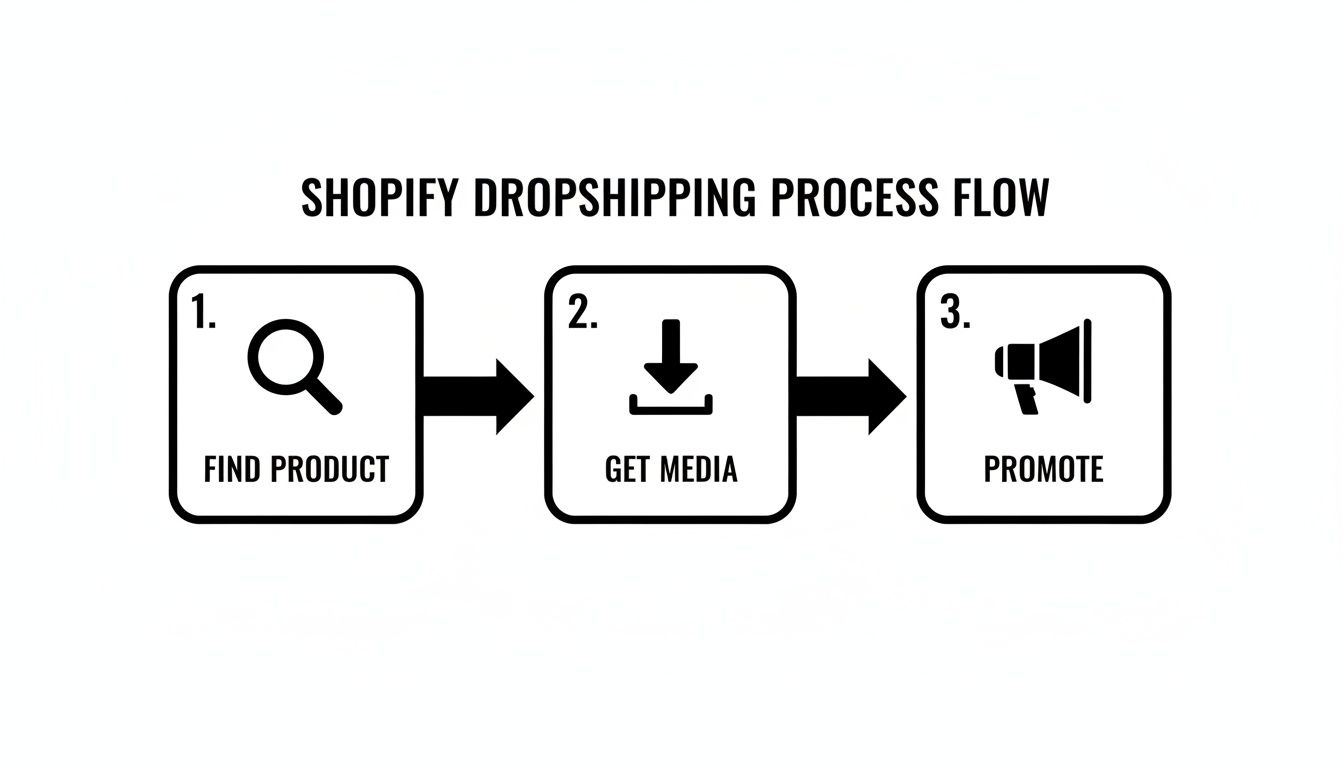
This process shows that success isn't about overcomplicating things. It’s about nailing three key stages: finding a great product, getting high-quality media for it, and then promoting it like crazy.
Step 1: Find a Winning Product
Your journey doesn't actually start in Shopify. It begins on a supplier marketplace like AliExpress. This is the product research phase, and it’s where you'll spend a lot of time sifting through endless categories, hunting for items with solid demand, good supplier ratings, and visuals that pop.
Maybe you’re looking for a clever kitchen gadget, a must-have pet accessory, or a slick home organization tool. The goal is to find something that solves a genuine problem or has that "wow" factor—the kind of thing that makes someone stop scrolling through their social media feed. Once you’ve pinpointed a potential winner, the next move is critical.
Step 2: Gather All Your Visual Assets
Let’s be honest: a product page with blurry, low-res images isn't going to sell anything. This is a point where your workflow can either become a massive bottleneck or a streamlined advantage. The old-school way means right-clicking and saving dozens of images one by one, a truly tedious and disorganized mess.
This is exactly why a specialized tool is no longer a "nice-to-have"—it's an essential part of the tech stack.
A dropshipper's most valuable asset is their time. Automating repetitive, low-value tasks like saving images frees up mental energy to focus on high-impact activities like marketing and customer service. Efficiency is the key to scaling.
Using a tool like the AliSave Pro Chrome extension, you can download every single piece of media from the AliExpress listing with just one click. This grabs everything you need:
- Main Product Images: High-resolution shots from every conceivable angle.
- Variant Photos: Crystal-clear images for each color, size, or style.
- Descriptive Videos: Short clips showing the product in action.
- Customer Review Photos: Authentic, user-generated content that builds instant trust.
All these files land in a single, perfectly organized ZIP folder on your computer. This simple step can save you hours and ensures your media is prepped and ready for the main event.
Step 3: Build and Promote Your Product Page
With a folder full of top-notch media, you head back into your Shopify admin. Now, you’ll create a new product listing. You upload the best images and videos you just grabbed, write a persuasive product description that focuses on benefits (not just features), and set a competitive price.
Once the page is live, it’s go-time. That same high-quality media gets repurposed to create eye-catching video ads for TikTok or slick carousel ads for Instagram. A potential customer sees your ad, clicks through to your polished Shopify product page, and feels confident enough to pull out their credit card.
Step 4: Fulfill the Order Hands-Free
The moment your customer hits "complete purchase," the final piece of the automation puzzle snaps into place. A dropshipping app, which you've already connected to your Shopify store, instantly receives the order information.
The app automatically sends the customer's shipping details and the product they ordered straight to the AliExpress supplier. From there, the supplier picks, packs, and ships the item directly to your customer's doorstep. You never touch a single box, yet you've seamlessly orchestrated the entire sale.
This end-to-end workflow—from research and media collection to promotion and automated fulfillment—is the engine that drives a modern dropshipping business. It’s the perfect, practical example of how Shopify works.
Common Questions About How Shopify Works
Whenever you're jumping into a new platform, a ton of questions pop up. It's only natural. As you start digging into how Shopify works, you might be wondering about the technical side, hidden costs, or if it's even the right choice for your grand idea.
Let's cut through the noise and tackle some of the most common questions I hear from new store owners. My goal here is to give you clear, straightforward answers so you can move forward with confidence.
Do I Need to Be a Designer or Coder to Use Shopify?
Absolutely not. This is probably the single biggest reason Shopify has become so popular. The entire platform was built from the ground up for entrepreneurs and business owners, not web developers. You can get a beautiful, fully functional online store running without ever writing a single line of code.
The secret sauce is Shopify’s theme editor. It’s an intuitive, visual tool that lets you customize just about every part of your store with simple clicks and drags.
- Customization is a breeze: You can swap out colors, change fonts, upload your logo, and move sections around on a page. No technical skills needed.
- Focus on your brand, not the backend: Shopify handles all the complicated server stuff, so you can pour your energy into making your store look great.
Now, can developers use code for super-advanced, one-of-a-kind customizations? Sure. But that’s completely optional. For the vast majority of store owners, the built-in tools and the huge library of professional themes give you more than enough power to build something you’re proud of.
How Does Shopify Handle Shipping and Taxes?
These two areas can feel pretty intimidating for newcomers, but Shopify has done an incredible job of simplifying them. The platform gives you a solid set of tools to create a shipping strategy that actually works for your business and automates most of the headache of tax collection.
When it comes to shipping, you're in complete control. You set the rules based on what makes sense for your products and profit margins. You can offer simple flat rates, use free shipping as a marketing tool to boost sales, or get super accurate with real-time calculated rates from carriers like USPS and UPS. It’s your call.
Think of Shopify as a smart assistant for your taxes. It automatically figures out the correct sales tax for major countries and states based on your location and your customer's. This is a lifesaver.
All you really have to do is set up your business address, and Shopify handles applying the right tax rates at checkout. Honestly, this feature alone saves so much time and stress for new entrepreneurs who are worried about navigating complex tax laws.
Is Shopify Good for Dropshipping from AliExpress?
Yes, without a doubt. Shopify is arguably the best and most popular platform on the planet for building a dropshipping business, especially if you're sourcing products from AliExpress. The whole ecosystem just clicks for this business model.
The Shopify App Store is your best friend here. It's packed with apps specifically designed to connect your store directly to AliExpress suppliers. These tools automate almost everything—importing products, syncing inventory levels, and even pushing customer orders to your supplier to be fulfilled.
To make the process even faster, a lot of dropshippers use a Chrome extension like AliSave Pro. Instead of manually saving product images one by one, you can use it to instantly download all the high-quality photos, videos, and even customer review pictures from an AliExpress listing. You can then upload that media straight to your Shopify product pages, helping you build a professional-looking, trustworthy store in a fraction of the time.
What Are the Main Costs of Running a Shopify Store?
Getting a handle on the costs is a crucial part of understanding how Shopify works. Your expenses really boil down to three main categories, which makes budgeting pretty straightforward.
- Shopify Subscription Fee: This is your fixed monthly cost for the platform itself. You'll choose a plan—like Basic, Shopify, or Advanced—and each one unlocks different features and offers better transaction rates. You can start small and upgrade as you grow.
- Payment Processing Fees: Every time a customer pays with a credit card through Shopify Payments, there's a small fee. It’s typically a percentage plus a few cents per transaction (for example, 2.9% + 30¢). These rates get a little better as you move up to the higher-tier plans.
- Apps and Themes: While you can get started with fantastic free themes and apps, you might eventually decide to invest in a premium theme for a unique design or paid apps for specialized features. This cost is completely variable and totally up to you.
If you budget for these three core areas, you'll have a realistic financial plan for launching and scaling your business on Shopify.
Ready to build your product pages faster? AliSave Pro lets you download all the high-quality images and videos from any AliExpress listing in a single click. Streamline your workflow and create stunning product pages in minutes by visiting the official AliSave Pro website.