
Think of the last time you walked into a great local shop. You probably noticed the inviting window display, how easy it was to find what you were looking for, and the smooth process at the checkout counter. Your ecommerce storefront is all of that—your digital shop window, sales floor, and cash register—combined into one cohesive online experience.
Your Digital Welcome Mat: What an Ecommerce Storefront Is

At its heart, an ecommerce storefront is the customer-facing part of your online business. It's where people browse your products, add things to their cart, and ultimately make a purchase.
But it’s so much more than just a website. It’s a complete digital environment crafted to guide a visitor from casual browsing to confident buying. The goal is to make online shopping feel just as intuitive and trustworthy as walking into a physical store.
The Modern Marketplace
Having a polished digital presence is no longer a "nice-to-have"—it's essential. The numbers speak for themselves. Projections show there will be over 28 million active ecommerce storefronts worldwide by 2025, up from 24 million back in 2022.
What's really interesting is who's behind this growth. A massive 70% of these stores are run by small businesses, proving that online selling is more accessible than ever. You can dig into more of these ecommerce growth insights on linkmybooks.com.
A great storefront doesn't just display products. It tells your brand’s story, builds genuine trust, and makes the entire buying process feel effortless and enjoyable for your customers.
To really grasp what an ecommerce storefront is, it helps to see how its digital parts mirror the familiar elements of a traditional brick-and-mortar shop. This direct comparison makes it clear what every successful online store needs to have.
Physical Store vs Ecommerce Storefront Comparison
This table breaks down the direct parallels between a physical retail store and its digital counterpart.
| Physical Store Component | Ecommerce Storefront Equivalent |
|---|---|
| Window Display | Homepage & Landing Pages |
| Store Layout & Aisles | Site Navigation & Product Categories |
| Product Shelves | Product Detail Pages |
| Price Tags & Signs | Pricing Information & Promotions |
| Shopping Cart/Basket | Digital Shopping Cart |
| Checkout Counter | Checkout Process & Payment Gateway |
| Sales Staff | Live Chat, FAQs & Customer Support |
Seeing these components side-by-side really clarifies how the core principles of good retail—great presentation, easy navigation, and a simple checkout—translate directly to the online world.
The Building Blocks of a Powerful Online Store
Think of a great online store as a well-oiled machine. Every single part, from the flashy homepage to the behind-the-scenes inventory system, has a job to do, and they all need to work together to create a smooth ride for the customer. Getting to know these individual pieces is the first step to building a store that actually sells.
Let's start with what everyone sees first: the product page. This is your digital shelf space. You absolutely need compelling descriptions, crisp, high-quality photos, and genuine customer reviews. This is where you make your pitch and earn the trust that gets someone to finally click "add to cart."
Once they do, they're whisked away to the shopping cart and checkout. This stage is critical. A clunky, confusing, or untrustworthy checkout is the number one reason people bail on a purchase. In fact, the average cart abandonment rate hovers around 70%—that’s a lot of lost sales. Every extra form field or confusing step is another reason for a potential customer to leave.
The Engine Room of Your Store
Behind the scenes, away from the customer's view, is the backend. This is the operational core of your store, the engine room where the real work happens.
This is the system that handles all the crucial jobs that keep your business humming along:
- Inventory Management: This tracks your stock in real-time so you don't accidentally sell a product you don't have.
- Order Processing: It handles everything from the moment a payment is confirmed to getting that order information over to the folks packing the box.
- Customer Data Management: This is where you securely keep customer info for things like marketing, customer service, and making their next purchase even easier.
A beautiful storefront might get people in the door, but it's a rock-solid backend that keeps them coming back. It’s what ensures the promises you make on your product pages are actually delivered.
Getting a handle on these backend operations is vital for staying profitable. If you really want to dig into the financial health of your store, understanding how to calculate cost per unit is essential for setting smart prices and making informed inventory buys.
When it all comes together, these building blocks—from the eye-catching product page to the invisible backend gears—create a complete system built for one goal: turning casual browsers into happy, repeat customers. If you're ready to start putting these pieces together, this complete how-to guide to creating a website on Shopify is a great resource for laying that foundation.
Choosing The Right Foundation For Your Store
Just like a brick-and-mortar shop needs a solid building in the right location, your online store needs the right digital foundation. This choice is one of the most important you'll make, as it dictates everything from your day-to-day operations to your ability to grow.
Thankfully, you don't need to be a coding wizard to get started. The real work is in picking the right type of platform that matches your budget, your technical comfort level, and your long-term business goals.
Understanding Your Platform Options
Think of it this way: you can rent a fully-serviced retail space, build one from scratch, or set up a booth inside a bustling megamall. Each path has its own set of rules, costs, and benefits.
There are three main models to get your head around:
SaaS (Software-as-a-Service): These are your all-in-one solutions like Shopify or BigCommerce. For a monthly fee, you get a ready-to-go storefront with hosting, security, and support included. It's the "rented" space—easy to start, but you operate within the landlord's rules.
Open-Source: This is the DIY approach, with platforms like WooCommerce for WordPress. The software itself is free, but you're on the hook for finding your own hosting, handling security, and managing all the technical bits. It's like owning the building—total freedom, but also total responsibility.
Marketplaces: Giants like Amazon or Etsy fall into this category. You aren't building your own store; you're setting up a stall in a massive, high-traffic digital mall. You get instant access to a huge customer base but have to play by their rules and pay a cut of your sales.
The "best" platform isn't a one-size-fits-all answer. It's about finding the best fit for your specific business—your products, your budget, and where you see yourself in five years.
No matter which path you take, the core elements of a successful store remain the same, as shown below.
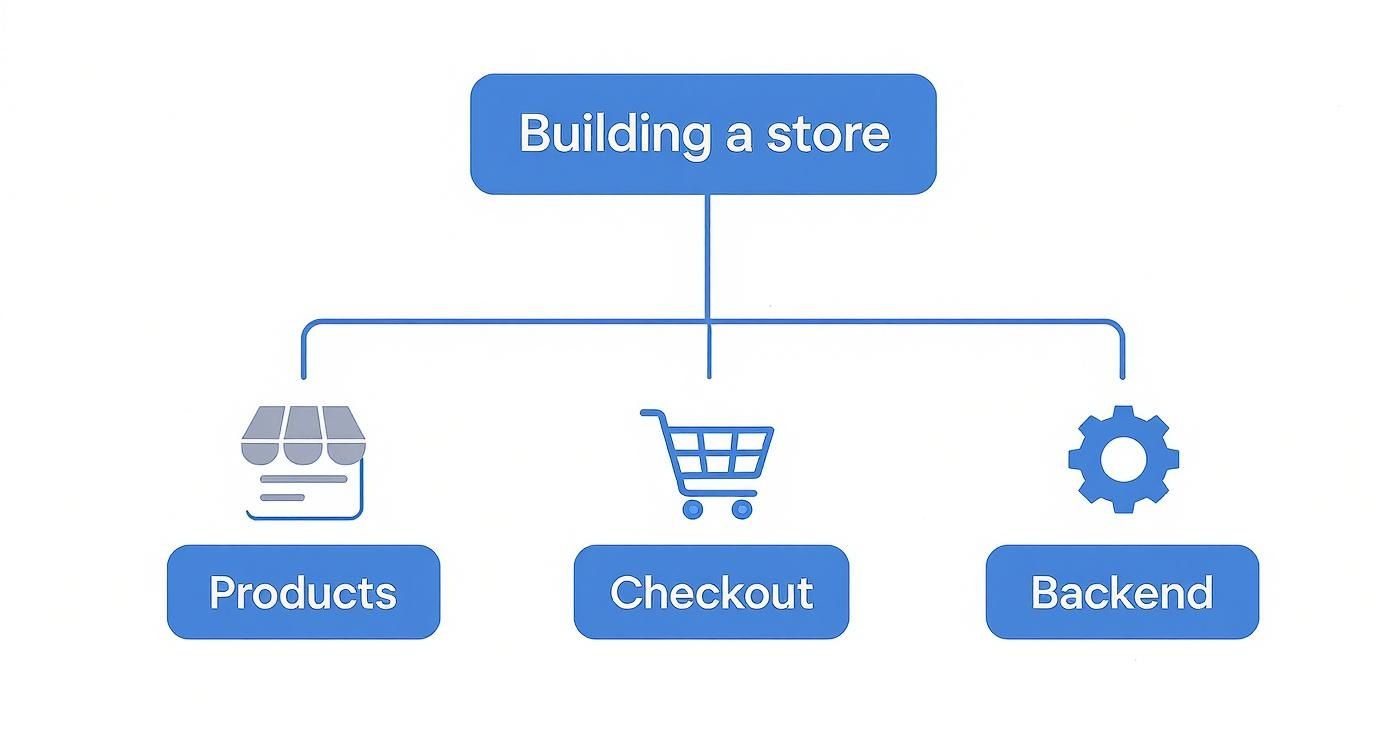
This decision tree breaks it down nicely: you have to nail how you present your products, how customers pay, and how you manage everything behind the scenes.
Comparing Ecommerce Platform Types
To help you visualize the trade-offs, here’s a breakdown of the three main platform types. This table should give you a clearer picture of which path might be the right starting point for your business.
| Platform Type | Best For | Key Advantages | Key Disadvantages |
|---|---|---|---|
| SaaS | Beginners, small-to-medium businesses, and brands wanting to scale quickly. | Easy to set up, all-in-one solution, excellent support, built-in security and hosting. | Monthly fees, less customization control, transaction fees on some plans. |
| Open-Source | Developers, businesses with unique needs, and those wanting full control. | Complete design freedom, no monthly platform fees, huge plugin ecosystem, highly scalable. | Requires technical skill, you are responsible for hosting, security, and maintenance. |
| Marketplace | Artisans, resellers, and sellers looking for a built-in audience. | Massive existing customer base, trusted brand recognition, simple to list products. | High competition, strict rules, significant fees and commissions, little branding control. |
Ultimately, weighing these pros and cons against your own resources is the key to making a smart decision.
Making An Informed Decision
Getting this right is more important than ever. The global ecommerce market is booming—by 2025, it's expected to account for 21% to 24% of all retail sales worldwide. The vast majority of this action, over 80% of all sales, is happening in just a few key regions: China, the United States, and Western Europe. You can discover more insights about global ecommerce sales on Shopify.com.
Choosing a foundation that can grow with you is non-negotiable. For a closer look at the top contenders, our guide to the best ecommerce platform breaks down the specific options available for different types of businesses.
How to Design a Storefront That Turns Visitors Into Customers

A great ecommerce storefront is much more than a digital catalog. It's a carefully crafted experience designed to guide visitors from their first click to the final checkout. Getting this right is a mix of art and science, where smart, conversion-focused design makes all the difference.
Think about it: a clean, intuitive layout does more than just look nice. It builds trust. When shoppers can easily find what they're looking for without getting frustrated, they feel more confident in your brand and are far more likely to stick around. This is absolutely critical for mobile users, who make up the bulk of online traffic today.
Crafting a High-Converting Experience
Everything starts with a strong, consistent brand identity. Your colors, fonts, and tone of voice should feel cohesive across every page, creating a professional and memorable impression. This consistency reassures shoppers they’re dealing with a real, trustworthy business.
But branding is only half the story. Your product pages are where the magic really happens—or doesn't. To tip the scales in your favor, you need to nail these key elements:
- Talk About Benefits, Not Just Features: Don't just list what your product has. Explain how it will solve a problem or make the customer’s life better.
- Show Off With High-Quality Visuals: Use professional photos and videos that show your products from every angle, ideally in a real-world setting.
- Make Your CTAs Impossible to Miss: Buttons like "Add to Cart" or "Buy Now" need to be bold, clear, and compelling. No one should have to hunt for them.
- Build Trust with Social Proof: Display genuine customer reviews, star ratings, and testimonials. A staggering 89% of consumers say a positive review makes them more likely to buy.
A storefront that converts is one that thinks ahead. It answers a customer's questions before they even ask and smooths out every bump on the road from discovery to purchase.
Putting these ideas into action is what separates a good storefront from a great one. If you're looking for inspiration, checking out examples of the best ecommerce website design can spark some fantastic ideas. And if you're building on WordPress, this ultimate guide to WooCommerce website design is an incredible resource.
By focusing on the user from start to finish, you create a digital space that doesn't just look professional—it’s built to sell.
Essential Tools That Power Your Storefront
A great ecommerce storefront is much more than what your customers see. Behind the scenes, a whole ecosystem of software keeps the engine running, automating tasks and managing the day-to-day operations that turn a simple website into a thriving business.
Think of these tools as your digital crew. You have your cashiers, your warehouse team, your marketers, and your analysts, all working together to create a smooth experience for every shopper. Without this team, you’d be drowning in manual work.
The Core Operational Toolkit
For any online store to function properly, a few types of tools are absolutely essential. These integrations handle the critical functions that customers expect and that you need to run your business efficiently.
Here’s a look at the must-haves for your ecommerce storefront:
- Payment Gateways: Services like Stripe and PayPal are your store's digital cash registers. They handle credit card transactions and other payment methods securely, protecting both you and your customers.
- Shipping and Fulfillment Software: The moment an order comes in, tools like ShipStation or Shippo take over. They automate everything from calculating shipping rates and printing labels to tracking packages, making sure your products get to their new homes on time.
- Email Marketing Platforms: Building a customer base is all about relationships. Platforms like Klaviyo or Mailchimp help you send automated emails for order confirmations, abandoned cart reminders, and marketing campaigns that keep people coming back.
- Analytics Tools: You can't improve what you don't measure. A tool like Google Analytics is non-negotiable for understanding how visitors behave on your site—where they come from, which pages they look at, and where they leave. This data is gold for making smarter decisions.
An ecommerce storefront is only as strong as the technology supporting it. Integrating the right tools automates repetitive work, letting you focus less on daily operations and more on strategy and growth.
When all these systems are connected, every part of your business, from the moment a customer pays to the moment their package arrives, runs like a well-oiled machine.
Answering Your Top Ecommerce Storefront Questions
Even after wrapping your head around the key components, a few common questions always pop up for aspiring store owners. Let's clear the air on some of these so you can move forward with confidence.
Getting these fundamentals sorted out early on is a huge advantage. It helps you dodge common mistakes and make smarter choices about your platform, budget, and the skills you'll actually need.
Website vs. Storefront: What's the Difference?
People often use "ecommerce website" and "storefront" as if they're the same thing, but there's a subtle yet important distinction. Think of your ecommerce website as the entire building. It includes the blog, the "About Us" page, your contact forms, and, of course, the storefront.
The storefront is the specific part of that building where the magic happens—it’s the digital shop floor. This is where your customers browse products, pop things into their cart, and pull out their wallets to make a purchase. So, while your storefront is part of your website, not every page on your website is part of the storefront.
How Much Does It Cost to Set Up a Storefront?
The price tag on an ecommerce storefront can swing wildly, from under $50 per month to tens of thousands of dollars. Your starting costs and ongoing expenses really depend on the path you take.
Here’s a quick look at the typical costs involved:
- SaaS Platforms: Solutions like Shopify are a go-to for a reason. You're typically looking at around $30-$40 a month plus transaction fees, making it a predictable and budget-friendly choice for newcomers.
- Open-Source Platforms: The software itself, like WooCommerce, might be free, but don't let that fool you. You'll still need to pay for hosting, themes, security, and possibly a developer's time. These costs are less predictable and can add up fast.
- Marketplaces: Kicking things off on a platform like Etsy involves listing fees and a cut of each sale. It's a fantastic way to start small, but those fees can start to bite as your sales volume grows.
Your budget and what you want to achieve with your business should guide your choice. A straightforward SaaS platform is perfect for testing the waters, while an open-source build gives you incredible flexibility down the road, but at a higher upfront cost.
Do I Need Coding Skills to Build a Storefront?
For the vast majority of people starting out, the answer is a resounding no. Modern ecommerce platforms like Shopify, BigCommerce, and Squarespace were built from the ground up for people who aren't tech-savvy.
They come packed with intuitive drag-and-drop editors and beautiful, professionally designed templates. This means you can create a fully functional and great-looking store without ever having to write a single line of code. You'd only need to flex your coding muscles if you choose a deeply customizable open-source platform like Magento or want to make very specific, complex changes to a theme.
Ready to fill your new storefront with high-quality product media? AliSave Pro lets you download AliExpress product images and videos in one click, seriously speeding up your workflow. Get started for free.