
Discount codes are one of the most powerful tools in your Shopify arsenal. Far from being a simple price cut, a smart discount strategy is your secret weapon for snagging new customers, rewarding your regulars, and convincing those on-the-fence shoppers to finally click "buy."
For any e-commerce owner, this isn't just about slashing prices. It's about using discounts as a strategic lever to grow your business and build a loyal following.
Why a Smart Discount Strategy Matters
In the world of online retail, a discount is almost never just a discount—it's a psychological nudge. A quick percentage-off deal can inject a sense of urgency into a flash sale. A compelling "Buy X, Get Y" offer, on the other hand, is a brilliant way to encourage shoppers to add more to their cart.
These aren't just random promotions; they're calculated moves that tap into basic human behavior, turning casual window shoppers into paying customers.
A well-thought-out discount strategy is a cornerstone for any brand looking to seriously increase Shopify sales. The trick isn't to be constantly on sale, which can cheapen your brand's image over time. It's about deploying the right offer, at the right moment, to hit a specific goal.
The Evolution of Shopify Discounts
The ability to create a Shopify discount code has been a game-changer for small businesses since the platform first got off the ground. Launched back in 2006, Shopify rolled out basic discount features by 2009, giving merchants the power to create simple percentage or fixed-amount codes. Suddenly, the little guys could compete with the big retailers on a more level playing field.
Fast forward to today, and the options are vastly more sophisticated. Shopify now natively supports over six different discount types, from simple "amount off products" and "free shipping" to the more complex "buy X get Y" deals. If you want a visual walkthrough, you can see these features in action in a detailed tutorial on creating Shopify discounts.
This evolution means you can now build incredibly targeted and effective campaigns designed for very specific outcomes.
Key Takeaway: A winning discount strategy isn’t just about making things cheaper. It's about understanding what makes your customers tick and using targeted offers to drive results, whether that’s a higher average order value (AOV) or keeping customers coming back for more.
How you handle discounts can directly shape your store's profitability and how customers perceive your brand. The key is to be intentional. Use your promotions to build momentum and strengthen relationships without killing your margins. This guide will show you how to do just that, step by step.
How to Create Manual Discount Codes in Shopify
Ready to jump in and create your first discount code? Let's start with manual codes. These are the classic promo codes your customers have to punch in at checkout to get a deal. They're perfect for things like your email newsletter, special social media offers, or when you're working with an influencer, because they give shoppers a tangible code to use.
First things first, you’ll need to get to the right place in your Shopify admin. Just look for Discounts in the main menu on the left. This is your command center for everything promotional—from dreaming up new offers to checking the stats on your current ones.
Go ahead and click Create discount, and you'll see the main options for manual codes pop up.
Choosing Your Discount Type
Shopify gives you four main flavors of manual discounts. Picking the right one really depends on what you're trying to achieve with your promotion.
- Amount off products: This is great for targeting specific items or collections. Maybe you need to clear out last season's stock or shine a spotlight on a new product launch without putting your whole store on sale.
- Amount off order: Think bigger. This one applies a discount to the customer's entire cart, making it ideal for major sales events like Black Friday or for rewarding customers who spend over a certain amount.
- Buy X get Y (BOGO): A classic for a reason. BOGO deals are fantastic for encouraging customers to add more to their cart. An offer like "Buy one t-shirt, get a second 50% off" is a proven way to bump up your average order value (AOV).
- Free shipping: Don't underestimate this one. Unexpected shipping fees are a conversion killer—in fact, nearly 70% of shoppers abandon carts because of them. Offering free shipping can be just the push someone needs to click "buy."
Deciding which path to take can feel tricky, but it often comes down to your primary goal. Are you looking for a quick sales boost, or are you trying to build a loyal following? This chart breaks down how different goals lead to different discount strategies.
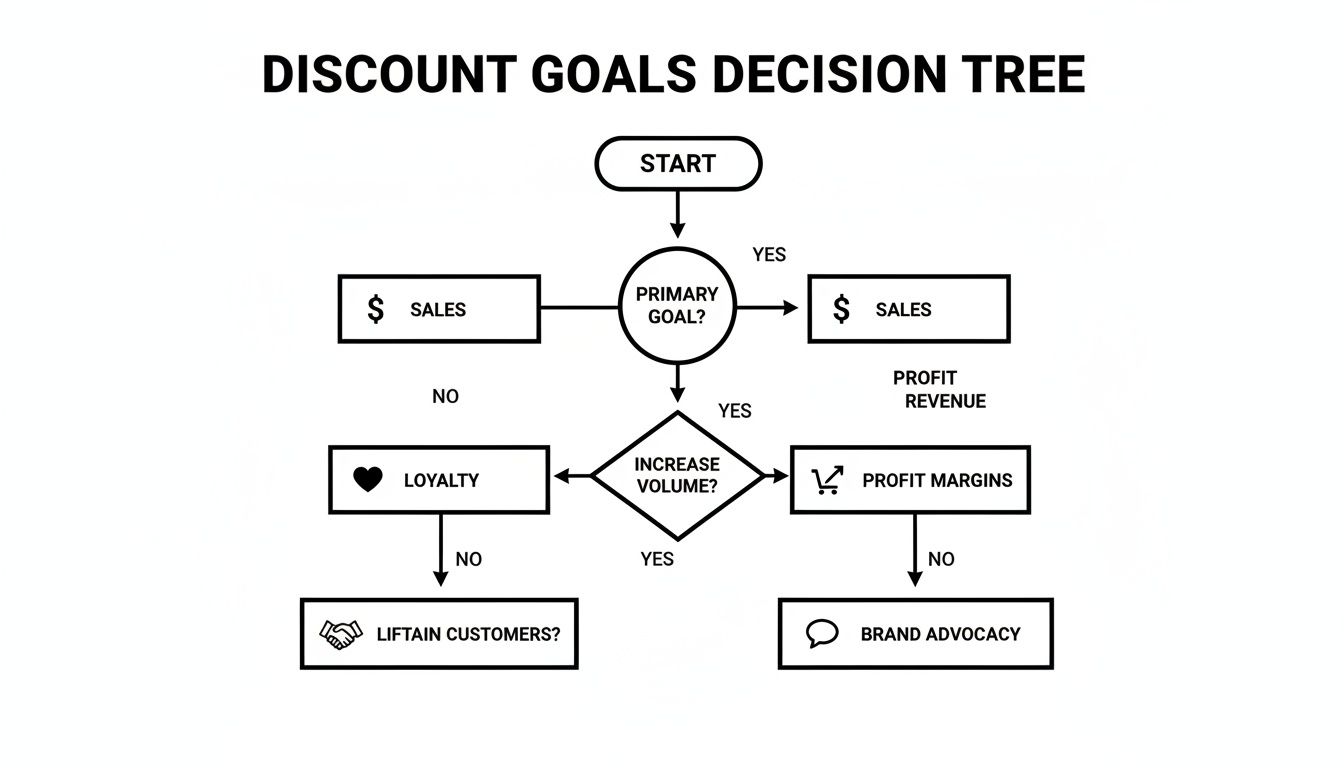
As you can see, if immediate sales are what you're after, a juicy BOGO or a storewide percentage-off deal makes a lot of sense. But if you're playing the long game and focusing on loyalty, exclusive offers or special rewards for repeat customers might be a better fit.
To make this even easier, here’s a quick-reference table to help you match your marketing goals with the right discount type.
Choosing the Right Manual Discount Type
| Discount Type | Best For | Example Scenario |
|---|---|---|
| Percentage Off | Driving urgency and converting new customers. | Running a weekend 20% OFF flash sale to your email list. |
| Fixed Amount Off | High-value orders or rewarding big spenders. | Offering $25 OFF all orders over $150 to increase AOV. |
| Buy X, Get Y | Moving specific inventory or introducing new products. | Buy one shampoo, get a conditioner free to encourage product pairing. |
| Free Shipping | Reducing cart abandonment and boosting conversions. | Providing Free Shipping on all orders to remove a common purchase barrier. |
Each type has its sweet spot, so think about what you want your customers to do and choose the discount that nudges them in that direction.
Configuring Your Discount Settings
Once you’ve picked a discount type, it's time to set the rules. This is where you get to control the nitty-gritty details of how, when, and for whom your offer works.
You’ll start by creating the actual discount code—this is what customers will type into the box at checkout. My advice? Make it easy to remember and type. Something like WELCOME15 for new subscribers or FLASH30 for a limited-time sale works much better than a random jumble of letters and numbers.
Next, you'll set the core value of the offer. If it's a percentage discount, you'll plug in the number. If it's a BOGO, you'll define what the customer needs to buy to get their free or discounted item.
Pro Tip: When you're stuck between offering a percentage vs. a fixed amount, remember the "rule of 100." For products under $100, a percentage discount usually sounds more impressive (e.g., 25% off a $40 shirt feels bigger than $10 off). For items over $100, a fixed dollar amount often has more psychological punch (e.g., $50 off a $200 coat).
After setting the value, you can dial in the restrictions to protect your profit margins and target the right shoppers. You can set minimum purchase amounts, limit the discount to certain customer groups, cap the number of times a code can be used, and set start and end dates. Getting these settings right is the key to running a promotion that's both profitable and easy to manage.
Using Automatic Discounts to Boost Conversions
While manual codes have their place for specific campaigns, automatic discounts are my go-to for a smoother, more powerful way to drive sales. Think about it: instead of making a customer remember and type in a code, these offers just appear in the cart or at checkout when they meet the right conditions. It's seamless.
That frictionless experience is a huge win. You're removing a major hurdle that often leads to abandoned carts. For example, setting up an automatic "Free Shipping on orders over $75" is a brilliant way to nudge someone to add just one more thing to their cart, all without making them feel like they have to go hunt for a coupon code.
Setting Up Your First Automatic Offer
Getting an automatic discount running on Shopify is just as easy as creating a manual one. Head over to your Shopify admin, find the Discounts section, and click Create discount. This time, you'll want to pick Automatic discount.
First, you'll give it a title. Don't overthink this—it's just for your own reference, as customers will never see this name. The real work happens in the setup, where you decide what actually triggers the discount.
Some of the most effective automatic discount types I've seen are:
- Spend X, Get Y: "Spend $100, get 15% off your entire order."
- Buy X, Get Y: "Buy any two skincare products, get a face mask for free."
- Free Shipping: "Free shipping on all domestic orders over $50."
Each of these gently guides customer behavior, either by bumping up the average order value or by knocking down common hesitations. It’s one of the best strategies to reduce cart abandonment and can give your conversion rates a serious lift.
Key Insight: Automatic discounts are fantastic for preventing that last-minute checkout hesitation. When a shopper sees a discount apply all on its own, it reinforces their decision to buy and makes them less likely to wander off searching for a better deal. This is a crucial piece of the puzzle if you're trying to figure out how to reduce shopping cart abandonment.
Target Specific Customer Segments
One of the biggest recent upgrades to Shopify has been the expansion of what you can do with automatic discounts. Recent Shopify Editions have rolled out over 150 updates, and one of the best is the ability to offer automatic discounts to specific customer segments—something that used to be a Shopify Plus exclusive. Now, you can build super-targeted offers for groups like first-time buyers, loyal repeat customers, or even shoppers in certain countries.
This is a game-changer. Imagine setting up an automatic 10% OFF that only applies to the carts of people who have never bought from you before. It’s a perfect welcome gift that encourages that first purchase without eating into the profit from your loyal customers.
And because these discounts are codeless, it practically eliminates the problem of them being shared all over coupon websites. This protects your margins and makes sure your best deals are actually reaching the people you want them to, making your promotions far more effective.
Advanced Discount Strategies That Actually Work
Anyone can create a simple "10% OFF" code. The real magic, and where the top-tier merchants shine, is in building a smart, profitable promotion that does more than just give away margin. When you move past basic storewide sales, you protect your brand's value and your bottom line. It’s all about creating targeted offers that feel exclusive and push customers to take a specific action.
For instance, think about your next influencer campaign. Instead of a generic code like INFLUENCER15 that will inevitably land on a coupon site, generate unique, one-time-use codes for that influencer's followers. This simple shift nearly eliminates code abuse and gives you crystal-clear tracking on that campaign's actual return on investment.
Mastering Tiered and Scheduled Promotions
Looking for a surefire way to lift your average order value (AOV)? Tiered discounts are your answer. This strategy works by dangling a better deal in front of customers to get them to spend just a little bit more. It’s a powerful psychological nudge that makes a bigger purchase feel like a smarter buy.
A typical tiered structure looks something like this:
- Spend $50, get 10% off
- Spend $100, get 15% off
- Spend $150, get 20% off plus free shipping
This approach pairs beautifully with a well-thought-out https://alisavepro.com/bundle-pricing-strategy/. You can subtly guide shoppers toward product combinations that just happen to hit those higher spending thresholds.
Another pro move is scheduling your promotions around major sales events. For Black Friday, don't just flip a switch on the day of. Build some hype! Offer early-bird access to your email list or "leak" a special code to your VIP customers a few days beforehand. You'll create buzz and lock in sales before your competitors' campaigns even go live.
Pro Tip: Be extremely careful about overlapping discounts. Shopify sometimes allows automatic discounts to stack with manual codes, which can lead to a much deeper price cut than you intended. Always run a few test orders to make sure your offers combine exactly as you planned and aren't eating away at your profits.
Leveraging Apps for Sophisticated Campaigns
While Shopify's native discount tools are solid, the Shopify App Store is where you can find some truly next-level features. Gamified pop-ups, for example, can transform a boring newsletter signup into a fun, interactive experience. Imagine a "spin-to-win" wheel where customers can land anything from free shipping to 25% off, all for just entering their email.
It’s far more engaging than a standard pop-up and can give your lead capture rates a serious boost. The app ecosystem is massive, with over 702 options now available for advanced promotions and analytics.
Apps like Seguno's Bulk Discount Code Bot are perfect for generating thousands of unique codes at once. This alone can cut down on discount abuse by up to 90% and makes it easy to run highly personalized campaigns for different customer segments. You can learn more about how Shopify apps are transforming promotions on seguno.com. These tools remove the manual grunt work, making your marketing faster and far more effective.
How to Test and Troubleshoot Your Discount Codes
Nothing sours a shopping experience faster than a promo code that doesn't work. When a customer gets to checkout, excited for their deal, and the code fails, it’s not just a lost sale—it’s a dent in your brand's credibility. That's why you absolutely have to test every single Shopify discount code before it goes live.
The best way to do this is to walk a mile in your customer's shoes. Run a full test order. Add the right products to your cart, head to checkout, and pop in the discount code yourself. This simple dry run is your best defense against those glaring issues that can torpedo a campaign.
A Quick Pre-Launch Checklist
Before you announce your promotion to the world, take a minute to run through a final check. A little diligence now can save you a world of support tickets and lost revenue later.
- Eligibility Check: Is the discount actually applying to the right products or collections? A common mistake is selecting the wrong items.
- Condition Check: Are your minimums working correctly? Test the "spend $50" or "buy 2" requirements to make sure they trigger as intended.
- Date Check: You’d be surprised how often start and end dates are set wrong. A typo can kill a sale before it begins or leave it running for weeks by accident.
- Stacking Check: If you have automatic discounts running, how does this new code interact with them? Make sure they play nice together.
This isn't about being paranoid; it's about being professional. A smooth checkout experience is crucial, and this quick check helps protect it.
Solving Common Customer Errors
Even with perfect testing, you might get an email from a confused customer. Knowing the common error messages they see will help you diagnose the problem in seconds.
Here are the most common snags and how to fix them on the fly:
1. "This discount is not valid for the items in your cart."
Nine times out of ten, this is a simple eligibility problem. The customer is trying to apply the discount to a product you’ve excluded.
- Solution: Jump into your discount settings and look at the "Applies to" section. Make sure the correct products or collections are selected and that you haven’t accidentally left something out.
2. "This discount has reached its usage limit."
This one is pretty straightforward. The code has either been used too many times in total or the customer is trying to use a "one per customer" code a second time.
- Solution: Check the "Usage limits" section for that discount. You may need to bump up the total number of uses or gently remind the customer about the single-use rule in your marketing materials.
Key Takeaway: Make testing a non-negotiable part of your workflow. Most customer service headaches related to discounts can be completely avoided with a quick check. When you find and fix problems early, you're not just preventing errors—you're building customer trust.
Once your codes are out in the wild, tracking their performance is the next step. To get a clear picture of what's working, using a dedicated Shopify sales tracker can show you exactly how each promotion impacts your bottom line.
Common Questions About Shopify Discounts
As you start rolling out your promotional strategy, a few common questions always seem to surface. Getting the hang of how Shopify's discount system works is crucial for running campaigns that actually make you money. Let's clear up some of the most frequent queries I hear from store owners.
Nailing these details helps you sidestep common mistakes, protect your profit margins, and give your customers a frustration-free checkout experience.
Can I Offer Multiple Discounts on a Single Order?
This is a big one. The short answer is yes, but there are some important ground rules. Shopify's checkout is built to accept only one manual discount code per order. So, a customer can't stack SAVE10 on top of FREESHIP.
However, you can often combine an automatic discount with one manual code.
Real-World Example: Let's say you're running an automatic promo for "Free Shipping on orders over $75." A customer's cart hits $80, and the free shipping automatically kicks in. They can then add a manual code like
WELCOME15to get 15% off their first purchase.
This stacking feature is incredibly useful, but it demands some planning. Make sure your promotion details are crystal clear so customers know exactly what to expect.
How Do I Prevent My Discount Code From Being Shared?
Nothing's worse than seeing your exclusive, single-use code pop up on a massive coupon site. The best way to combat this is to ditch generic, shareable codes like SAVE20 for your most valuable campaigns.
Your strongest defense here is to generate unique, single-use discount codes.
- For Influencers: Give each creator their own batch of unique codes to hand out.
- For Email Campaigns: Use a Shopify app to create a distinct code for every single person on your email list.
- For VIP Customers: Send one-time-use codes as a personal reward for their loyalty.
This approach makes the code useless once it's been redeemed, rendering it worthless on public coupon aggregators. It also gives you pinpoint-accurate tracking, so you know exactly which campaigns are driving sales. Always add strict expiration dates and usage limits for an extra layer of security.
What Is the Difference Between a Product and Order Discount?
Getting this right is fundamental. Think of a product discount as a surgical tool. It applies only to specific products or collections you've hand-picked. It’s perfect for pushing a new product line or clearing out old inventory—for example, offering "20% off all winter coats."
An order discount is more of a blanket approach. It applies to the entire cart's subtotal, making it the go-to for big, store-wide sales like Black Friday or for incentivizing a larger purchase by rewarding customers who hit a certain spending threshold.
Ready to take your product presentation to the next level? AliSave Pro helps you download high-quality AliExpress product images, videos, and reviews in a single click, making it effortless to create stunning listings and ads. Get the free Chrome extension and streamline your dropshipping workflow today at https://alisavepro.com.