

A promo code for AliExpress is your golden ticket to instant savings. Unlike a seller-specific coupon, these codes slash the total cost of your order at checkout, even if you’re buying from a bunch of different stores at once. That's what makes them so powerful for anyone serious about getting a good deal.
Finding Every AliExpress Discount

Welcome to smarter AliExpress shopping. Consistently finding a working promo code isn't about luck; it's about knowing exactly where to look. This guide will walk you through the entire process, turning you into a pro at cutting costs on every purchase.
AliExpress has made these promotional codes a huge part of its strategy. To give you an idea, in November 2025 alone, there were over 23 verified promo codes up for grabs. These weren't tiny discounts either—they ranged from $3 off $18 all the way up to a massive $50 off orders over $329. You can explore more about these AliExpress promotions to see just how much you can save.
Understanding the Discount Landscape
Before you start hunting, you need to know what you're looking for. Not all discounts are created equal, and understanding the difference is the key to maximizing your savings. It’s what lets you stack offers correctly and apply the right code at the right time.
Let’s quickly run through the different discount types you’ll find on the platform. Think of this table as your cheat sheet for navigating the deals.
Quick Guide to AliExpress Discount Types
| Discount Type | Where to Find | Best For |
|---|---|---|
| Seller Coupons | On individual product or store pages | Reducing the price of one or more items from a single shop. |
| Sitewide Promo Codes | On the AliExpress homepage, coupon sites, or during sales | Knocking a percentage or flat amount off your entire cart, regardless of the sellers. |
| Special Event Offers | Prominently displayed during events like 11.11 or the Anniversary Sale | Securing the biggest possible savings on high-value items or large orders. |
Knowing these distinctions is the foundation of smart shopping on AliExpress.
Once you can spot the difference between a Seller Coupon and a sitewide code, you’ll never pay full price again when a better deal is just a few clicks away.
Where to Hunt for Working Promo Codes
Finding a great AliExpress promo code isn't about luck; it's about knowing where to look. Honestly, your best bet is to start right on the source.
The AliExpress website and app both have a "Coupon Center," which is my first stop. This is where they centralize all the official sitewide codes, seller coupons, and other promotions. It’s a goldmine, and you can usually filter by category to find exactly what you need.
Digging Deeper on Seller Pages
Once you've checked the main hub, go directly to the stores you're interested in. If you find a seller you like, hit that "Follow" button. Many sellers will send exclusive coupons directly to their followers as a thank you. I've gotten some of my best deals this way, especially when I'm buying from the same shop again.
Expanding Your Search Off-Platform
While AliExpress itself is the most reliable place, don't be afraid to look elsewhere. I've found some fantastic codes on reputable coupon aggregator sites. Even better are the browser extensions that automatically hunt for and test codes for you right at checkout. They take all the guesswork out of it.
Pro Tip: For big events like the 11.11 Global Shopping Festival or the Anniversary Sale, I always set up alerts on a couple of my favorite third-party coupon sites. You'll get a notification the second a high-value, limited-time code drops, so you don't miss out.
This whole strategy is a massive part of what makes the platform so popular. The numbers don't lie—in 2023, AliExpress hit a peak of 408 million visits in a single month, and you can bet those promotions were a huge reason why. You can read more about these impressive AliExpress traffic statistics to see the full picture.
Mastering this skill is also transferable. You’ll find that many of these same tactics are part of effective strategies for finding promo code deals on other e-commerce platforms like TikTok Shop.
To keep it simple, here are the key places I always check:
The Official Coupon Center: This is your home base for verified, sitewide offers.
Individual Seller Storefronts: Perfect for grabbing store-specific deals and follower-only discounts.
Trusted Coupon Websites: A great backup for finding codes you might have missed and for setting sale alerts.
Automated Browser Extensions: These are the real time-savers, testing codes for you right in your cart.
How to Apply Your Promo Code Correctly
Alright, so you've snagged a great AliExpress promo code. That's the easy part. The real trick is making sure you apply it correctly to actually get the discount. I've seen plenty of people miss out on savings simply because they put the code in the wrong box at checkout—it's a surprisingly common slip-up.
You need to know the difference between the discount fields. AliExpress has separate spots for "Seller Coupons" and a general "Promo Code." Seller Coupons only work for items from that one specific store. A promo code, on the other hand, usually knocks down the price of your entire cart.
This is where hunting for codes in different places pays off. You might find some on the AliExpress site itself, others directly from sellers, or even on third-party coupon sites.
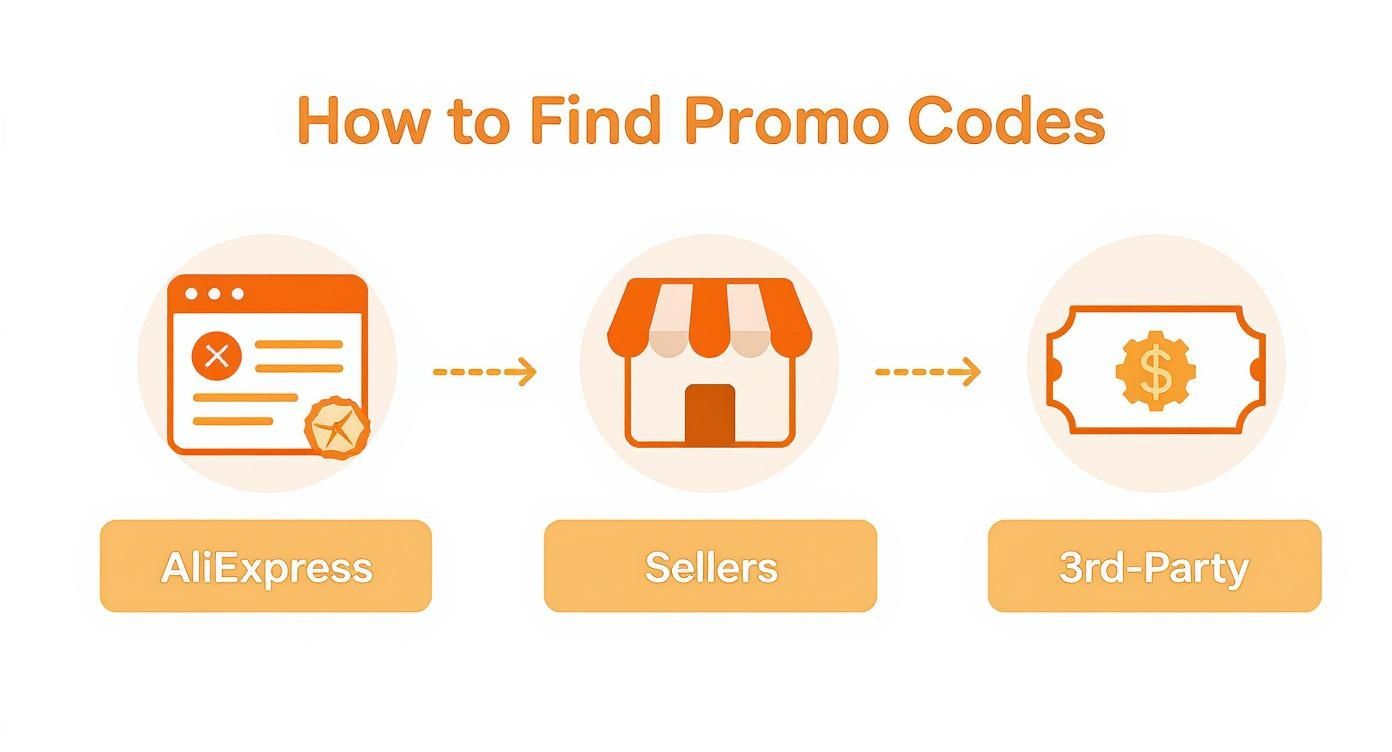
Being strategic and looking in all three channels gives you the best shot at finding the biggest discount for your order.
Navigating the Checkout Page
Once you’re ready to pay, this is where you need to focus. It’s the final step, and it’s where that all-important promo code box lives.
Here’s a pro tip: Apply your seller-specific coupons and any "Select Coupons" before you reach the final payment summary page. Save the main AliExpress promo code for last and enter it in the dedicated box on that final screen. This stacking order ensures you get every possible discount applied properly.
After you pop in your code and hit "Apply," don't just rush to confirm the payment. Take a second to scan your order summary. You should see the discount listed as a separate line item, and the grand total should be lower.
If the price doesn't change, something's wrong. The code might be expired or just not valid for the items in your cart. For a deeper dive into completing your purchase, check out our guide on AliExpress payment methods.
If you run into an error message, quickly troubleshoot these common issues:
Minimum Spend: Does the code only work if you spend a certain amount?
Expiration Date: Is it possible the code has already expired?
Regional Restrictions: Some codes are country-specific. Is this one valid where you live?
Advanced Strategies for Maximum Savings
So you've figured out how to find and use a basic promo code. That's a great start. But the real secret to getting those jaw-dropping deals on AliExpress is learning how to stack discounts and time your purchases perfectly. This is where good deals become unbelievable ones.
The most powerful technique in your arsenal is combining different types of discounts on a single order. You can absolutely use a seller-specific coupon on an item and then apply a sitewide promo code at the final checkout. This is the simplest form of stacking, but it's essentially a double discount.
Mastering the Triple Stack
It gets even better during major sales events. With a little planning, you can often layer three distinct offers for maximum savings. It’s a game-changer.
Here’s how a classic triple stack plays out:
Seller Coupon: This is your first layer of savings, a discount offered by the individual store that applies directly to their products.
Select Coupon: This is a special coupon from AliExpress itself that works across multiple, participating stores. Think of it as a bonus for shopping at specific shops.
Sitewide Promo Code: This is the grand finale. You apply this code to your entire cart total right before you pay, after all the other discounts have been tallied.
Getting this combo right means you’re saving money at every stage of the purchase. Just remember the order of operations: always apply the seller and select coupons before you enter the sitewide promo code on the payment screen.
Timing is everything. The biggest, most valuable promo codes are almost always tied to major shopping holidays. If you can, hold off on your larger purchases until one of these events rolls around. That’s how you unlock the deepest discounts of the year.
Align Your Calendar with Major Sales
The best promo codes are fleeting; they don't stick around all year. If you want to get serious about saving, it helps to understand the psychology behind high-converting promos and advanced strategies that retailers use to build excitement.
Go ahead and mark your calendar for these key events. They consistently deliver the best offers.
The 11.11 Global Shopping Festival: This is it. The single biggest sale of the year on AliExpress, no question.
Anniversary Sale: Keep an eye out for this one in late March.
Black Friday & Cyber Monday: These global shopping events are always packed with significant sitewide codes.
By planning ahead, saving your big-ticket items for these sales, and having your discount stacks ready to go, you can achieve savings that are simply out of reach the rest of the year.
That sinking feeling when a promo code fails at checkout is all too familiar. You've found the perfect deal, but the site flashes an error message. Don't abandon your cart just yet. More often than not, a quick check can fix the problem right up.
Most of the time, the issue isn't a technical glitch but a simple mismatch between the code's rules and your order. A code that seems perfectly fine might have some specific strings attached.
What's Really Going On?
Before you start clearing your browser cache, the first and fastest step is to re-read the code's fine print. That's where you'll usually find the answer.
Here are the usual suspects I've run into over the years:
Regional Locks: Is the coupon meant for a different country? A code for shoppers in the US won't do you any good if your shipping address is set to the UK.
Category Exclusions: Many codes are tied to specific product categories. For example, a 15% off coupon for "Home & Garden" will throw an error if you're trying to buy a new pair of headphones.
Expiration Dates: This one sounds obvious, but it gets a lot of people. It’s incredibly easy to find a code on a blog or forum that’s already expired. Always check the valid-through date.
Another potential snag can be a conflict between your shipping and billing details, which sometimes causes a hiccup in the payment validation process. Getting clear on the difference between a shipping address vs. billing address can save you from this specific headache at checkout.
Try This Quick Tech Fix: If you're 100% sure the code is valid for your specific order and it still won't work, it might be a browser issue. Try clearing your cache and cookies or, even easier, just open a new incognito/private window. This simple trick often clears up any stored data that’s causing a conflict and lets the code apply correctly.
Got Questions About AliExpress Codes? I've Got Answers.
Diving into the world of AliExpress discounts can feel a little confusing at first. If you've ever found yourself scratching your head at checkout, you're not alone. Let's clear up some of the most common questions so you can shop like a pro and never miss out on a good deal.
A big one I hear all the time is: can you use more than one promo code on AliExpress? The platform's rule is simple: only one sitewide promo code per order. But don't let that fool you into thinking you can't stack discounts. You absolutely can, you just have to know how the system works.
The Real Trick: Stacking Codes and Coupons
The secret to seriously deep discounts isn't about using multiple promo codes, but about combining different types of offers.
Think of it like building a discount sandwich. You can apply a store-specific Seller Coupon to an item first, and then punch in your sitewide promo code on the final checkout page. This is the master move for getting the absolute best price on a single order.
So, what’s the difference between a coupon and a code? It's a common point of confusion, but it's pretty straightforward:
Seller Coupons: These come directly from individual stores. They're only good for products sold by that specific seller.
AliExpress Promo Codes: These are the big ones. They're offered by AliExpress itself and usually work across the entire site, covering items from multiple sellers in your cart.
Here's the pro tip: Always apply your Seller Coupons before you get to the final payment screen. The promo code is the last thing you'll enter, and it will calculate its discount based on the price after the seller coupon has already been applied. It's a fantastic way to double-dip on savings.
Ever had that frustrating "invalid code" message pop up? It's usually not a glitch. More often than not, it means you've missed some of the fine print. Codes often have specific rules: maybe it has expired, requires a minimum spend, or is only valid for certain countries or product categories. A quick check of the terms and conditions will usually tell you exactly why it's not working. Getting these little details right is what separates casual shoppers from savvy deal hunters.
Ready to simplify how you find and use product media for your store? AliSave Pro is a free Chrome extension that lets you download all AliExpress product images and videos in just one click. Speed up your workflow and create stunning listings instantly. Get started for free at https://alisavepro.com.