
The thrill of finding a great deal on AliExpress is real, but let's be honest—the waiting game can be a little nerve-wracking. Fortunately, checking up on your package is simple. All you need to do is log into your account, head over to the 'My Orders' section, find the item you're curious about, and hit the 'Track Order' button. Just like that, you'll see the latest status and location of your package, all thanks to its unique tracking number.
Your Quick Guide to AliExpress Order Tracking
Once your order is placed, figuring out where it is becomes the next big question. AliExpress has a built-in tracking system that gives you a window into your package’s journey, from the seller’s warehouse right to your doorstep.
The whole system hinges on one thing: the tracking number. This is a unique code assigned to your package as soon as the seller ships it out. Don't worry, you won't have to dig for it—it’s right there in your order details and usually becomes active within a few days of shipping.
Setting Realistic Delivery Expectations
A huge part of a stress-free shopping experience is knowing what to expect from shipping times. The delivery method chosen by you or the seller makes all the difference in how long you’ll be waiting.
- AliExpress Standard Shipping: This is the go-to for most people. It strikes a good balance between cost, speed, and reliable tracking.
- AliExpress Premium Shipping: If you need your item faster, this is the way to go. It costs more, but you get quicker delivery and much more detailed tracking updates.
- Cainiao Super Economy: This is the budget option. It's cheap, but the trade-off is often limited or non-existent tracking once the package leaves China.
Knowing the difference helps you set a realistic timeline in your head. The screenshot below shows you exactly where to start—the "My Orders" page.
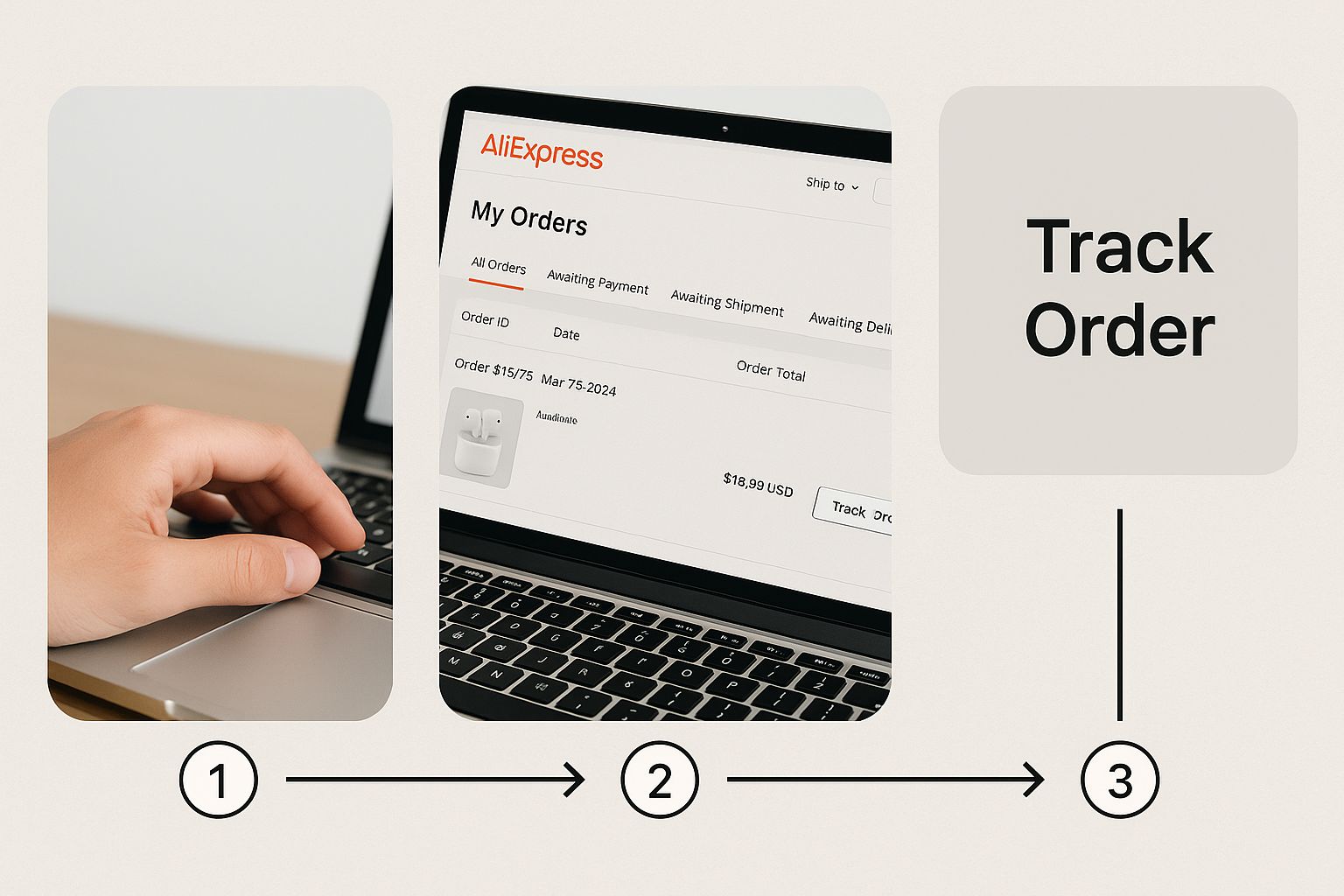
Think of this page as your personal command center for everything you've bought.
As a general rule of thumb for 2025, expect AliExpress Standard Shipping to take anywhere from 12 to 30 days. If you opt for Premium Shipping, that window can shrink to just 5 to 12 business days, though this heavily depends on where you live. For instance, a standard shipment to the USA often lands in the 8 to 20-day range.
To give you a clearer picture, here’s a quick breakdown of the most common shipping methods you'll encounter.
Common AliExpress Shipping Methods Compared
| Shipping Method | Typical Delivery Time | Tracking Reliability |
|---|---|---|
| Cainiao Super Economy | 30-60+ days | Low (often stops after leaving China) |
| AliExpress Standard Shipping | 12-30 days | Good (end-to-end tracking) |
| AliExpress Premium Shipping | 5-12 business days | Excellent (detailed and frequent updates) |
| ePacket | 15-30 days | Good (reliable for many destinations) |
This table should help you quickly gauge what to expect based on the shipping method listed in your order details. Knowing this upfront can save you a lot of guesswork.
How to Find Your Tracking Details on Desktop and Mobile
Whether you’re checking from your computer or quickly pulling up the app on your phone, getting to your tracking information on AliExpress is simple. The steps are practically the same for both, with only slight differences in where you click.

First things first, you'll need to log into your account. On a desktop, your starting point is the "My Orders" section. Just hover your mouse over your account name in the top-right corner of the screen, and you'll see it in the dropdown menu.
This page shows you a list of everything you've recently bought. Each item will have its own status and a few buttons next to it. Find the one you're curious about and click the "Track Order" button—that'll take you straight to the detailed logistics page for that specific package.
Finding Tracking Info on the AliExpress App
The mobile app makes this even easier, especially when you're out and about. Once you open the app and sign in, just tap the "Account" icon, which is usually sitting in the bottom-right corner.
You'll land on your main account screen. Look for the "My Orders" area and tap on "Shipped". This filters your list to show only the packages that are currently in transit.
Pro Tip: One of the best features of the app is the push notifications. It can alert you when your package hits a major milestone, like landing in your country. If you want these updates, just make sure you’ve enabled notifications for the AliExpress app in your phone's settings.
From the "Shipped" list, tap the order you want to check up on, and you'll see the "Track Order" button. This reveals the same tracking details you'd find on the desktop, showing every scan and update as your package makes its way to you. The whole process takes less than a minute.
What Do My AliExpress Tracking Statuses Actually Mean?
Once you've got your tracking number, the real fun begins: figuring out what all those updates from AliExpress actually mean. It can feel like you're trying to decipher a secret code, but each status is just a checkpoint on your package's long journey from the seller's warehouse to your front door.
It all starts simply enough. When you see "Awaiting shipment," that just means the seller has your order and is getting it ready. Soon after, you'll likely see something like "Shipment ready for dispatch," which tells you your item is all packed up and just waiting for the courier to swing by and grab it.
From China to Your Country
After the hand-off to the shipping company, things get a bit more complex as your package navigates the global logistics network. You'll see a flurry of updates that might not make sense at first glance, but they all signal progress.
Here are a few of the big ones you'll encounter during this stage:
- Accepted by carrier: This is the official starting pistol. The courier company has your package in its possession.
- [Fenggang Town] Departed from sorting center: Your package has left a local Chinese sorting facility. It’s on the move, usually heading towards a bigger export hub.
- Arrived at linehaul office: Don't let the jargon throw you. "Linehaul" just means the long-distance leg of the trip. Your package is now at a major hub, probably getting ready to be loaded onto a plane.
- Hand over to airline: This is one of the best updates to see! It means your order is officially on its way to your country.
These early transit stages are almost always handled by Cainiao, Alibaba’s own logistics company, or another Chinese carrier. The format of your tracking number can tell you a lot about the carrier, so if you're curious, you can learn more by understanding various AliExpress tracking numbers.
Understanding Common Tracking Statuses
To make it even clearer, here’s a quick rundown of the most common statuses you'll see and what they mean in plain English. Think of this as your personal AliExpress tracking dictionary.
| Tracking Status | What It Really Means |
|---|---|
| Awaiting shipment | The seller received your order and is packing it up. |
| Accepted by carrier | The shipping company has officially picked up your package. |
| Departed from sorting center | It has left a local warehouse and is moving to an export hub. |
| Arrived at linehaul office | Your package is at a major shipping hub, awaiting its flight. |
| Hand over to airline | Good news! It's being loaded onto a plane bound for your country. |
| Arrived at destination country | The package has landed but hasn't been processed by customs yet. |
| Held by customs | A standard step. Your package is being inspected by customs officials. |
| Import clearance success | It passed customs and is ready to be handed to your local post. |
| Out for delivery | It’s on the truck! Your package should arrive today. |
Hopefully, this table helps demystify the process. Each step, even the ones that sound confusing, is a sign that your package is getting closer.
The Final Stretch: Arrival and Delivery
The really exciting updates start once your package lands on your home turf. You’ll see "Arrived at destination country," which is quickly followed by statuses like "Held by customs" or "Import clearance success." Seeing "customs" can be a little nerve-wracking, but it's a totally normal part of the process and usually only takes a few days.
Once it's cleared, the package gets handed over to your local postal service—think USPS in the US, Royal Mail in the UK, or Canada Post. From that point on, the tracking updates will look much more familiar, leading to the final, glorious status: "Out for delivery."
Troubleshooting Common Tracking Problems
We’ve all been there. You excitedly copy your new AliExpress tracking number, paste it into the search bar, and… nothing. Before you panic, just know this is completely normal.
It usually takes the shipping company anywhere from 24 to 72 hours to scan the package into their system after the seller ships it. So, give it a few days for the tracking to go live.
You might also see the tracking status freeze for several days at a time. This is also common, especially when a package is between countries or sitting in a massive customs facility waiting to be processed. A few days of silence doesn't mean it's lost.
What to Do When Your Package Seems Stuck
Okay, so it's been a while. If your tracking hasn't updated in over a week, it’s fair to start wondering what’s going on. A package can sometimes go 7 to 10 days without a new scan, particularly if it's caught up in a customs bottleneck. If you're curious about how these delays fit into the bigger picture, you can learn more about how long AliExpress takes to deliver in general.
Once you cross that 10-day mark with no updates, it's time to be proactive. Send a polite message to the seller. They often have access to more detailed shipping insights and can check with their logistics partner for you.
My Two Cents: Patience is key when ordering from overseas, but don't just wait around forever. After a week and a half of silence, a quick message to the seller is your best move. They want you to get your package and are usually happy to help.
The Dreaded "Delivered" Status (When It's Not)
This is easily the most frustrating tracking issue. Your order says "Delivered," but your mailbox is empty. What now?
Don't open a dispute just yet. First, run through this checklist:
- Do a full search. Check behind bushes, at the side door, with your apartment manager, or ask your neighbors if they grabbed it for you. Couriers can get creative with hiding spots.
- Call your local post office. Give them the tracking number. They can sometimes access GPS data from the delivery scan to pinpoint exactly where the driver was when they marked it as delivered.
- Message the seller. Let them know what's happening. They can confirm the shipping address and may start an inquiry from their end.
If you’ve done all that and your package is still missing, it’s time to open a dispute on AliExpress. Just make sure you do it before your Buyer Protection window closes
Want More Detail? Try a Third-Party Tracker
The official AliExpress tracking is decent, but let's be honest—sometimes it leaves you wanting more. If you're looking for a play-by-play of your package's journey, a third-party tracking website is your best friend. These tools are fantastic for anyone asking how to track your order on AliExpress with a bit more precision.
Think of them as universal translators for shipping. They pull data from all the different couriers involved—Cainiao, China Post, your local service like USPS or Royal Mail—and stitch it all together into one coherent timeline. This is a game-changer once your package hits your home country, as these sites often pick up local scans much faster than the official AliExpress page.
My Go-To Universal Tracking Sites
Getting set up is a breeze. Just grab the tracking number from your "My Orders" page on AliExpress and pop it into one of these services:
- 17TRACK: This is the big one. It's incredibly popular for a reason—it supports a massive list of global carriers and even translates the tracking updates for you.
- ParcelsApp: I really like its clean, simple interface. The best part is that it often figures out which courier is handling your package automatically, just from the tracking number.
These tools give you the complete picture, from the moment it leaves the warehouse in China to the final scan at your local post office.
The real magic of these sites is seeing the hand-off. A third-party tracker will show you the exact moment USPS or your local carrier gets the package, often days before AliExpress updates its own status.
This consolidated view is a lifesaver. International shipping can get complicated, and by 2025, AliExpress's global logistics network is expected to be even more complex. A single order can bounce between multiple sorting centers and customs checkpoints. Seeing every one of those milestone scans helps you get a much more realistic idea of when your package will actually show up. If you're curious, you can learn more about these global shipping milestones on 4tracking.net.
Ultimately, using an external tracker takes the guesswork out of the equation. It turns a confusing list of updates into a clear story of your package's journey right to your doorstep.
Answering Your Top Tracking Questions
Even when you know the ropes, tracking an international package can throw a few curveballs your way. Let's walk through some of the most common issues people run into when trying to track an AliExpress order and what you should do.
My Tracking Hasn’t Updated in a Week. Is It Lost?
It’s completely normal to feel a little anxious when your tracking status goes silent for a few days, but don't panic. This happens all the time. A gap of 7-10 days between updates usually just means your package is in a "blind spot" in the shipping journey.
Think about it: your order is probably sitting in a massive shipping container on a cargo ship or waiting in a long line at a customs facility. There are no scanners in the middle of the ocean! However, if you see more than 14 days of radio silence, it’s a good idea to send a friendly message to the seller to see if they have more information.
Key Takeaway: A week without updates is standard for international shipping. Two weeks is your cue to check in with the seller, as they can often see more detailed logistics info than you can.
What Should I Do if My Buyer Protection Is About to Expire?
This is a big one, and you absolutely need to stay on top of it. If your Buyer Protection window is closing and your package is still a no-show, you have to act quickly to protect your money.
Head straight to your order details page and look for the option to request an extension for your Buyer Protection. Most sellers are happy to grant it. If the seller doesn't respond or refuses, you must open a dispute for "item not received" before that timer hits zero. This is the only official way to guarantee you can get a refund if the order never arrives.
The reliability of this system is a major factor when people are deciding if AliExpress can be trusted for their shopping.
Can I Change My Delivery Address After I’ve Placed the Order?
Unfortunately, the short answer is no. Once an order has been shipped and is with the courier, you can't change the delivery address through the AliExpress system.
Your only real shot is to wait until the tracking shows your package has landed in your country and cleared customs. Once it's handed over to your local postal service (like USPS, Royal Mail, or Canada Post), you can try contacting them directly with the tracking number. Sometimes they can hold it for pickup or reroute it, but this is never a guarantee and depends entirely on their policies.
Streamline how you gather product images for your store. With AliSave Pro, you can download all AliExpress product photos, videos, and review images in a single click, saving you hours of tedious work. Get AliSave Pro for free from the Chrome Web Store.