

If you've ever wondered how to get your TikTok followers over to your Instagram, you're in the right place. It’s actually pretty simple to link the two, and it only takes a few minutes. The most effective way is to put a clickable Instagram icon right on your TikTok profile, giving your followers a direct path to find you on the other app.
Why Bother Connecting TikTok and Instagram?
Knowing how to link your TikTok to your Instagram is less about a technical trick and more about a smart strategy. When you connect them, you stop treating them as two separate channels and start using them as one cohesive marketing machine. You get to grab all that viral attention on TikTok and then pull those people over to Instagram, where you can build a more lasting community.
This is a non-negotiable for most creators and e-commerce brands I work with. Think about it: a video blows up on TikTok, introducing your brand to thousands of new people. A link to your Instagram profile gives them an immediate place to go next to learn more about you.
Grow and Engage Your Audience on Both Fronts
This cross-platform approach is all about meeting your audience where they hang out. You can lean into TikTok for its unmatched organic reach and trend-chasing content, then use Instagram for deeper connection through Stories, DMs, and a more polished feed.
Here’s how linking them up really helps:
- Create a Follower Funnel: It’s a direct pipeline, guiding people from the fast-paced world of TikTok to a platform where you can build a stronger relationship.
- Amplify Your Best Content: A video doing numbers on TikTok? Share it to your Instagram Reels to get even more mileage out of it.
- Build a Cohesive Brand: It just looks more professional. When followers see you’re established on both platforms, it builds trust and recognition.
Pro Tip: Linking TikTok and Instagram has been a total game-changer for dropshippers and e-commerce shops. This cross-platform connection is crucial for getting the most reach. Social commerce tools have already shown us that connected accounts flat-out drive more sales.
A Must-Do for E-Commerce Sales
If you're running a dropshipping business or any online store, this link is a sales funnel, plain and simple. Picture this: your product demo video goes viral on TikTok. With a connected Instagram, you can send that huge wave of interested viewers right over to an Instagram profile they can shop from. If you need help with that, we have a detailed guide on how to create a shop on Instagram: https://alisavepro.com/how-to-create-shop-on-instagram/
For creators trying to monetize, understanding the ins and outs of affiliate marketing success on Instagram is another great reason to connect your accounts. Ultimately, you’re building a stronger, more flexible online presence that’s ready for growth and monetization.
Adding Your Instagram Link to Your TikTok Bio

The single best way to get your TikTok audience over to your Instagram is by putting a direct, clickable link right in your profile. This is the first, most crucial step in any cross-promotion strategy because it creates a permanent, always-on pathway for your followers.
You could just paste your Instagram URL into your bio text, but that link won't be clickable. A much better approach is to use TikTok's official integration, which adds the actual Instagram logo to your profile. When someone taps it, they go straight to your Instagram page. It's a clean, one-tap process that removes any friction for curious viewers wanting to see more of your content.
Getting the Link Set Up
This whole process is surprisingly quick and takes less than a minute. The steps are pretty much the same whether you're on an iPhone or an Android, so you can follow along on any device.
Ready to get started? Here's the play-by-play.
Quick Guide to Linking Your Instagram Profile
Follow these simple steps to add a clickable Instagram link to your TikTok bio.
| Step | Action | What to Look For |
|---|---|---|
| 1. Go to Your Profile | Open TikTok and tap the Profile icon in the bottom-right corner. | Your main profile page with your videos and follower count. |
| 2. Edit Your Profile | Tap the ‘Edit profile’ button right below your bio. | The screen where you can change your name, username, and add a bio. |
| 3. Find the Social Section | Scroll down to the ‘Social’ section. | You'll see options for ‘Add Instagram’ and ‘Add YouTube’. |
| 4. Add Your Instagram | Tap on ‘Add Instagram’. | An Instagram login screen will pop up asking for your credentials. |
| 5. Authorize the Link | Log in to your Instagram account and tap ‘Authorize’. | This is a secure step that gives TikTok permission to link the accounts. |
Once you've done this, the integration is complete. The system is designed to be as seamless as possible.
Confirming the Connection
After you authorize the link, Instagram will send you right back to your TikTok profile settings. You should now see your Instagram handle listed under the ‘Social’ section.
But the real test is to go back to your main profile page. Look right next to the ‘Edit profile’ button—you should now see a neat little Instagram camera icon. Give it a tap to make sure it opens your Instagram profile correctly.
And that's it! You've officially built a bridge between your two biggest platforms, making it incredibly easy for your audience to follow you on both.
Sharing Your TikToks Directly to Instagram

While the bio link is a static connection, the real magic happens when you start pushing individual videos from one platform to the other. This is where you build an active content pipeline, and luckily, TikTok makes it incredibly easy.
Once you’ve posted a new video on TikTok, don't navigate away. Just find your video and tap the “Share” icon, which looks like three dots. A menu will slide up offering to share to different apps—from here, you can choose Instagram, Instagram Reels, or Instagram Stories.
Tapping one of those options automatically saves the video to your phone and then launches you straight into the Instagram app, with your video already loaded up and ready to post. For busy creators or e-commerce shops, this is a game-changer. You can catch a trend on TikTok and immediately see if it has legs on Instagram, all in a matter of seconds.
The Great Watermark Debate
Here’s the catch: sharing directly from TikTok this way leaves the infamous TikTok watermark on your video. For years, creators have debated this, especially since Instagram has hinted that its algorithm might not favor content that's obviously recycled from other platforms.
So, what’s the right move?
- For pure speed: If you just need to get your content live on Instagram quickly, sharing with the watermark is the fastest path. It gets the job done.
- For maximum reach: To give your video the best possible chance on Instagram, the pro move is to download the video before posting it on TikTok. You can use a third-party tool to get a clean, watermark-free version. Then, you can upload that file to Reels separately. It’s an extra step, but it respects what each platform wants to see. For more on this, check out our tips on the proper Instagram Reels format.
A Note for Shops and Dropshippers:
This cross-posting strategy is non-negotiable in e-commerce. With TikTok’s algorithm now driving a staggering 85% of video views, many brands are using that momentum to fuel their product discovery on Instagram. It’s a powerful one-two punch that can send interactions soaring, especially when a viral TikTok is reposted as an Instagram Reel.
This workflow lets you use TikTok as your testing ground. Throw ideas and trending sounds at the wall, see what sticks, and then strategically redeploy your winning videos to Instagram to capture a second wave of engagement. Imagine a product demo going viral on TikTok—you can have that same video driving sales on Instagram Reels minutes later.
Getting Your Cross-Platform Strategy Right
Just linking your accounts is the easy part. The real magic happens when you build a smart content strategy around it. If you’re just dumping the same TikTok video onto your Instagram feed and calling it a day, you’re missing a huge opportunity. The goal here is to build a cohesive world for your brand, where each platform plays its own unique, complementary role.
I like to think of it this way: TikTok is where you grab someone's attention, and Instagram is where you hold it. The audiences are different, and the algorithms reward different things. A raw, off-the-cuff video might blow up on TikTok, while your Instagram followers might expect something a little more polished or a different kind of conversation.
Tweak Your Content for Each Audience
You don’t have to reinvent the wheel for every post, but small tweaks can make all the difference. While your core video might stay the same, adapting the packaging is crucial.
- Switch Up Captions & Hashtags: Always use hashtags and trending sounds that are native to each platform. Instagram gives you room for longer, more story-driven captions, while TikTok rewards things that are short and punchy.
- Change Your Calls to Action (CTAs): On TikTok, you might ask users to "stitch" your video. On Instagram, a better CTA might be to ask for a DM, encourage a "save," or point to a product tag in your shop.
- Lean into Native Features: When you share a TikTok to your Instagram Stories, throw in a poll or a question sticker. It makes the content feel like it belongs on Instagram and gives people an easy way to engage.
The best cross-platform strategies treat TikTok and Instagram like partners in crime, not identical twins. You could announce a giveaway on TikTok but tell followers the secret entry word is hidden in your latest Instagram post. Or use a TikTok to tease a product that's dropping exclusively on your Instagram Stories.
This gives people a real reason to follow you in both places. They're getting something different from each channel, which makes their connection to your brand that much stronger. For example, post a quick behind-the-scenes clip on TikTok, then share the final, polished version as an Instagram Reel.
Knowing when to use a Story versus a Reel is a whole strategy in itself. To really nail this, check out our guide on the difference between Instagram Story and Reels. When you create an interconnected experience like this, that simple profile link becomes a powerful engine for growth.
How to Fix Common Linking Problems
Let's be real—sometimes, even when you follow the steps perfectly, technology has other plans. If you're trying to link your TikTok and Instagram accounts but keep hitting a wall, you're not alone. It's incredibly frustrating when the "Add Instagram" button has simply vanished or you're caught in a login loop that goes nowhere.
The good news is that these glitches are almost always fixable and usually come down to a simple issue. Most of the time, the problem is a wonky app cache or an outdated version causing a communication breakdown between the two platforms.
Here’s how to troubleshoot the most common hiccups.
Is the Instagram Option Missing?
One of the biggest head-scratchers is when the option to add your Instagram link just isn't there in your 'Edit profile' menu. Before you get too frustrated, work through these quick fixes. They solve the problem 9 times out of 10.
- Update the TikTok App: This is the first thing you should always do. Head straight to the App Store or Google Play Store and check for an update. Developers are constantly pushing out fixes, and a new version often brings back missing features.
- Clear Your Cache: Go into your TikTok settings (
Settings and privacy>Free up space) and hit Clear Cache. This gets rid of old, temporary files that might be causing the glitch, and don't worry—it won't delete any of your drafts or important data. - The Classic Log-Out/Log-In: It sounds too simple, but logging out of your TikTok account and then logging back in forces a hard refresh of your profile data from the server. It works more often than you'd think!
This flowchart offers a solid framework for thinking about your cross-platform strategy once you've got everything connected.
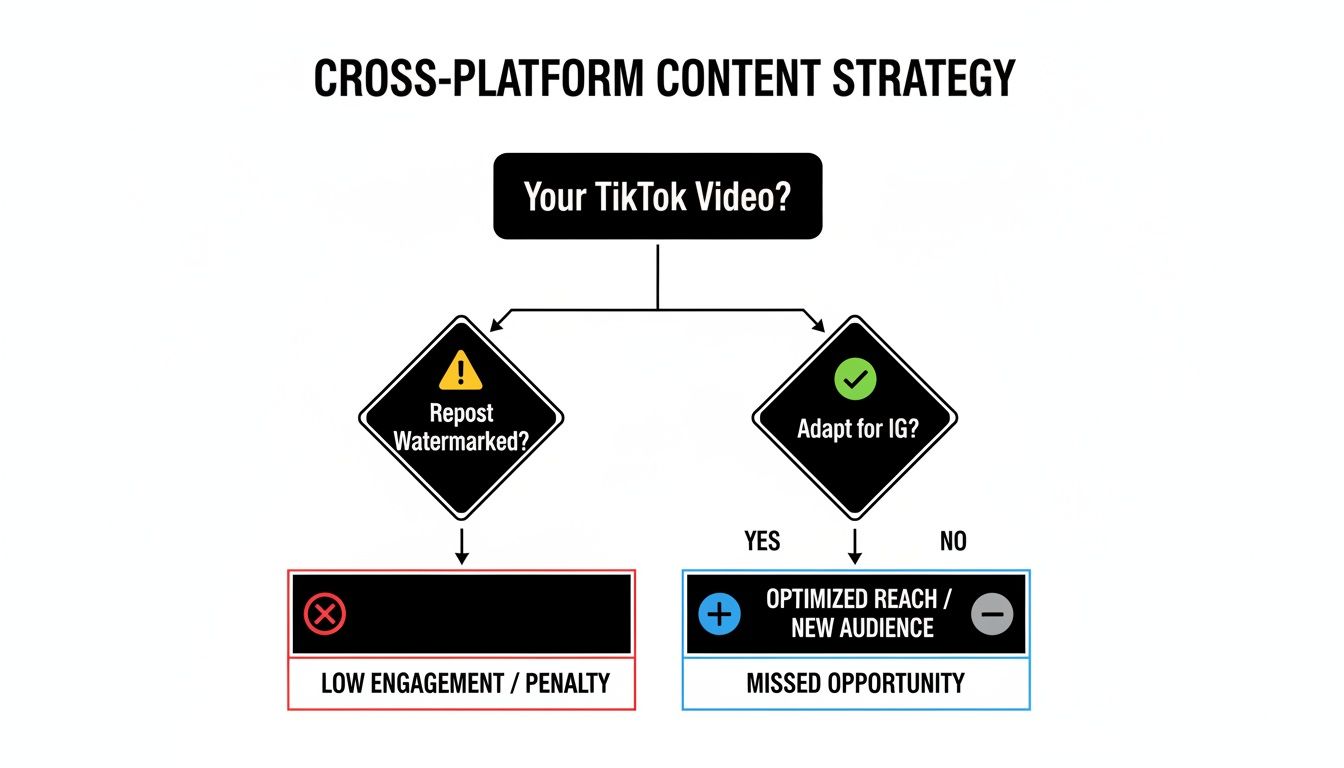
As the chart suggests, the best approach is often to adapt your TikToks for Instagram rather than just reposting them with the watermark. It makes a huge difference in engagement.
If you've tried all of the above and are still stuck, the issue might be your account type. Toggling your account from a Business Account to a Creator Account (or the other way around) in your settings can sometimes magically make the social linking options reappear. It's a quick switch that's definitely worth a shot.
Common Questions About Linking Your Accounts
Connecting your social media accounts for the first time can feel a bit tricky. You might wonder about how the algorithms will react, or run into a technical snag. Getting these things sorted out is key to building a smart, cross-platform presence.
I've seen these same questions pop up time and again from creators trying to learn how to link TikTok to Instagram. Let's walk through some of the most common ones so you can link your profiles with confidence.
Will Linking My TikTok to Instagram Hurt My Reach?
Not at all. Just adding that little Instagram icon to your TikTok bio won't negatively impact your reach on either platform. In fact, it does the opposite—it shows you’re serious about building a brand and gives your most engaged followers a direct path to find you elsewhere. Think of it as a funnel.
The real thing to watch is how you share your videos. It's no secret that Instagram's algorithm prefers content made within its own ecosystem. So, while cross-posting a TikTok with the watermark is easy, that video might not travel as far as one you upload directly to Reels. The bio link is a plus; your content strategy is what really moves the needle.
Can I Link a Business Instagram to a Personal TikTok?
Yep, you absolutely can. There's nothing stopping you from connecting an Instagram Business account to a personal TikTok, or a TikTok Creator account to a personal Instagram. The systems don't care about the account type.
The platforms are built to be flexible. As long as you can log in and authorize the connection on both sides, they'll link up just fine. This freedom lets you choose the right account type for your specific goals on each platform.
Pro Tip: For the best results, upload your videos natively to both platforms. Edit your video once, then upload that clean, watermark-free version separately to TikTok and Instagram Reels. This lets you tap into trending audio and hashtags specific to each app, which is a huge visibility booster.
Why Can't I See the Instagram Option on My Profile?
This is probably the most common headache people run into, but it’s usually an easy fix. If you go to “Edit Profile” on TikTok and the “Add Instagram” button is just… gone, don’t worry.
Here’s a quick troubleshooting checklist:
- Update the App: First things first, head to your app store and see if there’s a TikTok update waiting. An outdated version is the number one cause of missing features.
- Clear Your Cache: Dive into your TikTok settings and find the option to clear the cache. This gets rid of old temporary files that might be causing the glitch, and it won't delete your drafts.
- The Classic Log Out/Log In: Sometimes, all it takes is signing out of your TikTok account and then signing back in. This simple step can force a refresh and bring the option back.
Following these steps almost always resolves the issue and gets you back on track.
Ready to supercharge your dropshipping workflow? AliSave Pro is the free Chrome extension that lets you download all AliExpress product images and videos in a single click. Stop wasting time saving files one by one and start creating stunning product listings and social media ads faster. Join over 20,000 sellers who use AliSave Pro to streamline their process. Get it free on the Chrome Web Store today at https://alisavepro.com.