
Think of an Amazon Storefront as your brand's dedicated home within the massive, bustling city of Amazon. It's not just another product page; it's a multi-page, immersive experience that you control completely. While your product detail pages are transactional, focused on a single item, your Storefront is where you get to tell your story.
This is your chance to really connect with shoppers. You can build out an entire brand narrative using rich visuals, videos, and curated product collections. It’s the difference between a random stall and a full-fledged flagship store, turning one-off purchasers into people who actively follow your brand.
An effective storefront can also be a serious driver of sales. You can guide customers to discover new products, encouraging cross-sells and boosting the average order value. Plus, it gives you a clean, brand-safe landing page to direct traffic from social media, email campaigns, or influencer marketing—a much better look than a standard search results page. If you're new to the concept, understanding what an ecommerce storefront is provides a great foundation for what you're building.
Seizing the Marketplace Opportunity
Let's talk numbers for a second. As of the first quarter of 2025, Amazon had over 9.7 million sellers globally. Third-party sellers, like you, are now responsible for an incredible 62% of all sales on the platform.
That's a huge, active audience. By creating a professional storefront, you're staking your claim in a marketplace that generates a staggering $180.2 billion in quarterly net sales. You're not just listing products; you're building a real brand presence where millions of people are already shopping.
A well-designed storefront is a signal of legitimacy and authority. It tells customers you are a serious brand, not just a casual seller, which builds the trust necessary to drive conversions in a competitive environment.
For a great, performance-focused guide that walks you through the practical steps, I highly recommend this resource on How to Set Up an Amazon Storefront. It really breaks down what you need to do to get your store live and optimized from the get-go.
Amazon Storefront Key Benefits at a Glance
To really bring it home, let's look at the core advantages of investing your time in creating a dedicated Amazon Storefront. This isn't just about looking good; it's about driving tangible business results.
| Benefit | Description | Impact on Your Business |
|---|---|---|
| Brand Storytelling | Use custom pages, rich media, and curated collections to tell your brand's unique story. | Builds an emotional connection with shoppers, fostering loyalty beyond a single transaction. |
| Increased Sales | Showcase your full catalog and guide shoppers to related products, boosting cross-sells. | Increases the average order value (AOV) and overall revenue per customer. |
| Enhanced Credibility | A professional, branded space signals legitimacy and builds trust with potential buyers. | Higher conversion rates as customers feel more confident purchasing from an established brand. |
| Marketing Hub | Provides a single, brand-safe URL to use as a landing page for external traffic (social, ads, etc.). | Improves the ROI on your external marketing campaigns by sending traffic to a curated experience. |
| Mobile Optimization | Storefronts are automatically designed to be fully responsive and look great on any device. | Captures sales from the growing number of mobile shoppers without extra development work. |
Ultimately, a storefront centralizes your brand identity and sales strategy on the world's largest ecommerce platform, giving you a powerful tool for growth.
Laying the Groundwork Before You Build
Before you even think about designing pages or picking out hero images, there’s some essential prep work to tackle. Getting these foundational pieces right from the start makes the entire process of creating your Amazon Storefront a whole lot smoother. Trust me, it’s like pouring the concrete for a house before you put up the walls—skipping this part leads to major headaches down the road.
The first, and most critical, hurdle is getting into Amazon Brand Registry. This is the non-negotiable key that unlocks the Storefront feature, along with a ton of other powerful brand-building tools like A+ Content and Sponsored Brands. It’s Amazon’s system for verifying that you’re the legitimate owner of the brand you’re selling.
The Gateway Called Brand Registry
So, what does it take to get in? To qualify for Brand Registry, you absolutely must have an active, registered trademark for your brand name or logo. A pending application won't cut it; the trademark has to be fully registered and issued in the country where you plan to sell.
For example, if your primary marketplace is the United States, you'll need a registered trademark from the U.S. Patent and Trademark Office (USPTO). This is how Amazon protects brands from hijackers and counterfeiters, and there are no workarounds. It’s a hard requirement.
Upgrading to a Professional Seller Account
Once your brand is registered, the next step is making sure you have a Professional Seller Account. While Amazon does offer an Individual plan for casual sellers, it’s the Professional plan that gives you access to the advanced selling tools you need, including the ability to build a Storefront.
The Professional plan comes with a monthly subscription fee (currently $39.99 in the US) instead of a per-item fee. It’s built for businesses that are serious about growing on the platform and is essential for using the marketing and branding features that will help you stand out.
A Professional Seller Account isn't just a box to check. It’s a signal that you're treating your Amazon channel as a core part of your business and are ready to use the full suite of tools Amazon provides to scale.
Prepare Your Brand Assets in Advance
This last piece of advice will save you hours of frustration. Before you open the Store Builder for the first time, get all your brand assets organized in one dedicated folder. This simple bit of housekeeping makes the entire build-out feel less like a chore and more like a creative project.
Think about it: nothing kills your creative flow faster than having to dig through a dozen different folders to find that one perfect lifestyle photo or your high-res logo. By getting everything ready beforehand, you can stay focused on building a beautiful and effective store.
Here’s a quick checklist of what you should have on hand:
- High-Resolution Logo: Grab your primary logo and any secondary versions or icons. Make sure you have them with transparent backgrounds (PNG format is best).
- Brand Style Guide: If you have one, keep it open. You'll want easy access to your brand's color codes (HEX codes), fonts, and general visual rules.
- Lifestyle & Product Photography: Gather a solid mix of high-quality images. You'll want shots of your products in use, clean studio photos, and any images that capture your brand's personality.
- Video Content: Any brand stories, product demos, or how-to videos should be ready to go. Video is a fantastic way to engage shoppers on your Storefront pages.
- Brand Story & Copy: It’s a great idea to write your "About Us" section, mission statement, and key value propositions ahead of time. Having this text ready makes filling in the content modules a breeze.
Taking the time to lock in these three things—securing Brand Registry, activating a Professional account, and organizing your assets—sets you up for a seamless and efficient build. With this groundwork laid, you're officially ready to start creating.
Alright, you've got your Brand Registry sorted and your assets are lined up. Now for the fun part: actually building your Amazon Storefront. This is where you get to transform your product listings into a genuine brand destination.
To do this, you’ll head into Seller Central and fire up the Amazon Store Builder.
Don't let the idea of "building a store" intimidate you. You don’t need to be a designer or a developer. The Store Builder is a surprisingly user-friendly, drag-and-drop tool. I often tell clients to think of it like playing with digital LEGOs—Amazon gives you all the blocks (which they call content tiles), and you get to arrange them to build something that feels like your brand.
Getting Started in the Store Builder
The first time you open the builder, it’ll prompt you to create your homepage. Amazon gives you a few templates to get you started, which is a nice shortcut.
- Marquee: This one is my go-to recommendation for most brands. It's built for showcasing a variety of products with a big hero image and clear category sections.
- Product Highlight: Perfect if you're launching a new flagship item or want to put all the focus on your absolute best-seller.
- Product Grid: This is a no-frills, straight-to-the-point layout. It’s essentially a clean, shoppable grid of your products.
Don’t stress too much about picking the "perfect" template. They are just starting points, and you can add, delete, and rearrange everything later. My advice? Start with the Marquee template. It's the most flexible and scales well as you add more products and categories down the line.
Once you pick a template, you're dropped into the main interface. It's typically a three-panel layout: your page manager on the left, the content tiles you can add in the middle, and a live preview of your store on the right.
Planning Your Pages and Navigation
A great storefront is more than just a homepage; it's a mini-website. Before you start dragging and dropping tiles, take a minute to map out your page structure and navigation menu. Put yourself in your customer's shoes. How would they naturally shop for your products?
For example, a skincare brand might create pages for "Cleansers," "Serums," and "SPF." An outdoor gear company could have pages for "Tents," "Backpacks," and "Cooking Gear." The goal is to make it incredibly easy for a shopper to find what they're looking for without having to think too hard.
I can't stress this enough: a simple, clear navigation menu is one of the most important things for a good user experience. If a shopper can't find what they need in two clicks, they’re probably gone. Keep your page titles short and descriptive.
Before diving in, it's worth remembering the groundwork needed to even get to this point. This flowchart breaks down the three core pillars you need in place first.
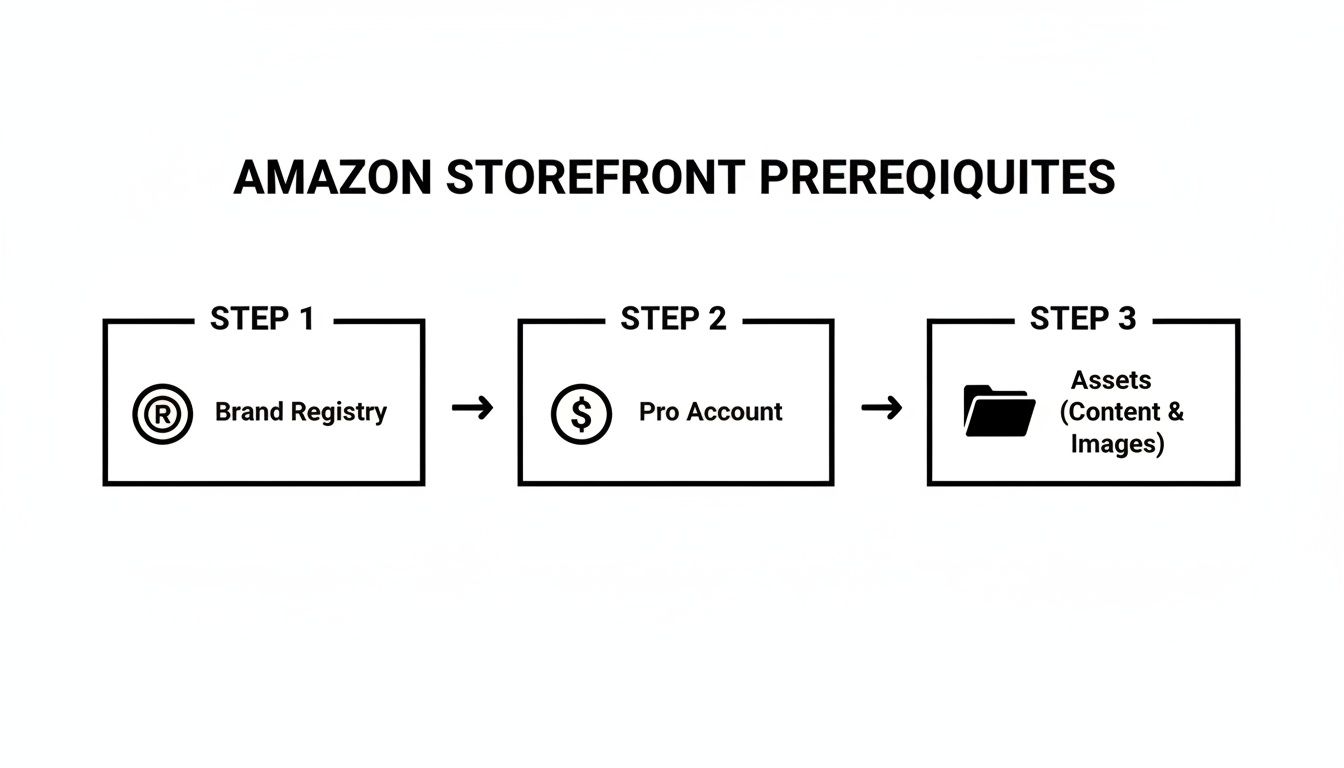
As you can see, having a Professional Account and well-organized brand assets are just as crucial as Brand Registry. Getting these things right first saves a lot of headaches during the build.
Getting the Most Out of Content Tiles
Content tiles are the building blocks for every page in your store. The Store Builder gives you a solid variety, and learning how to use each one effectively is what separates a basic store from one that actually drives sales.
Here are the most important tiles you'll be working with:
- Header: This is your storefront's first impression. You need a high-quality hero image or a short video that grabs attention. Your brand logo sits here, too.
- Product Tile: Use this to feature a single product. You just pop in the ASIN, and it automatically pulls the main image, title, price, and the "Add to Cart" button. It's clean and direct.
- Product Grid: This is your best friend for category pages or for showcasing a collection like "Best Sellers." You can hand-pick the products or just paste in a list of ASINs.
- Image with Text Tile: This is your brand storytelling workhorse. Pair a lifestyle photo with some sharp copy to explain product benefits, talk about your mission, or highlight unique features.
- Shoppable Image: A fantastic conversion tool. Upload a lifestyle photo with several of your products in it, then tag each one. When a customer hovers over a tag, a little pop-up appears with product info and a button to add it to their cart. It’s seamless.
Designing Pages That Convert Visitors into Customers
Now that you’ve handled the technical setup, it’s time for the fun part: transforming your storefront from a simple product catalog into a powerful sales machine. A high-converting Amazon Storefront isn’t just a collection of listings; it’s a carefully choreographed experience designed to turn casual browsers into loyal fans. This is where you get to blend compelling visuals with persuasive language to tell your brand's story.
The opportunity here is massive. Consider that third-party sellers accounted for 62% of all sales on Amazon in Q3 2025. In a sea of competition, a polished storefront is your secret weapon. With a professional account, you unlock custom banners, videos, and A+ style modules that Amazon itself says can bump conversions by 5-10%. That's a significant edge.
Weaving a Visual Narrative
Let's be honest—shoppers see with their eyes first. High-quality lifestyle photos and videos are your best tools for creating an immediate emotional connection. Don't just show your product; show the feeling or the outcome of using your product.
Imagine you're selling premium kitchen knives. A sterile photo of a knife on a white background is functional, but forgettable. Instead, picture a "Shoppable Image" tile: a stunning, delicious-looking meal with your knives artfully placed in the scene. Customers can see the end result and buy the tool that made it happen right from that inspirational image. You're no longer selling a knife; you're selling the dream of being a better cook.
Here are a few practical tips to get your visuals right:
- Lead with a Hero Video: Your header is prime real estate. Use it for a punchy, 15-30 second video that communicates your brand's vibe or shows your products in action. It conveys personality far better than a static image ever could.
- Lifestyle Over Studio Shots: While clean product photos have their place on detail pages, your storefront should feel more like a high-end magazine. Use images of real people genuinely enjoying your products in authentic settings.
- Keep it Consistent: Make sure all your visuals—from photos to videos—share a similar color scheme, tone, and overall style. This cohesiveness signals professionalism and builds trust instantly.
One of the biggest mistakes I see brands make is treating their storefront like just another product grid. Your job is to break the endless scroll. Use stunning visuals to make shoppers pause, explore, and actually connect with what you're all about.
Crafting Copy That Sells
Once your visuals grab their attention, your words have to close the deal. Every headline, caption, and snippet of text is a chance to reinforce your value and nudge the customer closer to clicking "Add to Cart."
Keep your copy clear, concise, and focused on the benefits. Don't just list specs; explain how those specs make your customer's life better.
For example, instead of a boring "Durable 600D Polyester," try something like, "Built with rugged 600D polyester to handle any adventure you throw at it." The second version paints a picture and speaks directly to what the customer actually wants. Building a great storefront is the first step, but learning the principles behind https://alisavepro.com/best-ecommerce-website-design/ will help you master the art of creating user-friendly digital experiences.
Choosing the Right Modules for the Job
Amazon gives you a toolbox of different content modules, and knowing which one to use and when is key. Think of them like different types of Lego bricks for building your ideal customer journey.
Here's a quick look at the most effective modules and what they're best for:
Storefront Content Module Comparison
| Module Type | Best Used For | Pro Tip |
|---|---|---|
| Video | Instantly grabbing attention, telling your brand story, or showing a product in action. | Keep it short (under 30 seconds) and design it to work without sound, as many shoppers browse in silence. |
| Shoppable Image | Showcasing products in a lifestyle context and driving direct sales from an image. | Tag up to 6 products in one image. This is fantastic for "shop the look" or bundled item suggestions. |
| Image with Text | Highlighting key features, announcing promotions, or introducing a new product line. | Use a compelling headline and benefit-driven copy. Keep the text brief and easy to scan on mobile. |
| Product Grid | Displaying a collection of products, like best sellers or new arrivals. | Don't just show random products. Curate the grid thoughtfully to tell a story or guide the shopper. |
| Best-Selling Grid | Automatically showcasing your top-performing products to build social proof. | Place this module prominently on your homepage to guide new visitors to your most popular items. |
By mixing and matching these modules, you can create dynamic pages that are both visually engaging and strategically designed to boost sales.
Structuring for an Intuitive User Journey
A confusing storefront is a dead end. You need a logical page structure that makes it effortless for shoppers to find what they're looking for. A smooth, intuitive flow not only improves the user experience but can also increase your average order value.
Think about organizing your store like this:
- Homepage: This is your digital welcome mat. It needs a powerful hero image or video, a short and sweet brand mission, and clear navigation to your key categories.
- Category Pages: Create separate pages for each main product line (e.g., "Skincare," "Haircare," "Body Care"). A good mix of product grids and lifestyle photos works wonders here.
- Collection Pages: This is where you can get creative. Group products into curated themes like "Best Sellers," "New Arrivals," or "Gifts Under $50." It's an excellent strategy for cross-selling and helping shoppers discover new items.
- About Us Page: Don't skip this! Use this space to share your origin story. A genuine narrative helps build a much stronger, more personal connection with your customers.
Once your storefront architecture is solid, the final step is to ensure each product page is a conversion powerhouse. Following expert listing optimization strategies ensures that when a shopper clicks through from your beautiful storefront, the landing page seals the deal. This holistic approach is what creates a seamless path from brand discovery to purchase.
Getting Your Store Live and Driving Traffic
You’ve built a beautiful, brand-centric Amazon Storefront. That’s a huge step, but clicking "Submit for publishing" isn't the finish line. Now it’s all about getting your store approved, making sure customers can actually find it, and figuring out what’s working. Think of it as moving from the design studio to your grand opening.

Once you submit, your store goes into Amazon's moderation queue. This review process usually takes somewhere between 24-72 hours. The team on their end is basically checking to make sure you've followed all their rules, from the images you used to the claims you've made in your text.
To avoid getting kicked back to the drawing board, you need to sidestep the common mistakes. Things like making unverified claims (e.g., "number one best-seller"), trying to sneak in external website links, or using blurry, low-resolution images will get you flagged almost immediately. A quick, thorough self-check before you hit submit can save you a lot of headaches.
Putting Your New Storefront to Work
Once your store gets the green light, it's officially live. So, how do people find it? Amazon gives you a clean, unique URL for your storefront that you can share anywhere you want.
This URL is your best friend for any off-Amazon promotion. It’s the perfect place to send people from your other marketing channels, giving them a much more cohesive brand experience than just dropping them on a single product page.
Here are a few ways to get that link out there:
- Social Media Profiles: Drop your storefront link right into your Instagram, Facebook, and TikTok bios. It’s the most direct path for your followers to browse everything you offer.
- Email Campaigns: When you're launching a new collection, run a promotion, or send out your weekly newsletter, link directly to that specific page in your store.
- Influencer Collaborations: Arm your influencers with your storefront URL. It’s a clean, simple link that makes it easy to see just how much traffic they’re actually sending your way.
If you’re looking for more inspiration, exploring different advertising ideas for small business can spark some creative ways to drive external traffic to your new digital home base.
Driving Traffic Within the Amazon Ecosystem
While bringing in outside traffic is great, don't ignore the tools Amazon gives you to capture customers who are already on the site and ready to shop.
The most powerful method here is using Sponsored Brands ads. These are the big banner ads you often see at the very top of search result pages. Instead of linking to just one product, you can point the entire ad to your storefront as the landing page. It’s an incredible way to introduce your whole brand to shoppers who are actively searching for what you sell.
Another simple but effective tactic is to leverage your own product detail pages. Your brand name, which appears just under the product title, automatically becomes a clickable link that takes shoppers right to your store. This is a built-in feature that encourages brand discovery and helps you cross-sell other items.
A well-built Amazon Storefront isn't just a collection of pages; it's the central hub for your brand. Every ad you run and every product you list should be treated as a signpost guiding shoppers back to that immersive experience.
Measuring What Matters with Store Insights
How do you know if all this is actually paying off? Amazon gives you a dedicated analytics dashboard called Store Insights. This is your command center for understanding traffic, engagement, and sales performance.
Inside, you can dig into the key metrics that show you exactly how customers are interacting with your store.
- Daily Visitors: See the raw number of unique shoppers stopping by your storefront each day.
- Page Views: Find out which pages are the most popular and where people are spending their time.
- Traffic Sources: This one is critical. It breaks down where your visitors came from—Sponsored Brands campaigns, your product pages, or external sources that you've tagged.
- Sales: Track the total sales generated directly from visitors who browsed your storefront.
By checking these analytics regularly, you can start making smarter, data-driven decisions. For example, if you notice a page gets a ton of traffic but very few sales, that’s a clear signal you need to tweak the layout or the products featured on it. This cycle of analyzing and refining is what separates the successful stores from the ones that just sit there.
Got Questions? Let's Talk Amazon Storefronts
Even with the best guide, a few questions always come up when you're about to create an Amazon storefront. It’s a big project, and getting the details right is what separates a good store from a great one. Let’s dive into some of the most common things sellers ask.
How Much Does an Amazon Storefront Cost?
This is the best part: creating and hosting the Storefront itself costs nothing. It’s a powerful feature that Amazon includes for sellers who are part of Brand Registry.
The only real cost involved is your Professional Seller Account, which is $39.99 per month in the U.S. market. That subscription is your key to unlocking the Store Builder, A+ Content, and a whole suite of other marketing tools. Think of the Storefront as a fantastic perk of your professional plan, not an extra line item on your bill.
Can I Update My Storefront After Publishing?
Absolutely. In fact, you should. Your Amazon Storefront is meant to be a living, breathing part of your brand, not a static page you set and forget.
Whenever you need to make a change, you can jump right back into the Store Builder. This is perfect for things like:
- Adding new products: You can easily create a new page or update a product grid to showcase your latest launch.
- Running promotions: Build out a special page for a holiday sale or a seasonal campaign.
- Refreshing your content: Swap out that hero image or update your lifestyle photos to keep your brand looking current.
Just keep in mind that any edits you make will go through a quick review by Amazon before they go live, which usually only takes a day or so. This flexibility is key to keeping your store aligned with your marketing calendar.
How Do I Know if My Store Is Performing Well?
You don't have to guess. Amazon gives you a fantastic built-in dashboard called Store Insights. This is where you’ll find all the data you need to see what’s working and what isn’t.
Inside Store Insights, you can track the most important metrics, including:
- Daily Visitors: See exactly how many shoppers are stopping by.
- Page Views: Discover which of your pages are the most popular.
- Traffic Sources: Pinpoint whether traffic is coming from your Sponsored Brands campaigns, organic searches, or your product pages.
- Sales: Track revenue that’s directly attributed to your Storefront.
Watching these numbers is how you make smart decisions. For example, if you notice a page gets a ton of traffic but generates very few sales, that’s your cue to rethink the layout or feature a different set of products.
Storefronts vs. A+ Content: What’s the Difference?
This is a really common point of confusion, but they have two very distinct jobs that actually complement each other perfectly.
Think of it like this: A+ Content is the beautiful, detailed brochure you find inside a single product's box. Your Storefront is the entire flagship retail store that houses all of your products under one roof.
A+ Content lives on a single product detail page. Its job is to use rich images, comparison charts, and branded graphics to convince a shopper to buy that one specific item.
Your Amazon Storefront, on the other hand, is a multi-page brand destination. It's the central hub for your entire catalog and your brand's story. A+ Content closes the deal on the product page; the Storefront builds the long-term brand experience.
When you create an Amazon storefront, every product image and video is a chance to make a sale. Streamline your entire media gathering process with AliSave Pro. Download high-resolution photos, variant images, and videos from AliExpress in a single click, perfectly organized and ready for your Amazon listings. Get the free extension today at https://alisavepro.com.